WooCommerce and SEO: Automating Store Content to Outrank Competitors

According to Wolfgang Digital's E-Commerce KPI Benchmarks, organic search accounts for an average of over 33% of overall e-commerce website revenue. Furthermore, research from BrightEdge indicates that organic search drives 53.3% of all trackable web traffic across industries. Yet, most online store owners running on WordPress struggle to convert these statistics into actual revenue.
When managing a store with hundreds or thousands of products, mastering WooCommerce and SEO requires moving beyond manual optimization. Writing bespoke product descriptions, building topical buying guides, and managing canonical links for massive inventories by hand is a losing battle.
To systematically outrank competitors, scale your store organic growth, and capture market share across high-intent search queries, you need to turn your catalog into an automated publishing engine.
Why Combine WooCommerce and SEO for Scalable Store Growth?
WooCommerce offers complete ownership of your database, URL structures, and publishing pipeline. Unlike closed SaaS e-commerce platforms, WordPress lets you modify how product metadata, attributes, and content blocks feed directly into search engines.
+-------------------------------------------------------------------+
|                  WooCommerce Database & Attributes                |
|           (SKUs, Technical Specifications, Categories, Tags)      |
+-------------------------------------------------------------------+
                                  │
                                  ▼
+-------------------------------------------------------------------+
|                  Autonomous Content Generator Engine               |
|         (Dynamic Templates, Entity Extraction, Brand Voice)       |
+-------------------------------------------------------------------+
                                  │
                                  ▼
+-------------------------------------------------------------------+
|               Programmatic E-Commerce Indexation                  |
|     (Rich Product Content, Schema Markup, Internal Linking)       |
+-------------------------------------------------------------------+
                                  │
                                  ▼
+-------------------------------------------------------------------+
|              Google / Bing / AI Search Engines (Overviews)        |
+-------------------------------------------------------------------+
The Scaling Dilemma: Manual Optimization vs. Automated Output
The standard approach to e-commerce content generation is fundamentally broken for scaling brands:
- Boutique Copywriting: Fine for 10 SKUs; completely impractical for 2,000 SKUs.
- Supplier Duplicate Content: Copying manufacturer descriptions verbatim leads to search engine penalties or indexation suppression.
- Thin Category Pages: Leaving category archives stripped of copy forfeits prime commercial real estate.
If it takes a copywriter 30 minutes to craft a single product page, optimizing a 1,000-product inventory requires 500 hours of labor. By the time you finish, early descriptions are already stale or outdated.
How Automated Store Content Fuels Long-Tail Visibility
Modern wordpress ecommerce search performance relies heavily on capturing long-tail intent. Shoppers rarely search for just "leather boots"—they search for "waterproof dark brown men's leather work boots size 11."
Automating your store content allows you to dynamically publish rich, unique descriptions across every child product, variations matrix, and secondary category page. This ensures complete coverage for thousands of long-tail queries without inflating operational costs.
Prerequisites: What You Need Before Automating Your WooCommerce SEO
Before deploying automated content pipelines, your baseline architecture must be clean. Garbage inputs produce garbage outputs.
Technical WordPress Baseline & Sitemap Preparation
Ensure your technical foundation is ready for scale:
- WordPress Permalinks: Set to
%category%/%postname%/or/product/%postname%/for clean, readable URLs. - SEO Plugin Framework: Use a trusted platform (Yoast SEO, Rank Math, or SEOPress) to handle foundational open-graph and baseline sitemap structures.
- Database Optimization: Clean up transient data and optimize your
wp_postmetatable to maintain sub-second database response times during bulk operations.
Clean Product Taxonomy and Attribute Data
Automation relies on structured data tokens. Audit your existing WooCommerce attribute list:
| Product Attribute | Required Token Value Example | SEO Purpose |
|---|---|---|
pa_brand |
Acme Outfitters | Entity establishment for Schema.org |
pa_material |
Full-Grain Leather | Long-tail keyword matching |
pa_use_case |
Heavy-Duty Construction | Commercial search intent alignment |
pa_color_finish |
Matte Espresso Brown | Image ALT tagging and variant ranking |
Ensure every product in your catalog has standardized, populated attributes before initiating automated content jobs.
Step 1: Audit and Optimize Your Core Catalog Architecture
To rank, your catalog hierarchy must guide both search crawlers and human users efficiently through your commercial funnel.
Eliminating Faceted Navigation Traps
Faceted search (filtering by price, size, color, and rating) creates infinite URL combinations that consume crawl budget and cause duplicate content issues. According to Baymard Institute, over 60% of top e-commerce websites suffer from poor search UX or duplicate content caused by poorly structured faceted navigation.
To protect your crawl budget:
- Add
rel="canonical"tags pointing filtered attributes back to the main category root. - Set non-essential filtering query strings (e.g.,
?filter_size=xl&sort=price_asc) tonoindex, followvia your SEO plugin or HTTP headers. - Refer to Google Search Central guidance on e-commerce filtering to ensure crawler bots do not get stuck in infinite indexing loops.
Streamlining Category Pages for High-Intent Queries
Category pages often drive higher search volume than individual product pages. Instead of leaving them as simple grids of thumbnails:
- Inject Dynamic Intro Content: Generate unique 150-word category overviews explaining what the collection covers and who it is for.
- Add Contextual Bottom Copy: Place automated 500-word buying FAQs beneath the product grid to capture top-of-funnel informational intent without distracting shoppers.

Step 2: Automate Unique Product Descriptions for WooCommerce and SEO
Default manufacturer descriptions ruin catalog rankings. When multiple e-commerce stores publish identical manufacturer descriptions, search engines select one primary source to index and suppress the rest as duplicate content.
Connecting Product Attributes to Contextual AI Prompts
WooCommerce content automation works by combining structured catalog attributes with dynamic contextual generation logic. Instead of feeding generic prompts to AI tools, construct modular pipelines that pull directly from your database fields:
[System Rule]: You are an expert technical product copywriter for high-end outdoors hardware.
[Input Token]: Product Name: {product_title}
[Input Token]: Category: {product_cat}
[Input Token]: Material: {pa_material}
[Input Token]: Primary Benefit: {pa_use_case}

[Instruction]: Write a 300-word persuasive product description.
Incorporate the material ({pa_material}) in the first paragraph.
Detail how it answers the specific needs of {pa_use_case}.
Avoid repetitive buzzwords like "game-changer" or "revolutionize."
Injecting Unique Value Propositions to Avoid Manufacturer Duplication
Ensure your automated pipelines inject your unique selling points into every SKU description:
- Return policies and warranty guarantees.
- Shipping timelines and regional dispatch details.
- Recommended maintenance or pairing suggestions.
Pro Tip: Never run automated generation directly to live publishing without an initial rule-set validation. Run a batch of 20 SKUs first, audit their readability and schema alignment, and then unlock bulk automation across your entire product catalog.
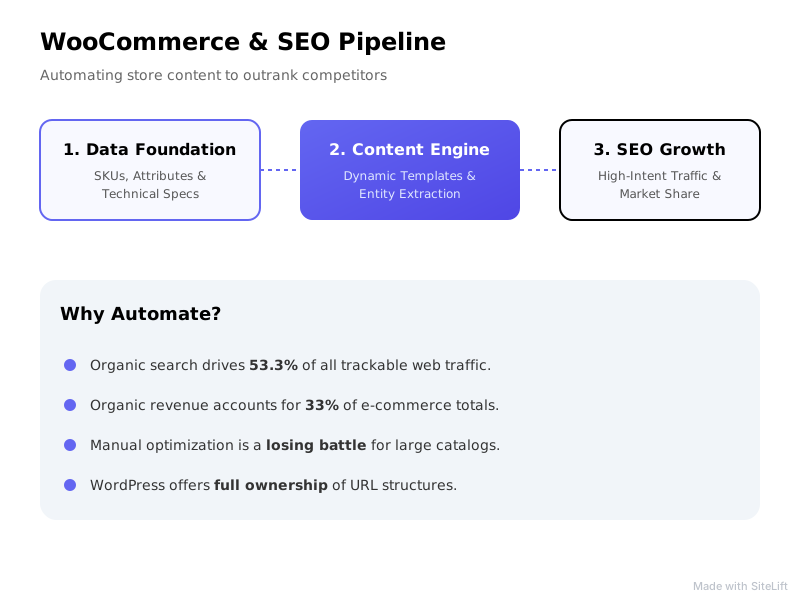
Infographic by SiteLift
| Feature / Strategy | Manual Copywriting | Standard AI Prompts | Autonomous SEO Pipelines |
|---|---|---|---|
| Publishing Speed | 2-4 SKUs per hour | 20-30 SKUs per hour | 500+ SKUs per hour |
| Catalog Consistency | Variable (multiple writers) | Uniform, often repetitive | High (templated logic + guardrails) |
| Internal Link Integration | Manual, easily missed | Manual insertion required | Automatic, algorithmically driven |
| Content Freshness | Rarely updated | Periodic manual re-prompts | Automated rules-based updates |
Step 3: Programmatically Generate Supporting Commercial & Informational Content
Product pages alone cannot build complete topical authority. Search engines reward stores that cover the entire customer journey, from research to purchasing decisions.
Autonomous Buying Guides and Product Comparisons
To dominate competitive niches, programmatically build supporting informational content linked to your product lines:
- Category Buying Guides: "How to Choose the Right {Category Name} in 2026"
- Comparison Articles: "{Product A} vs. {Product B}: Which Should You Buy?"
- Use-Case Roundups: "Top 5 {Category Name} for {Specific Use Case}"
These supporting assets pass link equity down to your transactional category and product pages. If you rely on traditional agencies for this content, costs escalate quickly; evaluating e-commerce content automation over agency retainers highlights how modern automation achieves this at a fraction of the cost.
Automated Internal Linking from Articles to Catalog Pages
Internal links act as conduits for link equity and context across your store. When programmatically publishing informational guides:
Informational Article ("How to Choose Full-Grain Boots")
                  │
                  ├────────► [Anchor: "waterproof work boots"] ──► Category Page
                  │
                  └────────► [Anchor: "Acme Pro Boot SKU-101"] ──► Product Page
Make sure your internal anchors use varied, keyword-rich phrases rather than generic text like "click here." Integrating intelligent internal links is a cornerstone of effective SEO conversion optimization, directing high-intent readers straight to product pages where they can complete their purchase.
Step 4: Accelerate Product Catalog Indexing and Crawl Efficiency
Creating thousands of optimized product pages yields no value if search engine crawlers do not index them. Streamlining product catalog indexing is critical for large-scale e-commerce success.
Managing XML Sitemaps for Large Inventories
Default WordPress sitemaps can break or time out when handling high product counts. Segment your sitemaps logically using your SEO plugin settings or custom functions:
sitemap-products-1.xml(SKUs 1 to 1,000)sitemap-products-2.xml(SKUs 1,001 to 2,000)sitemap-categories.xmlsitemap-brands.xml
This structure allows search engines to process updates systematically and isolate indexation issues to specific sub-sitemaps.
Leveraging Search Engine Indexing APIs and Ping Protocols
Rather than waiting weeks for search engines to discover catalog additions or updates, trigger automated pinging protocols:
- Google Indexing API & IndexNow Protocol: Connect your WooCommerce hook (
woocommerce_update_product) directly to IndexNow API endpoints. - Instant Ping on Catalog Edits: When your automated system generates or updates a product description, automatically dispatch a push payload to Search Console and Bing Webmaster Tools.
- Structured Data Validation: Implement pure JSON-LD markup adhering to Schema.org specs for
Product,Offer, andAggregateRating. Verify formatting via Google's Rich Results Test tool.
{
  "@context": "https://schema.org/",
  "@type": "Product",
  "name": "Acme Leather Work Boot",
  "image": [
    "https://example.com/images/1x1/photo.jpg"
  ],
  "description": "Full-grain matte espresso brown leather work boot built for construction sites.",
  "sku": "ACME-BOOT-001",
  "offers": {
    "@type": "Offer",
    "url": "https://example.com/product/acme-boot",
    "priceCurrency": "USD",
    "price": "189.99",
    "availability": "https://schema.org/InStock"
  }
}
Step 5: Track Keyword Momentum and Optimize Underperforming Pages
SEO is an iterative loop. Once your automated store content pipeline is running, set up performance-monitoring systems to measure impression growth and conversion movement.
Monitoring Rank Transitions and CTR Fluctuations
Track your catalog metrics across two primary vectors:
- Traditional Search Engine Visibility: Monitor impression growth, average positions, and organic click-through rates (CTR) in Google Search Console.
- AI Engine Visibility: Monitor how frequently your store's products are cited in search engine AI summaries and answer engines.
If a page maintains high impressions (e.g., position 4–8) but yields low CTR, run an automated title tag optimization test to make meta titles more compelling.
Setting Automated Content Refresh Triggers
Content relevance degrades over time. Establish programmatic rules to detect organic decay:
- Trigger: A product or category page experiences a 20% drop in organic impressions over 60 consecutive days.
- Action: Route the URL back into the automated generation pipeline to rewrite introduction paragraphs, update schema timestamps, and inject secondary, trending long-tail keywords.
My Editorial Perspective: Why Manual E-Commerce Copywriting Is Obsolete
In my experience auditing large e-commerce stores, manual copywriting for catalogs exceeding 500 SKUs is no longer a viable business strategy.
The math simply does not add up. Brands spending $50 to $100 per product page writing manual copy usually run out of budget before optimizing even 20% of their catalog. Meanwhile, competitors leveraging woocommerce content automation launch optimized, unique descriptions across 100% of their product matrix in days.
Is AI-generated copy perfect out of the box? Not always. But a store with 5,000 unique, structured, dynamic product pages will consistently outperform a store with 50 beautifully hand-crafted descriptions and 4,950 unindexed, manufacturer-copied product templates. Scale wins in search indexing every single time.
Common Pitfalls to Avoid in WooCommerce Content Automation
Automation provides speed, but without guardrails, it can accelerate errors just as easily.
The Thin Content & Duplicate Text Trap
Avoid injecting generic boilerplates across hundreds of products. Changing only the color keyword in an identical 200-word paragraph still triggers thin content filters. Ensure your generation templates combine multiple variable inputs (materials, target use cases, dimensions, compatibility specs) so each page remains unique.
Keyword Cannibalization Between Parent Categories and Child SKUs
When target keywords are not isolated, child product pages can cannibalize the traffic of parent category pages.
- Parent Category Target: Broad commercial query (e.g., "Men's Leather Boots")
- Child SKU Target: Precise transactional query (e.g., "Acme Waterproof Men's Leather Work Boot Size 11")
Keep product titles specific to exact model numbers, technical spec attributes, and precise finishes to ensure clear search intent boundaries.
Expected Results: What Does Autonomous Store Organic Growth Look Like?
When you properly execute programmatic e-commerce optimization on WooCommerce, store performance transitions from linear gains to compounding returns.
Organic Search Impressions & Clicks
  ▲
  │                                                      /  (Exponential Growth)
  │                                                     /
  │                                                    /
  │                                        ┌──────────┘
  │                                 ┌──────┘  <-- Full Catalog Automated Indexing
  │                          ┌──────┘
  │                  ┌───────┘  <-- Architecture & Faceted Search Cleaned
  │         ─────────┘  <-- Initial State (Manual Optimization Bottleneck)
  └──────────────────────────────────────────────────────────────────────────► Time (Months)
Catalog-Wide Keyword Expansion
Within 60 to 90 days of executing automated updates across your product baseline, you should expect:
- A significant increase in indexed landing pages within Google Search Console.
- Long-tail keyword rank growth across long-tail commercial search terms.
- Increased crawl frequency as search engine bots detect regular, structured site updates across your sitemap XMLs.
Sustainable Revenue Compounding Over 3-6 Months
By shifting reliance away from pure paid advertising campaigns and establishing steady organic visibility, modern brands reduce customer acquisition costs (CAC) substantially. Compounding organic search visibility ensures that your product catalog continues to capture high-intent customers automatically, day after day.
Scaling WooCommerce SEO on Autopilot with SiteLift
Executing technical site architecture cleanups, contextual attribute generation, XML sitemap distribution, and automated content refresh loops manually across thousands of SKUs requires significant engineering effort.
That is why we built sitelift.io—an autonomous platform engineered to execute end-to-end publishing pipelines, distribution, and real-time rank tracking seamlessly.
By leveraging modern automated SEO platforms, e-commerce operators can link their WooCommerce inventory to dynamic publishing pipelines. SiteLift handles the heavy lifting—from keyword expansion to automated internal linking and search indexation updates—allowing you to focus on managing fulfillment while your organic traffic compounds autonomously.
FAQ
Does automating product descriptions hurt SEO ranking on WooCommerce?
No, as long as the generated content is unique, helpful, and contextual. Search engines penalize low-quality, duplicate, or scraped manufacturer text. Using automated generation platforms that draw from unique product attributes to build rich, readable, and customer-focused copy complies fully with search engine quality guidelines.
How does WooCommerce handle faceted search and canonical URLs?
By default, WooCommerce creates archive filtered URLs when customers use attribute filters. To protect your SEO, ensure your SEO plugin or site code outputs rel="canonical" tags on filtered listing pages that point back to the main canonical category URL, preventing search engine crawlers from indexing duplicate filter combinations.
What is the best way to speed up product catalog indexing for large stores?
To maximize indexation speed, break your XML sitemaps into smaller subsets (e.g., 1,000 SKUs per sitemap file), maintain a flat site hierarchy where products are reachable within three clicks of the homepage, implement structured JSON-LD Product schema, and submit updates immediately via the IndexNow protocol and Google Indexing APIs.
How does automated content generation support organic store growth?
Automating content allows you to optimize thousands of product pages, child SKUs, and category archives simultaneously. This enables complete coverage of long-tail commercial search queries that manual copywriting cannot cover cost-effectively, driving consistent, compounding organic search traffic to your store.
— sitelift.io
Topics Covered:
- woocommerce and seo
- wordpress ecommerce search
- woocommerce content automation
- product catalog indexing
- store organic growth
More from SiteLift

AI for SEO: How to Automate Research, Content Creation and Distribution
Learn how to use AI for SEO to automate keyword research, generative content creation, CMS publishing, and search engine visibility.

SEO Tools in 2026: How to Build an Autonomous Stack That Grows Traffic on Autopilot
Discover how to build an autonomous stack with modern AI SEO tools, automated publishing workflows, and real-time rank tracking to grow organic traffic.

Repurposing Content for SEO: How to Multiply Organic Reach Across Channels
Learn how repurposing content for SEO multiplies organic reach. Discover step-by-step strategies for syndication, AI visibility, and automation.