Crawling in SEO: How Google and AI Bots Discover and Rank Your Pages
Every minute, thousands of new web pages go live across the internet. Yet, before Google can display your latest article in search results—or before an AI engine like ChatGPT can cite your research—an automated bot has to find it first. Understanding crawling in seo is the absolute bedrock of digital visibility. If a search engine spider or AI scraper cannot discover and fetch your URLs effectively, your content is essentially invisible.
Over the last few years, the mechanics of web discovery have undergone a massive shift. We no longer just deal with traditional search engine spiders like Googlebot and Bingbot. Today, a new class of AI web crawlers—such as GPTBot, ClaudeBot, and PerplexityBot—is scanning the web to train large language models (LLMs) and supply real-time answers to conversational queries.
In this comprehensive guide, I will break down how web crawling works under the hood, how traditional search engine spiders compare to modern AI scrapers, how to optimize your crawl budget, and what technical steps you must take to ensure your pages are discovered instantly.
Key Takeaways: Crawling in SEO at a Glance
| Topic | Key Concept | Impact on Visibility |
|---|---|---|
| Crawling Definition | Automated discovery of web pages via hyperlinks and sitemaps. | First step in the search pipeline; without it, indexing cannot happen. |
| Crawling vs. Indexing | Crawling discovers URL raw data; indexing parses and stores it. | Uncrawled pages never reach the index; unindexed pages never rank. |
| AI Web Crawlers | Scrapers (GPTBot, ClaudeBot) fetching context for LLMs vs traditional search bots. | Controls whether your content trains AI models or powers real-time AI answers. |
| Crawl Budget | The limit of requests a bot makes on your server within a set timeframe. | Critical for sites with over 10,000 URLs to prevent discovery drop-offs. |
| Server Response Speed | Lower Time to First Byte (TTFB) increases fetch rates. | Faster server responses can double crawler fetch throughput. |
What Is Crawling in SEO and How Does It Work?
To understand search engine optimization from the ground up, you must first master how bots move through the web. Search engines use automated software programs—commonly called spiders, crawlers, or web bots—to browse the open internet.
+------------------+     Hyperlinks     +------------------+
|   Seed URLs &    | -----------------> |   New Page URL   |
|   XML Sitemaps   |                    |    Discovered    |
+------------------+                    +------------------+
                                                 |
                                                 v
+------------------+     Parse HTML     +------------------+
| Saved to Index / | <----------------- |   HTTP Request   |
| AI Knowledgebase |                    |  (Googlebot/AI)  |
+------------------+                    +------------------+
The Fundamental Definition of Web Crawling
Web crawling is the process by which search engine spiders systematically scan the web to discover new and updated web pages. Instead of manually registering every web page in a centralized database, search engines rely on crawlers to follow links from known pages to unknown pages.
When a crawler hits a page, it downloads the page's raw HTML, extracts any hyperlinks embedded in the document, and adds those new URLs to a queue (known as the crawl frontier). The bot then proceeds to visit those newly discovered links, continuously expanding its map of the web.
Indexing vs. Crawling: Understanding the Critical Difference
Many webmasters use these terms interchangeably, but they refer to completely distinct technical phases in the search pipeline. If you want a deep dive on how storage works after discovery, check out our guide on search engine indexing mechanics.
- Crawling (Discovery): The crawler requests the URL from your server, downloads the resources (HTML, CSS, JavaScript), and discovers new links.
- Indexing (Processing & Storage): The search engine analyzes the downloaded content, parses its text, images, and structured data, determines its semantic meaning, and stores it in a massive database (the index).
- Ranking (Retrieval): When a user types a query, the search engine queries its index to serve the most relevant, authoritative pages ranked by complex algorithms.
Simply put: Crawling is finding the page. Indexing is understanding and saving the page. Ranking is showing the page to users.
How Search Engine Spiders (Bots) Discover New Content
Search engine spiders do not guess random web addresses. According to official Google Search Central documentation on crawling, bots initiate crawl sessions using a list of known URL seeds derived from previous crawls, external backlinks, and webmaster submissions.
Spiders discover your content primarily through three pathways:
- Internal and External Links: A crawler visits Page A, finds an
hreflink pointing to Page B, and adds Page B to its queue. - XML Sitemaps: An explicit map of canonical URLs uploaded by the site owner via Google Search Console or Bing Webmaster Tools.
- API Ping Services: Modern indexing APIs (like IndexNow) notify engines the exact second a URL is created or modified.
Traditional Search Engine Crawlers vs. Modern AI Bots
The web architecture landscape has fundamentally changed. Historically, technical SEO focused exclusively on how search engines like Google and Bing crawled content to build a search engine results page (SERP). Today, generative AI engines consume web data for two distinct purposes: model training and real-time retrieval.
How Googlebot and Bingbot Discovery Architecture Operates
Traditional search crawlers operate on a two-pass rendering system. First, Googlebot fetches the raw HTML response to extract essential links and metadata immediately. If your page relies heavily on client-side JavaScript execution, the URL enters a secondary rendering queue where a headless Chromium browser executes the JavaScript to reveal dynamically rendered links and content.
Because executing JavaScript at web scale requires immense computational power, Googlebot defers rendering until resources become available. This delay can slow down the discovery of deep pages on heavy client-side applications.
The Rise of AI Web Crawlers: GPTBot, ClaudeBot, and Perplexity
Modern AI engines deploy their own specialized bots. It is crucial to understand the difference between LLM training scrapers and real-time AI retrieval bots:
- GPTBot (OpenAI): Crawls the web primarily to collect massive text datasets used to train future foundation models (e.g., GPT-5).
- ChatGPT-User / PerplexityBot: Executes real-time web fetches when a user asks a query in a conversational AI interface that requires live, up-to-date web answers.
- ClaudeBot / CCBot (Anthropic & Common Crawl): Scrapes public web data to build training corpora for AI models.
How AI Search Engines Process Web Data Differently
Traditional search crawlers parse web content to extract keyword frequencies, link relationships, and page metadata to populate search index tables. AI bots operate differently: they analyze web documents to extract semantic entities, contextual relationships, and factual statements.
Rather than rating a page solely on classic authority signals like PageRank, AI retrieval engines prioritize clear entity structures, direct answers, and clean data formatting. If your content is wrapped in complex scripts or hidden behind client-side rendering hurdles, AI scrapers often skip processing it altogether.
Furthermore, how webmasters handle permissions differs across these bot types. In your site's robots.txt file, you can choose to allow Googlebot for traditional search while explicitly blocking GPTBot or CCBot to protect your intellectual property from training sets.
If you want to verify how your site handles different web crawlers, test your configuration using our free robots.txt tester tool.
What Is Crawl Budget and Why Does It Matter for Webmasters?
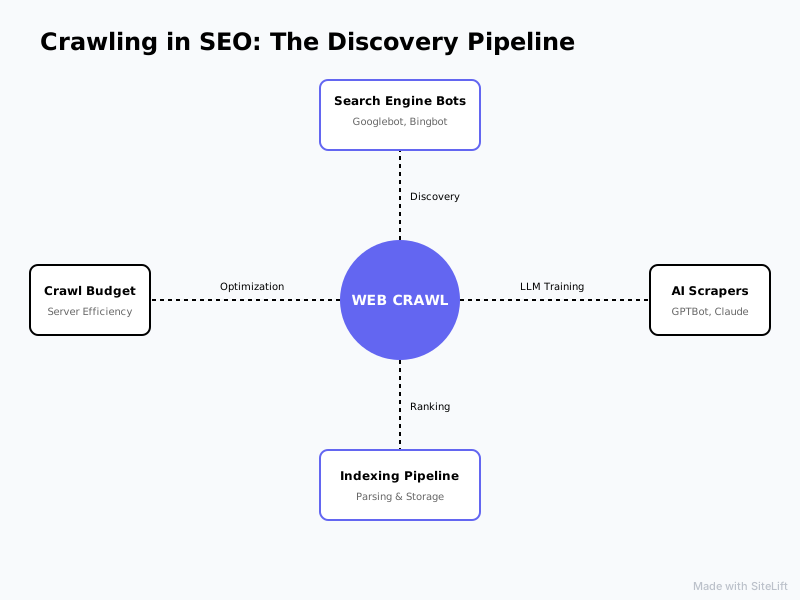
Every time a bot requests a page from your web server, it consumes server resources (CPU, RAM, and bandwidth). Because search engines crawl billions of pages daily, they cannot spend infinite resources on a single website. This limitation gives rise to the concept of crawl budget.
Infographic by SiteLift
Defining Crawl Capacity and Crawl Demand
Crawl budget is not a single setting; it is the total number of URLs Googlebot can and wants to crawl on your website within a given timeframe. It is determined by two main factors:
- Crawl Rate Limit (Crawl Capacity): The maximum fetching speed Googlebot can maintain without overloading your server. If your server responds quickly with 200 OK status codes, the limit goes up. If your server slows down or returns 500-level errors, Googlebot slows down its crawl rate.
- Crawl Demand: How badly search engines want to crawl your pages. Highly popular pages, frequently updated content, and sites with massive backlink authority command high crawl demand.
According to Google Search Central documentation, crawl budget is primarily a concern for enterprise sites with over 10,000 to 100,000 URLs. However, poor site architecture can cause crawl budget issues even on smaller sites.
Factors That Drain Your Website's Crawl Budget
According to research by Botify, up to 51% of pages on large enterprise websites are never crawled by search engines. This waste happens because bots spend their allocated budget navigating technical dead ends instead of discovering high-value URLs.
Common crawl budget wasters include:
- Facet Navigation and URL Parameters: E-commerce filter combinations (
?color=red&sort=price_asc) creating thousands of duplicate URL permutations. - Duplicate Content: Identical content accessible across HTTP/HTTPS, trailing slashes, or alternate URL pathways.
- Redirect Chains: Bots chasing multiple 301/302 redirects before reaching the target URL.
- Broken Links and 404 Errors: Bots wasting request quotas on non-existent pages.
- Unoptimized Dynamic JavaScript: Infinite scroll features or non-standard dynamic links that trap crawlers in endless loops.
How to Perform Log File Analysis to Track Bot Behavior
The only absolute source of truth regarding bot behavior is your web server log files. While tools like Google Search Console provide sample crawl statistics, raw server logs record every single HTTP request made by Googlebot, Bingbot, or GPTBot.
When analyzing your server logs, look for:
- Crawl Frequency: How often bots visit your core landing pages versus low-priority tag pages.
- HTTP Status Code Distribution: The ratio of 200 responses to 301, 404, or 500 response codes.
- Time to First Byte (TTFB) by User-Agent: Whether your server slows down specifically when automated bots fetch multiple URLs simultaneously.
Key Technical Factors Influencing Website Crawlability
Website crawlability refers to how easily a search engine spider can access, fetch, and navigate through the pages on your site. If technical obstacles prevent a spider from reaching a page, that page cannot be indexed—no matter how great the content is.
+-------------------------------------------------------------------+
|                        TECHNICAL CRAWLABILITY                     |
+-------------------------------------------------------------------+
  |               |                         |                    |
  v               v                         v                    v
Robots.txt   XML Sitemaps              Site Structure       Rendering Speed
(Directives) (URL Acceleration)        (Click Depth < 3)    (SSR vs CSR)
Configuring Robots.txt and Robots Meta Tags Correctly
Your robots.txt file acts as the primary gatekeeper for web crawlers. Located at the root directory of your domain (e.g., example.com/robots.txt), it sets rules for which bots can access specific directories.
User-agent: *
Disallow: /checkout/
Disallow: /admin/

User-agent: GPTBot
Disallow: /
Crucial Distinction: Blocking a URL in robots.txt tells the bot not to crawl the page, but it does not prevent the page from being indexed if other sites link to it. To prevent indexing while allowing crawling, you must use a robots meta tag or HTTP header:
<meta name="robots" content="noindex, follow">
Pro Tip: Never use robots.txt to block CSS or JavaScript files. Googlebot needs access to these assets to render your pages properly and evaluate layout signals.
XML Sitemaps and RSS/Atom Feeds for Continuous Discovery
While crawlers follow links, an XML sitemap acts as a direct roadmap of your canonical URLs. It informs search engine crawlers which pages exist, when they were last updated, and how frequently they change.
To maximize crawl efficiency:
- Include only canonical, 200 OK URLs (exclude 404s, redirects, and noindex pages).
- Keep sitemaps under 50,000 URLs or 50MB per file (break them into a sitemap index file if necessary).
- Keep the
<lastmod>timestamp accurate. Updating timestamps without actual content changes can lead engines to ignore your sitemap data.
Site Architecture, Depth, and Internal Linking Structures
How you arrange your content dictates how crawler budget and page authority (link equity) flow across your domain. For an in-depth breakdown of designing a bot-friendly layout, read our guide on site architecture for modern SEO and AI.
- Click Depth: Ensure every important landing page sits within 3 clicks of the homepage. Crawlers prioritize shallow URLs because they inherit more authority from the root domain.
- Internal Anchor Text: Use descriptive, keyword-rich anchor text in contextual links rather than generic "click here" text. This helps crawlers map semantic relationships between pages.
- Orphan Pages: Avoid pages that have no incoming internal links. Crawlers rarely discover orphan pages unless they appear in an XML sitemap.
JavaScript Rendering and Headless Browser Challenges
Modern web frameworks (React, Vue, Angular) often rely on Client-Side Rendering (CSR). When a bot requests a CSR page, the server returns a nearly empty HTML document containing scripts that construct the page layout inside the user's browser.
While Googlebot can execute JavaScript, it consumes significantly more processing power and time. If your code is inefficient, spiders may abandon the request before your page content renders.
To solve this, modern web applications adopt Server-Side Rendering (SSR) or Static Site Generation (SSG). Using SSR delivers fully rendered HTML on the initial HTTP request, enabling search engine spiders and AI scrapers to process text and links instantly.
Best Practices for Crawl Budget Optimization and AI Discovery
Optimizing how bots crawl your site requires systematic maintenance. By eliminating technical friction, you allow spiders to crawl your revenue-generating pages more frequently.
Eliminating Technical Obstacles and Soft 404 Errors
Technical errors cause bots to waste crawl requests on empty or invalid content.
- Soft 404 Errors: A soft 404 occurs when a page returns a 200 OK status code despite containing no content or displaying a "Not Found" message. Search engines catch these discrepancies and penalize site crawl frequency.
- Redirect Loops & Chains: Ensure 301 redirects point directly to the ultimate destination URL. Avoid chaining Page A -> Page B -> Page C.
- Canonicalization: Use explicit
<link rel="canonical" href="...">tags to prevent duplicate content variants from diluting crawl resources. To locate and resolve these issues automatically, explore our guide on how to use an SEO crawler tool.
Optimizing Server Performance and HTTP Response Times
Server performance directly dictates your site's crawl rate limit. A study by OnCrawl indicated that reducing page load speeds and TTFB can increase search engine crawler fetch rates by up to 200%.
To increase server fetch capacity:
- Implement effective HTTP caching headers and Content Delivery Networks (CDNs) to reduce load on your origin server.
- Compress server responses using Brotli or Gzip.
- Ensure your host scales dynamically during peak traffic periods so automated crawler traffic does not degrade site performance for human visitors.
Leveraging Autonomous Publishing and Instant Indexing APIs
Relying on traditional web crawling to discover new pages can take days or even weeks. Modern technical SEO moves beyond passive discovery toward proactive web push notifications.
Protocols like IndexNow allow webmasters to instantly notify Bing, Yandex, and Naver whenever content is created, updated, or deleted. Similarly, Google's Indexing API enables fast submission for specific structured content types.
My Take: Why AI Crawler Management Is the Underrated Frontier of Modern SEO
In my experience analyzing crawl logs across enterprise websites, most technical teams remain fixated entirely on Googlebot. They optimize for Google's traditional rendering pipeline, but completely ignore how AI agents read the web.
I believe treating LLM scrapers like an afterthought is a huge strategic mistake.
The way web traffic flows is changing rapidly. Users are turning to conversational interfaces to summarize data, compare solutions, and make buying decisions. If your website blocks scrapers like GPTBot, or if your JavaScript dynamic rendering blocks AI bots from reading your content, you are opting out of the AI search ecosystem.
Pro Tip: Audit your server logs specifically for GPTBot, PerplexityBot, and ClaudeBot. Track their fetch frequency alongside Googlebot. If AI bots are failing to render your pages, switch to Server-Side Rendering (SSR) or adopt clean, structured HTML layouts immediately.
— sitelift.io
Streamlining Crawlability and AI Discovery on Autopilot
Managing server logs, fixing canonical loops, optimizing sitemaps, and keeping your site updated for search engine spiders requires constant manual labor.
This is why we built SiteLift. SiteLift is an autonomous SEO and AI visibility platform that automates your publishing pipeline end-to-end. SiteLift generates search-optimized content, distributes it across a network of authoritative platforms, and maintains clean technical structures automatically.
By eliminating technical crawl barriers and delivering pre-rendered, perfectly structured content to both search engines and AI scrapers, SiteLift ensures your brand maintains organic momentum on autopilot.
Frequently Asked Questions
What is the difference between crawling and indexing in SEO?
Crawling is the discovery phase where search engine bots scan your site, follow links, and download page resources. Indexing is the storage and analysis phase where the search engine parses the downloaded HTML, understands its content, and saves it in a database so it can appear in search results.
What is a crawl budget and does every website need to worry about it?
Crawl budget is the total number of pages a search engine bot will crawl on your website within a given time frame. Small websites (under 10,000 pages) rarely need to worry about crawl budget unless they have server speed issues or massive duplicate URL parameters. It is primarily a concern for enterprise and e-commerce websites.
How do I check how often Googlebot is crawling my website?
You can monitor crawl behavior by checking the Crawl Stats report in Google Search Console (under Settings > Crawl Stats). For granular, real-time data, perform log file analysis on your web server to view every HTTP request made by Googlebot user-agents.
Can I block AI bots while still allowing Googlebot to crawl my site?
Yes. You can manage access for individual user-agents in your robots.txt file. For instance, you can allow Googlebot full access while adding Disallow: / rules specifically for AI crawlers like GPTBot, ClaudeBot, or CCBot.
Why is Google discovering my pages but not crawling or indexing them?
When Google Search Console reports "Discovered - currently not indexed," it means Google found the URL (often via a sitemap or link), but has not prioritized spending crawl budget to fetch it yet. This typically happens due to low site authority, weak internal linking, server response delays, or thin content quality signals.
Topics Covered:
- crawling in seo
- search engine crawling
- crawl budget optimization
- website crawlability
- indexing vs crawling
More from SiteLift
Site Architecture for SEO and AI Search: Structure for Crawlers, Users and LLMs
Master site architecture for SEO, web crawlers, and AI engines. Discover how to build topic clusters, reduce click depth, and optimize crawl budget.

Dynamic Content and SEO: How to Personalize Pages Without Hurting Rankings
Learn how to personalize dynamic content without hurting SEO rankings. Master rendering, avoid cloaking, and optimize Core Web Vitals.

What Modern Technical SEO Services Must Include to Win in AI Search
Discover what modern technical seo services must include to win in AI search. Optimize technical site health, crawl budget, and schema markup today.