Dynamic Content and SEO: How to Personalize Pages Without Hurting Rankings

Personalization drives modern digital experiences. According to McKinsey, 71% of consumers expect companies to deliver personalized interactions, making customized content a revenue driver rather than a luxury. Furthermore, Segment's State of Personalization Report found that 56% of consumers say they will become repeat buyers after a personalized experience.
However, balancing dynamic content and seo creates a technical tightrope. When a page constantly changes based on user location, browsing history, or account status, search engine crawlers struggle to determine which version of the page to index. If executed incorrectly, dynamic personalization can lead to indexation failures, cloaking penalties, and ruined Core Web Vitals.
This guide provides a blueprint for delivering personalized user content while keeping your search engine rankings completely safe.
Key Takeaways
| Challenge | SEO Risk | Recommended Strategy |
|---|---|---|
| User Location Personalization | Incorrect regional indexing, IP-blocking crawlers | Use structured hreflang tags and explicit URL paths rather than silent IP redirects. |
| Client-Side Rendering (CSR) | Unindexed content due to WRS delay | Serve a static HTML baseline for crawlers; mutate non-critical DOM elements client-side. |
| URL Parameters for State | Duplicate content, crawl budget exhaustion | Self-canonicalize parameter URLs and use cookies/localStorage for session state. |
| Layout Shift from Injection | Failed Core Web Vitals (CLS/INP) | Reserve layout dimensions using CSS aspect-ratio or skeleton loaders before scripts execute. |
The Editorial View: Why the Static-Baseline Approach Wins
In my experience auditing enterprise web applications, engineering teams often fall into one of two extremes: they either turn off personalization completely on organic landing pages, or they build pure single-page applications (SPAs) that defer all rendering to client-side JavaScript. Both approaches miss the mark.
The most effective, scalable path for handling dynamic content and seo is what I call the Static Baseline with Edge Mutation Framework. By serving a fully formed, SEO-optimized static HTML document from the server or edge, you guarantee that search crawlers capture your core keywords and structured data every single time.
Once that baseline hits the browser, targeted client-side scripts or edge workers can hydrate specific modules—like user recommendations, localized pricing, or custom banners—without altering the primary content hierarchy that search engines care about. When evaluating modern publishing setups—such as evaluating SEO content writing services vs automated AI publishing pipelines—establishing this clean architecture upfront is what separates high-ranking dynamic platforms from those trapped in indexing limbo.
What Is Dynamic Content and Why Does It Challenge SEO?
Dynamic content refers to page elements, text, images, or entire templates that change dynamically based on specific user signals. These signals include geolocation, device type, referral source, user segment, or past purchase behavior.
Unlike static pages that serve identical HTML to every visitor, dynamic pages adapt on the fly. While this increases user engagement, it presents distinct hurdles for javascript SEO and bot crawling.
Defining Dynamic Content vs. Static Content
Static content lives as a pre-rendered HTML file on a server. When a visitor or bot requests the page, the server returns the exact same markup every time. It is fast, predictable, and easy for search engines to digest.
Dynamic content relies on database queries, APIs, and client-side or server-side scripts to assemble markup at runtime. Because the output varies per request, search engines cannot easily determine what constitutes the "authoritative" version of the page.
How Search Engine Crawlers Handle Personalized Pages
Search engine crawlers—like Googlebot—operate as anonymous, state-less users. They typically crawl without active cookies, local storage data, or logged-in session IDs.
When Googlebot requests a personalized page, it sees whatever default experience your server displays to a first-time, unauthenticated visitor from a specific IP subnet (usually California, USA). If your primary product messaging, headings, or content require a logged-in cookie or specific user actions to render, Googlebot will never see or index that content.
The Web Rendering Service (WRS) and JavaScript SEO
Google processes web pages using a two-wave indexing pipeline. In the first wave, Googlebot crawls the raw server HTML response and indexes what it finds immediately.
[Wave 1: Raw HTML Crawled & Indexed] ➔ [WRS Resource Queue] ➔ [Wave 2: JS Rendered DOM Indexed]
If your dynamic content relies heavily on client-side JavaScript execution, the page enters a queue for Google’s Web Rendering Service (WRS). While WRS is far more capable today than in years past, rendering delays still occur. According to Google Search Central documentation on JavaScript SEO, deferred JavaScript rendering can lead to missing content during initial indexing, especially if your client-side API requests take too long or fail to execute properly within the WRS execution budget.
How Can Personalization Accidentally Trigger Search Engine Penalties?
Personalization features designed to help users can accidentally cross the line into technical violations if implemented without SEO safeguards.

The Thin Line Between Personalization and Cloaking
Cloaking occurs when a site serves different content or URLs to search engines than to human users with the intent to manipulate search rankings. Google's Search Essentials strictly prohibit deliberate cloaking.
Dynamic personalization can trigger accidental cloaking flags if your system detects Googlebot's user-agent and explicitly strips out marketing copy, links, or media to speed up crawling. To avoid penalties, your server must serve the exact same baseline HTML to Googlebot as it would to any anonymous human visitor arriving from the same geographic region without cookies.
Duplicate Content and Canonicalization Pitfalls
Many personalization engines append tracking parameters to the URL string to maintain user state across sessions:
https://example.com/product?user_segment=enterprise®ion=uk
If your system generates hundreds of unique URL variations for the same fundamental page, search engines may treat them as duplicate content. Without strict canonical tags pointing back to the primary canonical URL (https://example.com/product), your search equity dilutes across hundreds of parameter variations.
Session-Based URLs and Crawl Budget Exhaustion
When personalization engines generate temporary, session-based URLs (e.g., incorporating session_id=12345), search crawlers can get caught in infinite parameter loops.
This rapidly consumes your site's crawl budget—the limited number of pages Googlebot will crawl during a given timeframe. When crawlers waste resources on parameter-heavy session URLs, they fail to discover and index your high-value, revenue-generating content.
Which Technical Rendering Methods Are Safest for Dynamic Content and SEO?
Choosing the right technical rendering architecture determines whether your personalized site prospers or struggles in search results.
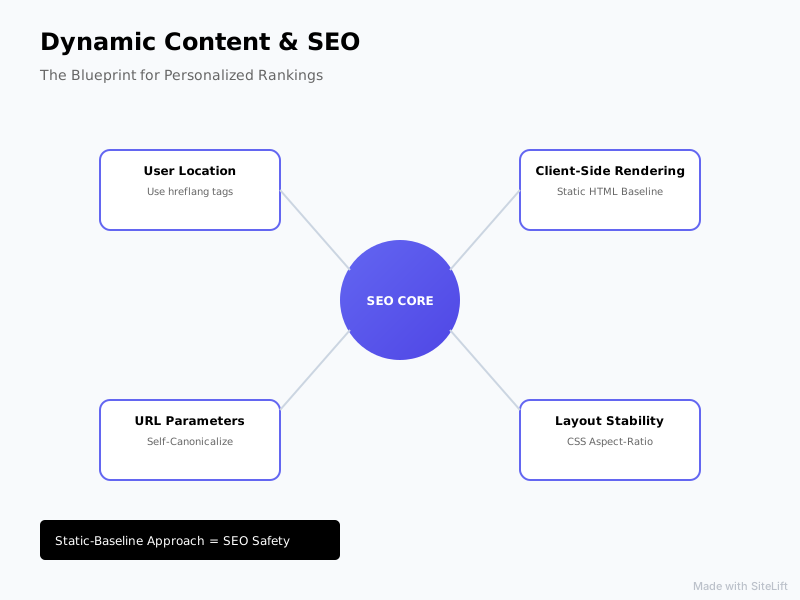
Infographic by SiteLift
| Rendering Strategy | Crawlability | Personalization Flexibility | Core Web Vitals Risk | Ideal Use Case |
|---|---|---|---|---|
| Server-Side Rendering (SSR) | Excellent | High | Low | Enterprise SaaS, E-Commerce |
| Edge Personalization | Excellent | Very High | Very Low | Global dynamic platforms |
| Client-Side Rendering (CSR) | Variable | High | High (CLS/INP risks) | Dashboard tools, post-login UX |
| Static Site Generation (SSG) | Perfect | Low | Minimal | Blogs, documentation |
Server-Side Rendering (SSR) and Edge Personalization
Server-Side Rendering (SSR) executes page logic on the web server before returning full HTML markup to the browser. Edge personalization pushes this execution closer to the user using edge networks like Cloudflare Workers or Vercel Edge Functions.
Edge workers inspect incoming requests (headers, IP location, device type) and inject personalized HTML snippets into the cached baseline response in milliseconds before delivering the page. Because the resulting document is fully formed HTML, both search engines and users receive immediate, indexable content without client-side rendering lag.
Client-Side Rendering (CSR) with Post-Load DOM Mutation
Client-Side Rendering (CSR) serves a bare-bones HTML shell and relies on the browser's JavaScript engine to fetch data and construct the Document Object Model (DOM).
While CSR offers flexibility for dynamic user interactions, it carries significant search engine crawling risks if your core textual content relies entirely on dynamic API responses. If you must use CSR, use post-load DOM mutation: render all critical SEO text, schema, and headings in static server HTML, and use CSR only for non-SEO elements like account notifications, live stock indicators, or personalized recommended cards.
Dynamic Rendering vs. Static Site Generation (SSG)
Dynamic rendering serves pre-rendered HTML to search engine bots while serving client-side JavaScript experiences to human browsers. While Google historically accepted dynamic rendering as a temporary workaround, they now explicitly recommend SSR, Edge rendering, or hybrid SSG architecture over pure dynamic rendering setups.
Static Site Generation (SSG) combined with client-side hydration offers the cleanest path forward. The core page structure remains static and blazing fast, while lightweight JavaScript handles micro-personalizations after the initial page load.
How Do You Implement SEO-Safe Dynamic Personalization Step-by-Step?
Follow this concrete execution framework to personalize web pages without risking indexing issues or organic visibility drops.
+--------------------------------------------------------+
| 1. Deliver Default Static HTML Baseline                |
|    (Contains core H1, text content, and Schema.org)    |
+--------------------------------------------------------+
                           |
                           v
+--------------------------------------------------------+
| 2. Evaluate State (Edge Worker / Cookies / Storage)     |
|    (Read cookies or geolocation without silent redirects)|
+--------------------------------------------------------+
                           |
                           v
+--------------------------------------------------------+
| 3. Mutate Specific Non-Critical DOM Modules            |
|    (Inject dynamic pricing, regional banners, user name)|
+--------------------------------------------------------+
1. Establishing Default Baseline Content for Bots
- Define the Canonical Baseline: Ensure your server returns a complete, self-contained HTML payload containing your targeted keywords, page titles, meta descriptions, and structural elements (H1, H2 tags) when queried without cookies or parameters.
- Embed Schema Markup: Include static JSON-LD structured data in the initial HTML document according to Schema.org standards so search engines capture your entity markup during Wave 1 indexing.
- Validate Anonymous Requests: Test your server responses with cURL or headless scripts without passing session headers to verify the baseline payload is fully populated.
2. Configuring Hreflang and Geo-Targeting Correctly
Avoid automatically redirecting users—or bots—based on IP address geolocation. IP ranges change, and Googlebot primarily crawls from US-based IP addresses. If you forcefully redirect US visitors to /us/, Googlebot will never discover your /uk/ or /eu/ content variations.
Instead, implement explicit URL structures for international variations (e.g., example.com/en-gb/) and use explicit hreflang cross-referencing annotations in your HTML head:
<link rel="alternate" hreflang="en-us" href="https://example.com/en-us/page" />
<link rel="alternate" hreflang="en-gb" href="https://example.com/en-gb/page" />
<link rel="alternate" hreflang="x-default" href="https://example.com/page" />
Use non-intrusive banner popups to suggest local currency or region choices to human visitors rather than forcing silent HTTP redirects.
3. Managing Cookies, Local Storage, and State Modifications
Pro Tip: Never store critical page content exclusively inside browser local Storage or session cookies if you expect search engines to index that content. Always treat cookies as non-essential enhancement triggers.
To handle dynamic state safely:
- Keep state parameters out of canonical indexed URLs.
- Use
localStorageor cookies to store personal preferences (e.g.,theme=dark,visited_category=software). - Mutate layout components client-side after DOMContentLoaded fires, ensuring your main structural content remains untouched.
How Does Dynamic Content Affect Core Web Vitals and User Experience?
Dynamic component injection directly impacts page performance and user experience metrics. Research from Google indicates that pages taking longer than 3 seconds to load suffer a 53% bounce rate, emphasizing how critical performance optimization is for personalized applications.
Mitigating Cumulative Layout Shift (CLS) from Dynamic Elements
When personalized elements—like customized promo banners or recommended products—load asynchronously after the initial paint, they often push existing page content down unexpectedly. This causes high Cumulative Layout Shift (CLS) scores.
To eliminate dynamic layout shifts:
- Reserve Container Dimensions: Set explicit CSS height, width, or
aspect-ratioproperties on parent containers holding dynamic modules. - Use Skeleton Screens: Render structural placeholder boxes with identical dimensions to the incoming dynamic elements.
.dynamic-banner-slot {
  min-height: 120px;
  aspect-ratio: 16 / 9;
  background-color: #f0f0f0; /* Skeleton placeholder */
}
Optimizing Interaction to Next Paint (INP) for Personalized Modules
Interaction to Next Paint (INP) evaluates page responsiveness to user input. Heavily personalized pages often suffer from poor INP because large JavaScript bundles block the browser main thread while parsing session data and rendering custom components.
To optimize INP performance on pages using personalized user content:
- Break long tasks into smaller sub-tasks using
requestIdleCallback()orscheduler.yield(). - Defer non-critical personalization scripts until after the main thread handles initial user inputs.
- Explore modular performance guides on web.dev technical documentation to keep main-thread execution window tasks strictly under 50 milliseconds.
Balancing Personalization Latency with Page Load Speed
Adding third-party personalization scripts can severely degrade site speed. Every additional API fetch blocks rendering or delays time-to-interactive.
Set strict performance budgets: restrict personalization payload executions to under 100 milliseconds. If an edge worker or client-side fetch fails to resolve within that window, fallback to showing the static default baseline immediately.
How Do You Audit and Test Dynamic Pages for SEO Health?
Ongoing testing guarantees that your dynamic rendering setup remains compliant with search engine requirements.
Inspecting Rendered DOM with Google Search Console
The most authoritative tool for evaluating search engine crawling on dynamic pages is Google Search Console’s URL Inspection Tool.
- Open Google Search Console and enter your personalized page URL.
- Click Test Live URL to render the page in real-time.
- Click View Tested Page and examine the HTML tab.
- Search the rendered HTML string for your target keywords, primary headings, internal links, and structured data elements to confirm Googlebot captures them completely.
Simulating Bots and User Agents Across Regions
To verify how your personalization setup responds to different crawling agents, use headless browser tools (such as Puppeteer or Playwright) or command-line tools like cURL:
curl -A "Mozilla/5.0 (compatible; Googlebot/2.1; +http://www.google.com/bot.html)" \
-H "Accept-Language: en-US" \
https://yourwebsite.com/dynamic-page
Check the returned markup to ensure it serves the robust static baseline experience without throwing 500 errors, infinite redirects, or stripped-down thin content.
Monitoring Server Logs for Bot Crawl Patterns
Regular log file analysis exposes hidden personalization traps. Monitor your web server logs for:
- High volume of 301/302 redirects triggered on Googlebot IP addresses.
- Spikes in crawled parameter URLs (e.g.,
?session=,?variant=). - Excessive 429 (Too Many Requests) errors hit by search crawlers trying to execute dynamic backend API endpoints.
Pro Tip: Set up automatic log alerts for sudden drops in 200 OK status codes on your core dynamic templates. A misconfigured edge worker or personalization deployment can silently serve blank HTML or errors to search crawlers without raising immediate visual alarms in human browser tests.
Scaling Dynamic Content Safely with Autonomous Pipelines
Managing complex technical setups across hundreds of dynamic landing pages quickly exhausts engineering resources. Achieving organic reach in modern search environments requires maintaining dynamic freshness alongside strict technical compliance. Understanding what defines high-quality content SEO today means delivering technical perfection, user relevance, and constant topic coverage in equal measure.

This is where automated infrastructure transforms organic operations. Platforms like sitelift.io streamline this process by automating content generation, structure, and distribution across curated publishing networks with native CMS integrations. Rather than managing manual rendering setups and parameter edge-cases across every page variation, automated publishing frameworks handle crawl optimization, keyword tracking, and canonical structural integrity on autopilot.
By pairing a rock-solid dynamic rendering framework with an autonomous SEO content strategy that compounds traffic, businesses can scale personalized experiences effortlessly without losing search visibility.
— sitelift.io
FAQ
What is the difference between dynamic content personalization and cloaking?
Dynamic content personalization tailors page elements based on legitimate user context (like region or language) while serving an equivalent baseline HTML experience to search engine crawlers. Cloaking intentionally serves entirely different content, keywords, or markup to search crawlers than to human users to manipulate search engine rankings, which violates search engine guidelines.
Does Googlebot see dynamic content loaded via JavaScript?
Yes, Googlebot can execute JavaScript using its Web Rendering Service (WRS). However, this occurs in a two-wave indexing pipeline. If your client-side JavaScript takes too long to load, fails to execute, or requires complex user interactions (like clicking a button or logging in), Googlebot may miss that dynamic content entirely.
How does dynamic content impact Core Web Vitals like CLS and INP?
Dynamic content can cause Cumulative Layout Shift (CLS) if newly injected elements push existing text or images around after the initial page render. It can also degrade Interaction to Next Paint (INP) if heavy JavaScript bundles block the browser's main thread while parsing dynamic session states or fetching external user data.
Should I use URL parameters or cookies for personalizing dynamic content?
For user-specific state or temporary browsing sessions, use cookies, session storage, or localStorage instead of appending URL parameters. If you must use URL parameters for personalization or filtering, always set clean canonical tags pointing back to the main unparameterized URL to avoid crawl budget waste and duplicate content issues.
Can geo-targeting dynamic content harm my global search rankings?
Yes, if implemented incorrectly. If your website uses automatic IP-based redirects that block or force US-based crawlers (like Googlebot) away from international site variations, search engines will fail to discover and index your global pages. Always use proper hreflang implementation and allow bots and users to crawl all regional variations freely.
Topics Covered:
- dynamic content and seo
- personalized user content
- dynamic rendering
- search engine crawling
- javascript SEO
More from SiteLift

AI for SEO: How to Automate Research, Content Creation and Distribution
Learn how to use AI for SEO to automate keyword research, generative content creation, CMS publishing, and search engine visibility.

SEO Tools in 2026: How to Build an Autonomous Stack That Grows Traffic on Autopilot
Discover how to build an autonomous stack with modern AI SEO tools, automated publishing workflows, and real-time rank tracking to grow organic traffic.

Repurposing Content for SEO: How to Multiply Organic Reach Across Channels
Learn how repurposing content for SEO multiplies organic reach. Discover step-by-step strategies for syndication, AI visibility, and automation.