SEO for Single Page Website: How to Rank a One-Page Site on Google and AI Search
Learning seo for single page website projects feels a little unfair at first. You get one URL, one title tag, and one shot to convince Google you deserve to rank — while multi-page competitors get dozens of pages to cover every angle.
I’ve audited plenty of one-pagers that look beautiful but are invisible in search. The good news: a single-page site can rank, and rank well, if you treat it like a focused topic hub instead of a digital business card. This guide shows you exactly how.
Key Takeaways
| What Matters Most | What to Do on a One-Pager |
|---|---|
| Focus | Target 1 primary keyword + 5-10 closely related long-tails on a single URL |
| Structure | Build scrollable sections (problem, features, how it works, pricing, FAQ) with descriptive H2s |
| On-page | One H1, keyword-rich title tag, 1,500-3,000+ words of crawlable text, optimized media |
| Technical | Sticky anchor nav, fast Core Web Vitals, mobile-first design, FAQ + Organization schema |
| Authority | Earn all links to one URL, optimize for snippets and AI Overviews, track momentum and expand when you plateau |
What Is SEO for Single Page Website and When Does It Make Sense?
SEO for single page website means optimizing a single URL to rank for one core topic cluster. Instead of spreading authority across a blog, service pages, and location pages, everything — content depth, links, schema, and conversions — lives on one long, scrollable page.
How Is One Page Website SEO Different from Multi-Page SEO?
With multi-page SEO, each intent gets its own URL. With one page website seo, one URL has to do it all.
That creates hard limits:
- One title tag and one H1: You can’t target “vegan catering NYC” and “vegan meal prep delivery” as separate intents without diluting relevance.
- Limited topical breadth: Google ranks pages, but it rewards sites that demonstrate depth. One page can show depth on one subject, not ten.
- No real internal linking graph: You can’t pass authority between related articles. Your one-pager internal linking strategy relies on anchor fragments (#pricing, #faq) instead.
According to StatCounter, Google holds over 90% of the global search engine market share, which is why I still prioritize Google fundamentals first, then layer AI search optimization on top.
What Are the Pros and Cons of Ranking a Single-Page Site?
Pros:
- All backlinks point to one URL, so authority concentrates fast
- Simpler to maintain, faster to launch, easier to tell a tight story
- Great for conversion — no leaks, one clear call to action
Cons:
- You’ll struggle to rank for unrelated keywords
- Long pages can get heavy and slow if you’re not careful
- Blog content, multiple locations, or multiple services don’t fit well
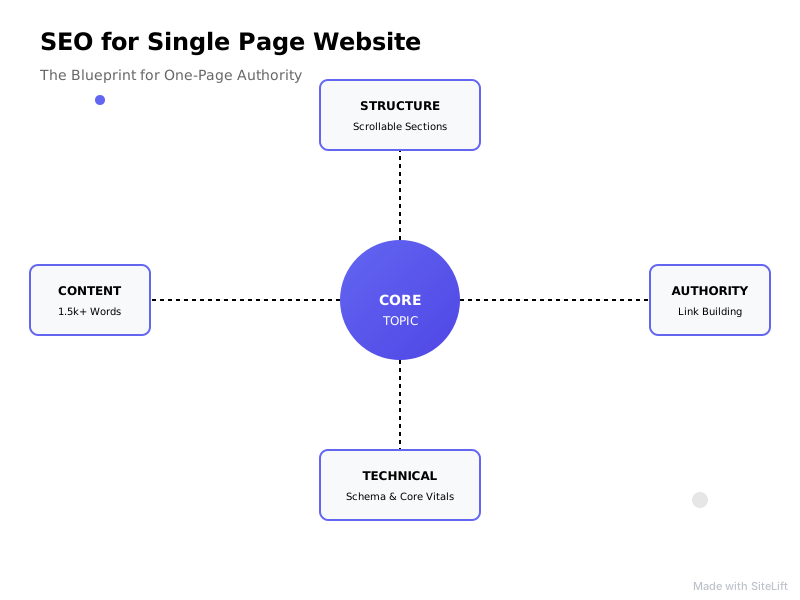
Infographic by SiteLift
| One-Page Site | Multi-Page Site |
|---|---|
| Best for 1 offer, 1 audience, 1 location | Best for multiple offers, audiences, locations |
| 1 URL to optimize and build links to | Hub-and-spoke architecture with internal links |
| Ranks for focused cluster | Can rank for hundreds of clusters |
Which Businesses Should Use a One-Pager vs. Expand to Multi-Page?
Stick with a one-pager if you are: A freelancer portfolio, SaaS MVP waitlist, mobile app landing page, event site, restaurant, local plumber/electrician with one service area, or personal brand.
Expand to multi-page if you are: An e-commerce store, agency targeting 5+ services, business targeting multiple cities, or anyone who needs a blog to educate buyers. According to BrightEdge, 53.3% of all website traffic comes from organic search, and you can’t capture that breadth with a single URL if your business serves multiple intents.
Pro Tip: If you’re debating, start with a one-pager but structure sections so they can become separate pages later. Your #pricing section today can become /pricing/ tomorrow.
How Do You Do Keyword Research and Content Strategy for SEO for Single Page Website?
This is where most single page site optimization fails. People try to rank one URL for five different businesses. Don’t.
How to Choose One Primary Keyword and Supporting Long-Tails?
Pick one primary term that matches your core offer — for example, “personal injury lawyer austin” or “ai meeting notes app” — then add 5-10 closely related long-tails and semantic variants.
Use SERP analysis to validate:
- Check People Also Ask and Related Searches for questions to answer in your FAQ
- Look at the top 3 ranking pages: what subtopics do they all cover?
- For keyword fundamentals, the Moz Learn SEO hub is a solid refresher on search volume vs. intent.
Avoid unrelated keywords on the same URL. If intents require different CTAs, they need different pages.
How to Structure Sections to Target Multiple Intents on One URL?
Think of sections as virtual pages. A high-converting, rankable template looks like this:
- Hero (transactional): H1 with primary keyword + outcome
- Problem / Pain (informational): Agitate the problem in the searcher’s words
- Solution / Features & Benefits: H2s with secondary terms
- How It Works: Numbered steps — great for AI citation
- Proof: Testimonials, case studies, logos, stats
- Pricing / Offer: Clear table, even if it’s “starting at”
- FAQ: 6-10 real questions in Q&A format
Aim for comprehensive depth without fluff. I usually see the sweet spot at 1,500-3,000+ words split into scannable blocks.
How to Map Search Intent to Scroll Depth and Content Blocks?
Top of page = ready to buy. Bottom of page = still researching.
Map it like this: hero and pricing serve transactional intent, features and how-it-works serve commercial investigation, and FAQs and definitions serve informational intent. That way, skimmers convert and researchers stay long enough to send positive engagement signals.
If you’re validating a startup idea on a one-pager, pair this with a lean content plan like the one in SEO for startups on a bootstrap budget.

What Are Landing Page SEO Best Practices for Single Page Site Optimization?
Landing page seo best practices and one-pager SEO overlap heavily: crawlable text first, conversion design second.
How to Optimize Title Tag, Meta Description and Single H1?
You only get one of each, so make them count.
- Title tag formula: Primary Keyword + Benefit + Brand. Example: SEO for Single Page Website Services | Rank Your One-Pager – Acme
- Meta description: 140-155 characters, include the primary term naturally, end with a reason to click. The #1 organic result earns an average CTR of 27.6% according to Backlinko’s analysis of 4 million search results, so CTR tuning matters.
- H1: One only. Make it match search intent, not just your brand slogan. “Book a Same-Day Plumber in Austin” beats “Welcome to FlowPro.”
For crawling and indexing rules behind titles and headings, I always cross-check the Google Search Central documentation.
How to Use H2s, Content Depth and FAQs for Topical Authority?
Use one descriptive H2 per section and weave in secondary keywords naturally: “one page website seo checklist,” “pricing,” “reviews,” “FAQs.”
Make each section genuinely useful:
- Use bullet lists, comparison tables, and pros/cons boxes
- Add an FAQ with concise 40-60 word answers — perfect for featured snippets
- Define terms clearly in one or two sentences. AI engines love quotable definitions.
Pro Tip: Write your H2s as questions your buyer actually asks Google. “How much does it cost?” will outperform “Our Pricing Philosophy” every time.
How to Optimize Images, Video and CTAs Without Hurting SEO?
One-pagers are image-heavy, which kills speed if you’re sloppy.
- Rename files descriptively (austin-plumber-van.jpg), write real alt text, compress to WebP/AVIF
- Lazy-load everything below the fold, keep hero image lightweight
- If you embed video, add a transcript and key takeaways below it so Google can read it
- Balance pop-ups and sticky CTAs with crawlable text — don’t replace paragraphs with images of text
How Do You Solve Technical SEO and One-Pager Internal Linking Strategy?
Technical work makes or breaks long single pages.
How Does One-Pager Internal Linking Strategy Work With Anchor Links?
A true one-pager internal linking strategy doesn’t link page-to-page. It links section-to-section with fragments.
Do this:
- Sticky nav with descriptive anchors: Features, Pricing, Reviews, FAQ — not just “#section-3”
- Use real
<a href="#pricing">links in HTML, not JS-only click handlers - Add cross-section links in body copy (“see pricing breakdown below”) and a back-to-top link
- Keep IDs stable:
#features,#how-it-works,#pricing,#faq
This helps users jump around and helps Google understand your page structure. Just remember: anchor fragments aren’t treated as separate URLs for indexing. All value stays on one page, which is both the strength and the ceiling.
Don’t confuse a one-page website with a JavaScript framework issue. If your site is built in React or Vue, read this single page application SEO guide for rendering and indexing to make sure content is actually crawlable.
How to Improve Core Web Vitals, Mobile UX and Crawlability?
According to Think with Google, 53% of mobile site visits are abandoned if a page takes longer than 3 seconds to load. Long one-pagers hit that wall fast.
Tighten up:
- LCP: Preload hero image, inline critical CSS, use a CDN
- INP: Defer non-critical JS, avoid heavy animation libraries and chat widgets firing on load
- CLS: Set width/height on images and embeds, reserve space for testimonials carousels
- Mobile-first: Test sticky nav, tap targets, and accordion FAQs on a real phone
- Crawlability: Ensure content is in HTML, not loaded only after scroll via JS. One canonical tag, one URL in your XML sitemap. For a quick check, follow this guide to check web SEO in minutes.
Google’s web performance best practices is my go-to reference when a page builder adds 2MB of bloat I didn’t ask for.
How to Implement Structured Data and Anchor Navigation Correctly?
Schema helps Google and AI engines parse sections on a single URL. At minimum, add:
Organization(orLocalBusiness) + logo, contact, social profilesProductorServicewith offers and reviewsFAQPagefor your Q&A sectionBreadcrumbListis less useful here — skip it if you have no hierarchy
Validate with Google’s Rich Results Test and keep markup in sync with visible content. Use the official structured data vocabulary to get types and properties right — don’t invent fields.
How to Build Authority and Rank a One-Page Site on Google and AI Search?
With only one URL, every link and mention counts double.
How to Earn Backlinks and Brand Mentions to a Single URL?
You don’t need 100 pages. You need 10-20 great links to one page:
- Digital PR around original data, a free tool, or a contrarian take
- HARO / journalist requests, podcast appearances, partner pages
- Testimonials you write for vendors (they link back to you)
- Directories that actually matter: Google Business Profile, Yelp, Clutch, Product Hunt, app stores
- All social profiles linking to the same URL with consistent NAP for local
For local one-pagers, embed a map, list service areas in text, and get reviews mentioning the service + city.
How to Optimize a One-Pager for Featured Snippets, Local SEO and AI Overviews?
According to Gartner, traditional search engine volume will drop 25% by 2026 due to AI chatbots and virtual agents. I’m already seeing informational queries get answered without a click.
To stay citable:
- Demonstrate E-E-A-T: real author bio with photo, contact details, case studies, honest pros/cons
- Format for extraction: clear Q&A headings, 40-60 word direct answers, tables, step-by-step processes
- Add quotable facts, definitions, and original stats — LLMs cite content that’s concise and verifiable
- Keep key facts consistent across your site, GBP, and socials so AI trusts the entity
If you personalize content by location or audience, do it carefully so you don’t create cloaking issues. This guide to dynamic content and SEO explains how to personalize safely.
How to Measure Performance and Know When to Scale Beyond One Page?
Track in Search Console + GA4:
- Impressions and average position for your primary cluster and keyword momentum week over week
- Scroll depth and CTA clicks by section — if no one reaches pricing, move proof higher
- Conversions, not just traffic
Scale when you plateau: you rank #6-15 for adjacent terms but can’t break through, or you want to target a second city/service. Add a blog, then split high-potential sections into dedicated pages and link them from the one-pager. Keep the one-pager as your flagship hub — don’t 301 it unless you have a clear replacement.
My Honest Take: One-Pagers Are Underrated — If You Respect Their Limits
I’ll be blunt: most SEOs dismiss one-pagers because they’re boring to scale. I get it. No sprawling architecture, no clever internal linking graph to brag about.
But for a focused offer, I actually prefer starting with one page. You launch faster, your message stays sharp, and every link you earn makes that single URL stronger instead of being diluted across thin service pages you wrote just to “have more content.”
Where founders go wrong is denial. They want the simplicity of one page with the traffic of a 200-page site. That doesn’t exist. If you have three distinct services in four cities, you don’t have a one-page business — you have a multi-page business hiding in a one-page design.
My rule: one page, one promise, one buyer. Nail that, rank, get revenue, then expand. A one-pager should be a launchpad, not a cage.
Ready to Grow a One-Pager Without Guesswork?
Ranking a single URL means every section, anchor, and millisecond of load time has to pull its weight. That’s a lot to manage manually.
sitelift.io helps you monitor keyword momentum, spot content gaps in your sections, and build authority on autopilot so your one page keeps compounding while you focus on customers. If you plan to expand later, it can help you prioritize which page to build next based on real demand — not hunches.
FAQ About One Page Website SEO
Can a single page website rank on Google?
Yes. A single-page website can rank on Google for a focused topic cluster if it has deep, crawlable content, a clear title and headings, fast mobile performance, and quality backlinks to that URL. Breadth is the limit — you won’t outrank multi-page sites for many unrelated terms.
How do you do SEO for single page website with multiple keywords?
Target one primary keyword plus 5-10 closely related long-tails and semantic variants. Create a dedicated section for each sub-intent with a descriptive H2, answer related questions in your FAQ, and avoid forcing unrelated topics onto the same URL.
How many keywords can a one-page website rank for?
Most strong one-pagers rank for dozens to low hundreds of closely related variations of one core topic, especially long-tails. If you need to rank for distinct services, products, or locations with different intent, you’ll need additional pages.
How do you do internal linking on a one-page website?
Use a sticky nav with descriptive anchor links (#features, #pricing, #faq), add contextual jump links between sections, and include a back-to-top link. Use standard HTML anchors with stable IDs so users and crawlers can navigate your content blocks.
Is a one-page or multi-page website better for SEO?
A multi-page site is better for broad SEO because each intent gets its own optimized URL. A one-page site is better when you have a single offer and want to concentrate authority and conversions. Start with one page for focus, expand to multi-page when rankings plateau or your offer diversifies.
— sitelift.io
Topics Covered:
- seo for single page website
- one page website seo
- single page site optimization
- landing page seo best practices
- one-pager internal linking strategy
More from SiteLift

Smart SEO Tech Explained: How Autonomous Platforms Replace Manual SEO Work
Learn how smart SEO tech and autonomous platforms eliminate manual workflows, automate CMS publishing, and scale organic search traffic on autopilot.

SEO with Spa Brands: Local Search Playbook to Fill Your Booking Calendar
Dominate local search and fill your appointment calendar. Discover the ultimate local SEO playbook built specifically for day spas and med spa brands.

Single-Page Application SEO: How to Get React, Vue and Angular Apps Indexed and Ranking
Master single-page application SEO. Fix JavaScript rendering bottlenecks, solve SPA indexing issues, and optimize Core Web Vitals for React, Vue, and Angular.