How to Check Web SEO in Minutes: Instant Health, Indexing and Visibility Audit

Research from Ahrefs' search traffic study reveals that 90.63% of all web pages receive zero organic search traffic from Google. It is a staggering reality, but most sites fail not because their product or message is poor, but because technical roadblocks prevent search engines from ranking them. If you want to know how to check web seo quickly without getting lost in bloated, enterprise-level tools, you are in the right place.
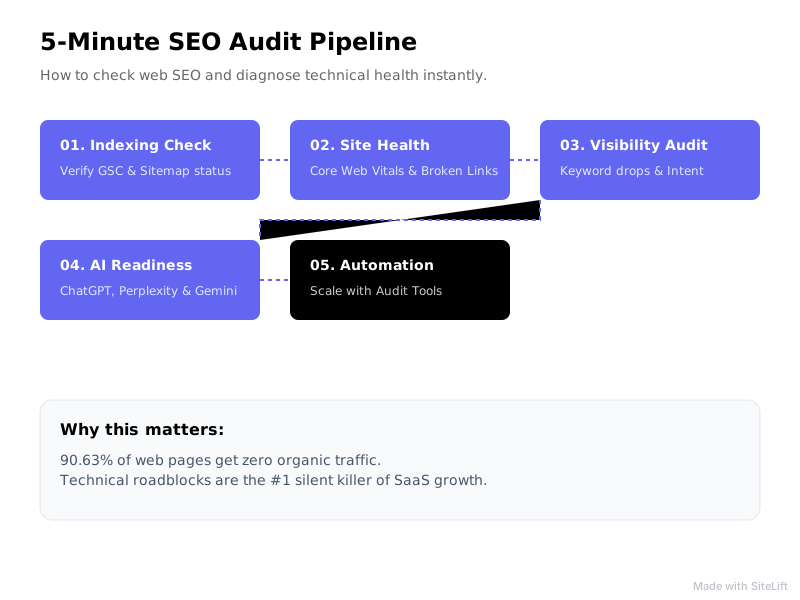
In this guide, I will walk you through a practical, 5-minute audit framework to diagnose technical health, resolve indexing issues, track ranking momentum, and optimize your site for modern AI engines.
Quick answer: To check web SEO in minutes, verify indexing in Google Search Console, test robots.txt and sitemaps, run a rapid site health check for Core Web Vitals and broken links, then review keyword visibility and AI search readiness.
In this guide you'll learn:
- How to confirm Google can crawl and index your key pages
- How to run a fast site health check with a lightweight website seo checker
- How to spot keyword drops and search intent mismatches
- How to check visibility in ChatGPT, Perplexity, and Gemini
- When to switch from manual checks to seo audit automation
Prerequisites: What You Need Before You Check Web SEO
Before running a site audit, gather the basic tools and assets needed to evaluate your technical foundation. You do not need expensive software subscriptions to run an effective initial check. I've run this exact pre-check for small blogs and large SaaS sites — it works because it focuses on what Google actually sees first.
Gathering Access to Essential Webmaster Tools
To get accurate real-time data directly from search engines, make sure you have admin or read-access to the following platforms:
- Google Search Console: Essential for verifying indexing, inspecting individual URLs, and spotting crawl errors straight from Google.
- Google Analytics 4 (GA4): Critical for tracking organic user retention, conversion paths, and sudden session drops.
- Lightweight Diagnostic Crawlers: Keep a browser-based website seo checker on hand for instant client-side testing without lengthy setup times.
Defining Your Core Target Keywords and Competitor URLs
Audit tools produce raw data, but context determines priorities. Prepare a small list containing:
- 3 to 5 core landing pages generating your primary leads or revenue.
- 5 to 10 primary target keywords you expect these pages to rank for.
- 2 direct competitors whose organic visibility you want to benchmark against.
I recommend writing these down before you open any tool. In my experience, audits go off track when people chase every warning instead of protecting revenue pages first.
Step 1: Perform an Instant Indexing and Crawlability Check
If Google cannot crawl or store your pages in its index, none of your on-page copy or backlinks matter. Crawlability is the gatekeeper of organic search visibility.
How to Identify Indexing Issues in Google Search Console
Open Google Search Console and navigate to the Pages report under the Indexing menu. This report segments your submitted pages into two categories: Indexed and Not Indexed. For background on how Google decides what to store, see Google Search Central's guide to indexing.
Look closely at the reasons listed under the "Why pages aren't indexed" table:
- Discovered - currently not indexed: Google knows the URL exists, but has not crawled it yet due to crawl budget constraints or suspected low quality.
- Crawled - currently not indexed: Google inspected the page but chose not to enter it into the index, often indicating duplicate content or thin information.
- Excluded by 'noindex' tag: Confirm that strategic revenue pages do not accidentally contain a
<meta name="robots" content="noindex">tag in their source code.
Verifying Robots.txt and XML Sitemap Health
Your robots.txt file instructs search engine crawlers which paths they can or cannot access. A single line mistake can block your entire site from search results.
To test your configuration, run your domain through our free robots.txt tester to verify line-by-line crawl permissions. Additionally, if you want to ensure modern LLMs can discover your brand content, use our free AI Bot Access Checker to verify that agents like GPTBot, ClaudeBot, and PerplexityBot are not accidentally blocked.
Finally, verify that your XML sitemap URL (usually yourdomain.com/sitemap.xml) is submitted in Search Console and returns a clean Success status.
Pro Tip: Always verify that your canonical tags point directly to the self-referential HTTPS version of your canonical page. Misconfigured canonicals frequently drain crawl budget. I've seen staging-site canonicals leak into production more times than I can count — it's a 30-second check that saves weeks of headaches.
Step 2: Run a Rapid Site Health Check for Technical and On-Page Errors
Once you confirm search engines can access your site, the next step is diagnosing performance bottlenecks and structural errors across your key pages.

Evaluating Core Web Vitals and Page Speed
Site speed is an explicit Google ranking factor that directly impacts user conversion rates. According to Think with Google's mobile speed benchmarks, 53% of mobile website visits are abandoned if a page takes longer than 3 seconds to load.
Use Google PageSpeed Insights or test your pages using our dedicated Core Web Vitals checker to measure real-user metrics. Thresholds below follow Google's Core Web Vitals thresholds on web.dev:
| Core Metric | Good Threshold | What It Measures | Quick Fix |
|---|---|---|---|
| LCP (Largest Contentful Paint) | $\le$ 2.5 seconds | Main visual load speed | Compress hero images & leverage browser caching |
| INP (Interaction to Next Paint) | $\le$ 200 milliseconds | Page responsiveness to clicks/taps | Defer non-critical JavaScript execution |
| CLS (Cumulative Layout Shift) | $\le$ 0.1 | Visual layout stability | Set explicit width and height on images & embeds |
Infographic by SiteLift
My rule of thumb: if LCP is red on mobile for a money page, fix that before you touch anything else. I've watched conversion rates recover just from compressing a single hero image and preloading fonts.
Scanning for Broken Links, Missing Meta Tags, and Heading Structure
Technical glitches erode user trust and disrupt internal link equity distribution. Run a quick scan over your primary landing pages to evaluate three structural elements:
- Title Tags & Meta Descriptions: Titles should stay between 50–60 characters and naturally include target keywords. Meta descriptions should range from 145–160 characters with a clear call-to-action.
- Heading Hierarchy: Ensure every page has exactly one
<h1>tag matching the page topic, followed by nested<h2>and<h3>tags for structured readability. - Broken Links: Dead internal links drain search engine crawl capacity and create dead ends for visitors. You can run a free broken link checker to inspect up to 150 live internal and external links in seconds.
This is where a simple website seo checker earns its keep. You don't need a 10,000-page crawl to catch a missing H1 or a broken signup button — you need a fast site health check on the pages that drive revenue.
Step 3: Analyze Keyword Visibility and Organic Search Momentum
A technically sound site still requires keyword momentum to capture search traffic. This step tracks how effectively your pages translate indexation into actual impressions and clicks.
Tracking Keyword Rank Drops and Impression Spikes
According to Backlinko's CTR study, the #1 result in Google's organic search results has an average click-through rate (CTR) of 27.6%. Moving from position #4 to position #1 can dramatically alter your lead volume.
In Google Search Console, open the Performance report and select a Compare date range (e.g., Last 28 Days vs. Previous Period). Filter the results by:
- Impression Spikes with Low Clicks: Indicates your content is appearing in search results, but your title tags or meta descriptions fail to entice users to click.
- Position Drops: Look for target keywords dropping from page 1 (positions 1–10) to page 2 (positions 11–20). These are prime candidates for rapid content refresh projects.
I personally sort by impressions first, then look for position 8-20 terms. Those striking-distance keywords are usually the fastest wins when you check web SEO for an established site.
Evaluating Content Gaps and Search Intent Alignment
Analyze your top target keywords to verify that your page format matches the user's explicit intent:
- Informational Intent: Users want guides, tutorials, or explanations (best served by blog posts or knowledge bases).
- Transactional Intent: Users want to buy or sign up (best served by streamlined pricing or product landing pages).
- Commercial Intent: Users are comparing solutions (best served by direct comparisons, listicles, or reviews).
Step 4: How to Check Web SEO for AI Engines and Generative Search
Search is no longer limited to blue links on traditional engine results pages. Modern users rely heavily on generative search engines like ChatGPT, Perplexity, and Google Gemini to find solutions.
Checking Brand Mentions in AI Engines (ChatGPT, Perplexity, Gemini)
Generative Engine Optimization (GEO) requires monitoring how AI models synthesize and summarize your brand information. Perform direct queries inside conversational engines using queries like:
- "What are the top platforms for automated SEO publishing?"
- "Compare the best tools for web SEO health checks."
If your site is not cited, AI crawlers may be blocked from your server, or your domain may lack clear schema context. Test your site's generative search readiness with our free AI readiness checker to see if key AI bots can process your published material.
Assessing Structured Data and Schema Markup
Structured data (JSON-LD) acts as a direct language bridge between your website and search engines. Review your structured data implementation against official Google Search Central technical guidelines to ensure valid markup for:
OrganizationorLocalBusinessschemaArticleschema on insights and blog postsProductorSoftwareApplicationschema on core offering pagesFAQPageschema on step-by-step guides
From what I've tested, clear Organization + Article schema plus crawlable, factual copy makes it much easier for AI engines to quote you correctly.
My Take: Why SEO Audit Automation Beats Manual Inspections Every Time
In my experience running digital strategy, manual audits become obsolete the moment you export the spreadsheet. While spending hours pulling crawling reports feels productive, search engines inspect your site continuously. If a plugin update breaks a canonical tag or a server configuration generates 500 errors, waiting for your next quarterly manual audit means sacrificing weeks of organic revenue.
This is why I strongly favor transitioning from periodic manual checks to seo audit automation. Automated systems continuously verify site health, monitor indexation status, detect crawling blocks, and fix structural issues in real time. Combining continuous health monitoring with automated publishing pipelines bridges the gap between identifying SEO issues and driving sustainable organic growth.
My honest advice? Do the 5-minute manual check web SEO routine monthly to stay sharp, but let automation handle daily monitoring. You want alerts when traffic dips or indexing fails, not another spreadsheet to babysit.
Troubleshooting Common SEO Audit Failures and Quick Fixes
When running a site health check, you will occasionally encounter stubborn errors. Here is how to fix the two most common issues:
What to Do When Pages Are 'Discovered - Currently Not Indexed'
When Google places URLs in this state, it usually signifies a site-wide quality evaluation issue or crawl budget bottleneck:
- Consolidate Thin Content: Merge overlapping or short articles into comprehensive, authoritative resources.
- Improve Internal Linking: Link to the unindexed page directly from high-authority pages on your website using descriptive anchor text.
- Clean Up Sitemaps: Remove redirected (301) or non-canonical URLs from your XML sitemap so crawlers focus exclusively on primary URLs.
Fixing Sudden Drops in Organic Traffic
If traffic drops abruptly, follow this quick elimination sequence:
- Rule out analytics tracking errors: Check if the drop is real or if a broken GA4 script stopped logging events.
- Check for manual actions: Open Search Console and view the Security & Manual Actions tab to confirm your site was not flagged for policy violations.
- Inspect technical changes: Check your
robots.txtfile, SSL certificates, and recent developer deployments to ensure crawl blocks were not introduced accidentally.
Turning Audit Insights into Automated SEO Growth
Running a manual check provides a valuable snapshot, but long-term organic authority requires ongoing optimization and regular publication of high-quality content.
Prioritizing High-Impact SEO Fixes
Organize your audit findings by business impact and implementation effort:
- High Priority (Immediate Fix): Sitewide
noindexbugs, blockedrobots.txtdirectives, broken core user conversion links, and severe server latency. - Medium Priority (Fix within 14 Days): Core Web Vitals optimization, missing or duplicate
<h1>tags, and unindexed striking-distance keywords. - Low Priority (Ongoing Maintenance): Minor schema validation warnings, missing alt text on decorative images, and outdated meta descriptions.
Leveraging SEO Audit Automation for Continuous Health Monitoring
If manually analyzing site errors and crafting search-optimized content feels overwhelming, autonomous solutions like SiteLift offer a powerful alternative.
SiteLift functions as an end-to-end growth platform that automatically generates targeted, authoritative content, distributes it across a curated premium network, and monitors keyword momentum in real time. Instead of spending endless hours running repetitive manual health checks, you can automate your SEO pipeline to scale indexation, authority, and revenue on autopilot.
Frequently Asked Questions
How long does it take to check a website's SEO?
A basic site check takes under 5 minutes using Google Search Console and automated tool checkers. A full technical audit across enterprise domains with thousands of URLs can take 1 to 2 hours of thorough diagnostic review.
What is the difference between crawling and indexing issues?
Crawling issues happen when a search engine bot is blocked from accessing or fetching a page's code (e.g., blocked by robots.txt or server errors). Indexing issues occur when Google successfully accesses the page but decides not to store it in its search database due to quality, duplicate content, or canonical directives.
How can I check my website SEO for free?
You can check web seo for free using official search tools like Google Search Console and Google PageSpeed Insights, alongside free specialized diagnostic tools like SiteLift's Core Web Vitals and broken link checkers.
What does a website seo checker actually test?
A good website seo checker tests crawl access, indexability, Core Web Vitals, title tags and meta descriptions, heading structure, broken links, sitemap status, and schema. Use it for a fast site health check on your top 3-5 pages before you run a deeper crawl.
Why is my website indexed but not showing up on Google search results?
Your page may rank beyond page 5 where traffic is negligible, suffer from target keyword cannibalization, or lack adequate internal link authority. Refining search intent alignment and securing high-quality backlinks typically improves search position.
How often should I run a site health check on my website?
You should monitor core site health continuously using seo audit automation tools, or perform manual reviews at least once a month and immediately following major website redesigns or CMS migrations.
What is seo audit automation and do I need it?
Seo audit automation means continuous monitoring for indexing issues, crawl blocks, broken links, and ranking drops instead of one-off manual audits. I recommend it for any site that publishes regularly or depends on organic leads, because it catches errors within hours rather than months.
— sitelift.io
Topics Covered:
- check web seo
- website seo checker
- seo audit automation
- site health check
- indexing issues
More from SiteLift

AI for SEO: How to Automate Research, Content Creation and Distribution
Learn how to use AI for SEO to automate keyword research, generative content creation, CMS publishing, and search engine visibility.

SEO Tools in 2026: How to Build an Autonomous Stack That Grows Traffic on Autopilot
Discover how to build an autonomous stack with modern AI SEO tools, automated publishing workflows, and real-time rank tracking to grow organic traffic.

Repurposing Content for SEO: How to Multiply Organic Reach Across Channels
Learn how repurposing content for SEO multiplies organic reach. Discover step-by-step strategies for syndication, AI visibility, and automation.