Define Crawler: How Search and AI Bots Read the Web
If you look up define crawler, you'll find a simple answer: it's an automated bot that browses the web to discover pages. That's true, but it undersells what's actually happening.
A modern what is web crawler story isn't just about Google anymore. Your site is being read by a search engine spider like Googlebot, a training bot like GPTBot, and a real-time answer bot like PerplexityBot — all at the same time, all for different reasons.
I’ve spent years watching server logs, and I can tell you: understanding who’s crawling you, why, and how to control them is now a core SEO and AI visibility skill.
Key Takeaways: Crawler Essentials at a Glance
| Concept | What You Need to Know |
|---|---|
| To define crawler | An automated script that systematically follows links, fetches pages, and passes content to an index or AI model |
| Crawling vs. Scraping vs. Indexing | Crawling = discovery, Scraping = extraction, Indexing = storage and retrieval |
| Googlebot crawling | Mobile-first, two-wave rendering for JavaScript, respects robots.txt and crawl budget |
| AI crawler GPTBot | Crawls for LLM training and live answers; blocked by 30%+ of top sites |
| Control | Use robots.txt, meta robots, sitemaps, and log monitoring to guide bots |
What Is a Web Crawler? How to Define Crawler, Spider, and Bot
To define crawler precisely: it's an automated program — also called a spider or bot — that systematically browses the World Wide Web to discover, fetch, and report back content.
The terms are mostly interchangeable, but they come from different eras:
- Crawler: The technical term. It “crawls” from link to link.
- Spider: The early search term. It “spins” a web of links. You’ll still see search engine spider in SEO docs.
- Bot: The generic term. Short for robot. All crawlers are bots, but not all bots are crawlers.
According to Cloudflare, automated bot traffic accounts for roughly 45% of total internet traffic worldwide. That includes good bots like Googlebot, commercial scrapers, and malicious bots. Your server logs are noisier than you think.
How to Define Crawler vs. Scraper vs. Indexer?
People mix these up, and it costs them. Here’s the clean distinction:
| Process | Job | Example |
|---|---|---|
| Crawling | Discover URLs by following links and sitemaps | Googlebot finding your new blog post |
| Scraping | Extract specific data points from a page | Pulling prices, emails, or article text |
| Indexing | Store, organize, and rank content for retrieval | Google adding your page to its search index |
Think of it like a library: crawling is walking the aisles to find books, scraping is photocopying a chapter, and indexing is adding the book to the card catalog.
If you want the full discovery-to-ranking flow, this breakdown of crawling in SEO and how Google and AI bots discover pages pairs well with this guide.
Pro Tip: Don’t block scraping by blocking crawling. If you disallow Googlebot to stop a scraper, you’ll disappear from search too. Block by user-agent instead.
How Do Web Crawlers Work? The Technical Crawl Process Explained
Every crawler, from 1990s AltaVista to GPTBot, follows the same basic loop. Only the scale and rendering have changed.
Step 1: Discovery via seed URLs and sitemaps
Bots don’t start from scratch. They start with a list of known URLs — seed URLs from previous crawls — plus URLs submitted in XML sitemaps and found via backlinks. From there, they extract every <a href> and add new URLs to a crawl queue.
Step 2: Fetching, parsing, and handling JavaScript For each URL, the bot sends an HTTP request, reads headers and status codes (200, 301, 404, 503), then downloads the HTML. That HTML is parsed according to web standards set by the World Wide Web Consortium.
Simple bots stop there. Googlebot doesn’t. Because so much of the web runs on JavaScript, Googlebot renders pages in what SEOs call two-wave indexing: first the raw HTML, then a second pass after rendering JavaScript. If your key content only appears after rendering, it can be indexed days later.
Step 3: Link extraction and managing crawl budget After parsing, the crawler extracts new links, respects canonical tags and nofollow directives, and decides what to crawl next based on crawl budget — how much time and resources it’s willing to spend on your site.
Crawl budget isn’t infinite. Large, slow, or poorly structured sites get crawled less deeply. That’s why flat site architecture built for crawlers and LLMs gets new pages discovered in hours, while deep, orphaned pages can sit undiscovered for weeks.

How Does Googlebot Crawling and Mobile-First Indexing Work?
Googlebot crawling is still the crawler that pays your bills. Data from Google Developers indicates that Googlebot accesses web pages millions of times per second to keep its global index updated.
Here’s how to think about it in practice:
Googlebot Smartphone vs. Googlebot Desktop
Google is now almost entirely mobile-first. That means the primary version it uses for indexing and ranking is Googlebot Smartphone, which crawls with a mobile user-agent.
If your mobile site hides content, lazy-loads images without proper markup, or has a slower experience than desktop, Google sees the degraded version. Desktop parity isn’t optional anymore.
You can read exactly how Googlebot discovers and audits web pages in Google’s official Search Central guide.
Bingbot, YandexBot, and DuckDuckBot
Google gets the attention, but don’t ignore the rest:
- Bingbot: Powers Bing, DuckDuckGo results, and ChatGPT browsing with Bing. Important for AI visibility.
- YandexBot: Dominant in Russia and parts of Eastern Europe.
- DuckDuckBot: Lightweight, focused on fetching favicons and site info rather than full indexing.
All of them evaluate page structure, canonical tags, hreflang, and structured data (Schema.org) to understand what a page means, not just what it says.
Identifying Crawlers Using User-Agent Strings
Every legitimate bot identifies itself with a user-agent string in server logs, like:
Mozilla/5.0 (compatible; Googlebot/2.1; +http://www.google.com/bot.html)
But user-agents can be spoofed. To verify a genuine search engine spider, do a reverse DNS lookup and confirm it resolves to googlebot.com or search.msn.com for Bing. Fake Googlebots are one of the most common sources of junk traffic I see in logs.
For a deeper look at what happens after the crawl, see this guide on how search engine indexing works and how to get indexed faster.
Pro Tip: Filter your server logs by verified user-agent + reverse DNS weekly. I regularly find “Googlebot” hits from AWS IPs that are just scrapers in disguise.
How to Define Crawler in the AI Era? GPTBot, ClaudeBot, and PerplexityBot
This is where the old definition breaks. To define crawler today, you have to split bots into two camps: search indexers and AI synthesizers.
Traditional bots index to point to you. AI bots crawl to replace the click with a generated answer.
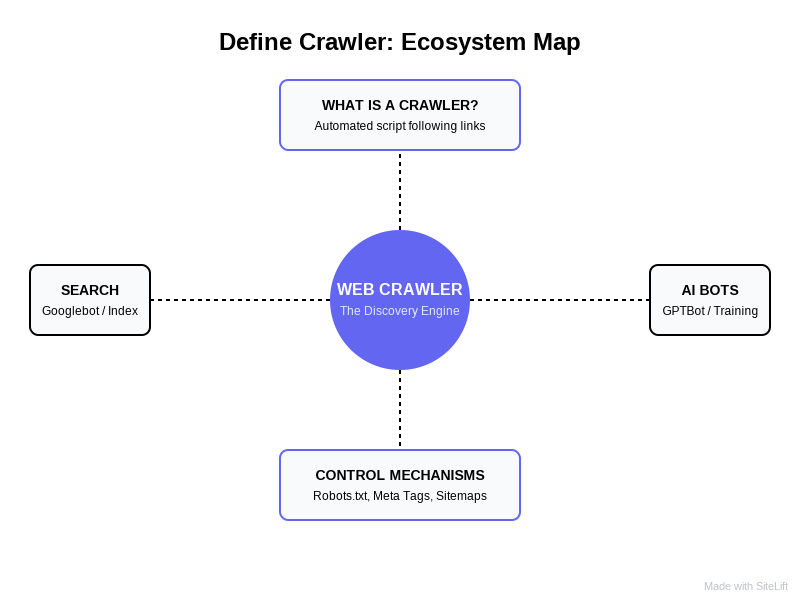
Infographic by SiteLift
AI Training Bots vs. Real-Time Retrieval Bots
- Training bots crawl to build LLM knowledge. Example: AI crawler GPTBot collecting data to train future GPT models. Your content may influence answers months later, with no visit or citation.
- Retrieval bots crawl live to answer a prompt now. Example: PerplexityBot or ChatGPT-User fetching your page to ground an answer with a link. This is Answer Engine Optimization territory.
That difference matters for your allow/block decision.
Key AI Crawlers to Know
| Bot | Owner | Purpose | User-Agent |
|---|---|---|---|
| GPTBot | OpenAI | LLM training data | GPTBot/1.0 |
| ChatGPT-User | OpenAI | Live browsing for prompts | ChatGPT-User/1.0 |
| ClaudeBot | Anthropic | Training + retrieval | ClaudeBot/1.0 |
| PerplexityBot | Perplexity | Live answer retrieval | PerplexityBot/1.0 |
| CCBot | Common Crawl | Open dataset used by many LLMs | CCBot/2.0 |
You can verify OpenAI’s crawlers by checking the official GPTBot user-agent strings and verification method documentation.
The Impact on Traffic and IP
Research from Originality.ai reveals that over 30% of top 1,000 global websites block OpenAI's GPTBot via robots.txt. Publishers are asking a fair question: why let a bot train on our work for free if it reduces clicks and offers no attribution?
There’s no universal answer. If you rely on brand authority in AI answers, allowing retrieval bots makes sense. If you sell proprietary data, courses, or original research, blocking training bots is reasonable. Just be intentional — blocking everything by default can make you invisible in AI search.
How Do You Direct and Control Crawler Behavior on Your Site?
You can’t manually invite Googlebot to every page, but you can absolutely tell bots where they’re welcome and where they aren’t.
Robots.txt Rules and User-Agent Directives
Your robots.txt file is the front door. It lives at yourdomain.com/robots.txt and gives per-bot instructions.
To allow search but block AI training:
User-agent: Googlebot
Allow: /

User-agent: Bingbot
Allow: /

User-agent: GPTBot
Disallow: /

User-agent: ClaudeBot
Disallow: /

User-agent: CCBot
Disallow: /
This is the exact pattern many news sites now use: stay visible in SERPs, opt out of LLM training. Test changes in Google Search Console before pushing live — one misplaced Disallow: / can deindex your whole site.
Meta Robots Tags: Controlling Noindex and Nofollow
Robots.txt controls crawling. Meta tags control indexing:
<meta name="robots" content="noindex, follow">— crawl links, but don’t index this page<meta name="robots" content="index, nofollow">— index it, but don’t pass equity through linksX-Robots-Tag: noindexin HTTP headers — same as noindex, but for PDFs and images
Use noindex for thank-you pages, internal search results, and thin tag archives. Don’t waste crawl budget on pages that should never rank.
Monitoring Crawler Activity via Server Logs and Search Console
If you only do one technical SEO habit, make it this: watch how bots actually behave.
- Google Search Console > Settings > Crawl stats: Shows Googlebot hits, response times, and errors by file type.
- Server logs: Show every bot, including AI bots Search Console won’t show you. Look for crawl spikes, 404 loops, and slow URLs that burn budget.
- XML sitemaps: Keep them clean, under 50,000 URLs, and updated automatically. A sitemap won’t force a crawl, but it removes excuses for missing pages.
Pro Tip: If key revenue pages have low crawl frequency but your blog tag pages get hammered, tighten internal linking and noindex the tags. Crawl budget follows link equity.
My Take: We’re Blocking AI Bots for the Wrong Reasons
I’ll be honest — I think most of the current GPTBot panic is misdirected.
I talk to site owners every week who blocked all AI crawlers on day one because “AI steals content,” while their core product pages still take 6 seconds to load and aren’t even in Google’s index. They locked the back window while the front door was hanging off its hinges.
Here’s my first-person rule after auditing dozens of sites: earn the crawl before you restrict it.
Let Googlebot and Bingbot crawl efficiently first. Fix server errors, flatten architecture, and get your money pages indexed. Then decide on AI bots based on your business model, not headlines. If you’re a B2B SaaS with how-to content, being cited by Perplexity and ChatGPT is free distribution. If you’re selling licensed data, block training bots without guilt.
Crawlers aren’t good or evil. They’re infrastructure. The sites that win in both search and AI are the ones that treat log files like analytics — not an afterthought.
— sitelift.io
Get Discovered Without Babysitting Bots
Managing Googlebot, Bingbot, GPTBot, and the rest manually is exhausting. You have to publish, structure content for both search and LLMs, keep sitemaps clean, and watch crawl momentum — constantly.
That’s why I like automation for this layer. sitelift.io is built to handle that end-to-end pipeline: it generates targeted content, distributes it across a premium network, syncs with your CMS, and tracks keyword momentum in real time. You still control robots.txt and strategy, but you don’t have to hand-publish every page you want crawled.
If crawl budget and AI discovery are on your roadmap this quarter, start by auditing which bots hit your site now — then make your allow/block rules intentional.
FAQ
What is the difference between a web crawler and a web scraper?
A web crawler discovers pages by systematically following links and sitemaps, while a web scraper extracts specific data from those pages. Crawling is about finding URLs at scale; scraping is about pulling structured content like prices or text. Search engines crawl to index, scrapers harvest to reuse.
How can I tell if Googlebot or an AI bot is crawling my website?
Check your server logs for user-agent strings like Googlebot, Bingbot, GPTBot, or PerplexityBot, then verify with reverse DNS lookup. For Googlebot, confirm the IP resolves to googlebot.com. For AI bots, cross-check IPs against the provider’s official docs. Google Search Console crawl stats also show Googlebot activity, but not AI bots.
What is GPTBot and should I block it on my website?
GPTBot is OpenAI’s crawler that collects web content to train large language models. Blocking it via User-agent: GPTBot Disallow: / in robots.txt opts you out of training, but it doesn’t remove you from ChatGPT’s live browsing, which uses ChatGPT-User. Block it if you want to protect proprietary content; allow it if you want maximum influence on future AI answers.
What is a crawl budget and why is it important for SEO?
Crawl budget is the number of pages and resources a search engine is willing to crawl on your site in a given timeframe. It’s influenced by site size, server speed, errors, and internal linking. If budget is wasted on duplicate, thin, or broken pages, important pages get crawled less often and rank slower. Optimizing architecture and server performance helps key pages get discovered faster.
Topics Covered:
- define crawler
- what is web crawler
- search engine spider
- googlebot crawling
- AI crawler GPTBot
More from SiteLift

Blog Pagination and SEO: Prevent Crawl Traps and Ranking Dilution
Learn how to optimize blog pagination for SEO. Stop crawl traps, implement self-referential canonicals, and optimize infinite scroll for higher rankings.

External Link Building Explained: Earn Third-Party Authority That Sticks
Master external link building. Learn inbound vs outbound link mechanics, data-led link acquisition, and how to win third-party authority for Google and AI.

What Is AI Search? How ChatGPT and Google AI Answer Differently Than Google
Discover what is AI search, how ChatGPT and Google AI Overviews answer differently than traditional search, and how to optimize for LLM visibility.