Blog Pagination and SEO: Prevent Crawl Traps and Ranking Dilution

Managing a growing library of content is a milestone for any digital publication, but it comes with a hidden technical hurdle: blog pagination. When your archives stretch across dozens or hundreds of pages, the way search engines navigate and process those paginated series determines whether your newest articles get indexed in minutes or buried in a crawl trap.
Unoptimized blog pagination can silently drain your site's search visibility. It creates duplicate meta titles, triggers infinite parameter loops, and dilutes internal link equity across low-value archive pages. In this step-by-step tutorial, you will learn how to audit your current paginated series, implement canonical tags correctly, manage robots directives, and engineer an accessible, crawl-friendly architecture that protects your organic momentum.
What You Need Before Starting
Before implementing technical fixes, gather the following tools and requirements:
- Access to Google Search Console (GSC): To inspect indexation status and canonical choices made by Google.
- A Site Crawler: Tools like Screaming Frog, Sitebulb, or automated site audit modules to crawl parameterized URLs.
- CMS / Server Access: Ability to edit code, HTTP headers, or template files in WordPress, Webflow, custom JavaScript frameworks, or through a managed platform like SiteLift's Hosted Integration.
- Time Required: 1 to 3 hours depending on your site's scale and developer workflows.
Prerequisites: How Do You Audit Your Current Blog Pagination SEO?
Before changing code, you need a baseline understanding of how search bots currently view your archive structure.
Auditing Paginated Pages with Site Crawlers
Fire up your preferred crawler and run a crawl on your blog path (e.g., /blog/). Filter the crawl results by HTML pages and look for URLs matching patterns like /blog?page=2, /blog/page/3/, or /blog?p=4.
Key metrics to note during your audit:
- Total number of paginated archive URLs discovered.
- Canonical tag destinations on paginated URLs.
- HTTP status codes (ensure all return
200 OKand never301or404for active pages).
Identifying Crawl Traps and Parameter Bloat
A crawl trap occurs when a crawler gets trapped in an infinite loop of generated URLs. In blog archives, this frequently happens when multi-select category filters, tag pages, and sorting parameters (e.g., ?sort=date&category=tech&page=2&filter=asc) combine to create tens of thousands of duplicate URL variations.
Research from Lumar indicates that misconfigured pagination and crawl traps account for up to 30% of wasted crawl budget on content-heavy websites. If Googlebot spends its daily allocation indexing page 84 of a filtered tag view, it misses your newly published high-intent pillar content.
Checking Indexation Status in Google Search Console
Navigate to Google Search Console and open the Pages report under Indexing. Use the search filter to query URL paths containing page or p=.
Look for two primary warnings:
- Alternate page with proper canonical tag: Check if Google is accepting your canonical tags or overriding them.
- Duplicate without user-selected canonical: Indicates Google found identical or thin archive content with no clear canonical guidance.
| Audit Check | Healthy State | Red Flag |
|---|---|---|
| Canonical Tags | Self-referential on every page | Pointing all pages back to Page 1 |
| Robots Directive | index, follow across series |
noindex, follow or noindex, nofollow |
| Indexation Status | Deep posts indexed, main archive indexed | Thousands of /blog?p=X indexed in SERPs |
| URL Parameters | Standardized clean path (/blog/page/2/) |
Dynamic filter strings (?p=2&dir=desc&ref=bot) |
Step 1: How Do You Implement Self-Referential Canonical Tags for Blog Pagination?
The single most destructive mistake in blog pagination is forcing every paginated URL (/blog/page/2/, /blog/page/3/) to canonicalize back to the primary blog homepage (/blog/).
Why Canonicalizing Everything to Page 1 Is a Critical Mistake
When you tell search engines that /blog/page/5/ is identical to /blog/, you are instructing them to ignore the unique links listed on page 5. Over time, search crawlers stop processing the internal links on deeper pages, leaving your older blog posts orphan-indexed or completely dropped from the index.
Google treats paginated pages as distinct sequence components that contain unique content (distinct lists of articles). Therefore, each paginated page must maintain its own self-referential canonical tag.
Configuring Self-Referential Canonical Tags on Every Paginated URL
Ensure your CMS output inserts a self-referential canonical tag into the <head> section of every paginated document.
On Page 1 (https://example.com/blog):
<link rel="canonical" href="https://example.com/blog/" />
On Page 2 (https://example.com/blog/page/2/):
<link rel="canonical" href="https://example.com/blog/page/2/" />
On Page 3 (https://example.com/blog/page/3/):
<link rel="canonical" href="https://example.com/blog/page/3/" />
Pro Tip: If your site uses clean path structures, make sure your canonical URLs include or exclude trailing slashes consistently. Mismatched trailing slashes between canonical tags and internal links create unnecessary redirect chains that erode your crawl budget blog efficiency.

Step 2: How Should You Manage Title Tags, Descriptions, and Robots Directives?
Search engines flag identical title tags and meta descriptions across multiple URLs as duplicate meta data. While this is rarely a manual penalty issue, fixing it improves click-through rates and clarity in search results.
Unique Meta Titles and Descriptions for Paginated Series
Dynamically append the current page number to your title tags and meta descriptions for pages 2 and beyond.
<!-- Meta Tags for Page 1 -->
<title>Insights & Tech Guides - Example Blog</title>
<meta name="description" content="Explore our latest tutorials and strategic insights on web development and SEO." />

<!-- Meta Tags for Page 2 -->
<title>Insights & Tech Guides - Page 2 of 12 - Example Blog</title>
<meta name="description" content="Explore our latest tutorials and strategic insights on web development and SEO. (Page 2)" />
Why You Should Avoid 'noindex, follow' on Paginated Pages
A common piece of legacy advice was adding <meta name="robots" content="noindex, follow"> to paginated archive pages to "save crawl budget." Do not do this.
Google Search Central engineers have repeatedly confirmed that if a page is marked as noindex for a prolonged period, search crawlers will eventually stop following the links on that page altogether. Treating noindex, follow as a permanent fix eventually transforms it into noindex, nofollow, severing the flow of PageRank to older articles listed deep within your archives.
Keep all paginated archive pages set to:
<meta name="robots" content="index, follow" />
Step 3: How Do You Optimize Infinite Scroll and Load-More Buttons for SEO?
Modern web design heavily favors dynamic page loads, such as infinite scrolling or interactive "Load More" buttons. While great for mobile user engagement, pure client-side infinite scroll hides deep blog content from search engines.
Converting Client-Side Infinite Scroll to SEO-Friendly Pagination
Search engine crawlers do not scroll down pages or trigger user click events to fetch additional items. If your blog relies solely on JavaScript event listeners to load articles into the DOM, content on page 2 and beyond will never be crawled.
To implement infinite scroll seo successfully, pair dynamic page loading with clean, crawlable HTML fallbacks and history manipulation.
Implementing HTML5 History API (pushState) with Paginated Fallbacks
When a user scrolls down or clicks "Load More", your JavaScript should perform two actions:
- Fetch the next batch of posts via an API call and render them.
- Update the browser address bar URL using
window.history.pushState()so the URL reflects the active page segment.
Simultaneously, ensure that if JavaScript is disabled, or when a crawler fetches the standard URL, a full HTML document is returned containing static <a href="..."> links to adjacent paginated pages.
// Example: Updating URL state on scroll intersect
window.addEventListener('scroll', () => {
  if (userHasScrolledToPage(2)) {
    window.history.pushState({ page: 2 }, 'Blog - Page 2', '/blog/page/2/');
    document.title = 'Insights & Tech Guides - Page 2 of 12 - Example Blog';
  }
});
According to Google Search Central's JavaScript SEO guides, every state in an infinite scroll stream must correspond to an accessible, independent HTTP endpoint that renders content server-side or via pre-rendering.
Step 4: How Do You Optimize Crawl Budget and Internal Link Architecture?
Optimizing internal page rank and crawl efficiency requires clean URL structures and logical UI controls.
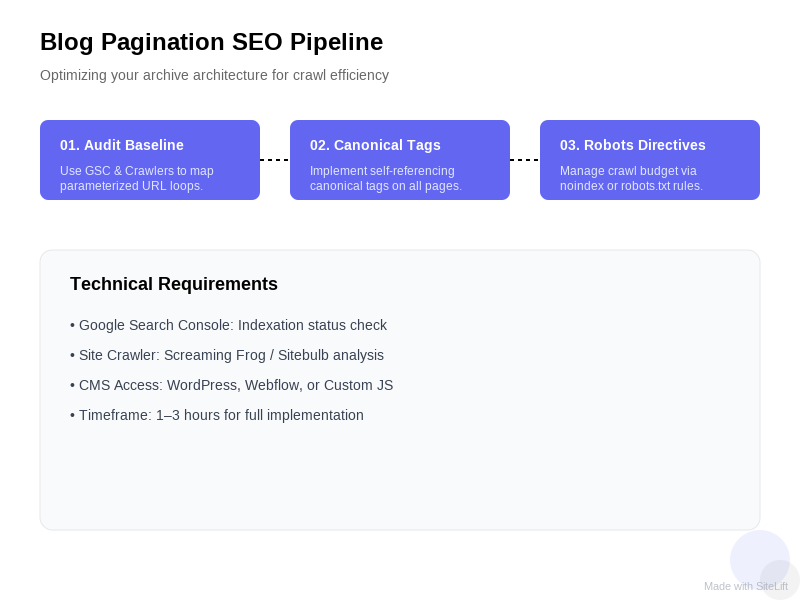
Infographic by SiteLift
Using Clean URL Structures for Pagination
Avoid messy query parameters in favor of clean path segments:
- Recommended:
https://example.com/blog/page/2/ - Discouraged:
https://example.com/blog?p=2&session=9483&dir=1
Clean URL paths are easier for search engines to discover, evaluate, and group within their site architecture models.
Optimizing Anchor Text and Pagination UI Controls
The pagination navigation block at the bottom of your blog stream acts as an internal link distribution system. Ensure your HTML pagination controls include direct links to key page numbers, rather than just basic "Previous" and "Next" buttons.
Include links to:
- First page (
Page 1) - Previous page (
Page N-1) - Next page (
Page N+1) - Key numeric jumps (e.g.,
Page 5,Page 10) - Last page (
Page X)
A study by WebAIM highlights that accessible pagination UI components with clear numeric text and descriptive aria-label attributes boost user navigation success rates by over 40%. Proper labeling helps search engine accessibility parsers accurately understand user interface flows.
<nav aria-label="Blog pagination">
<ul class="pagination">
<li><a href="/blog/" aria-label="Go to Page 1">1</a></li>
<li><a href="/blog/page/2/" aria-label="Current Page, Page 2" aria-current="page">2</a></li>
<li><a href="/blog/page/3/" aria-label="Go to Page 3">3</a></li>
<li><a href="/blog/page/10/" aria-label="Go to Page 10">10</a></li>
<li><a href="/blog/page/3/" aria-label="Go to Next Page">Next »</a></li>
</ul>
</nav>
Excluding Paginated Pages from XML Sitemaps
Your XML sitemap should strictly list primary, high-value canonical assets that you want ranked in search results. Do not include paginated archive pages (/blog/page/2/) in your XML sitemap.
Instead, let your natural site navigation and internal link links guide crawlers through pagination sequences, reserving sitemap bandwidth exclusively for individual blog posts and primary index pages.
Why Simple Archival Architecture Is Underrated
In the race to build slick JavaScript-heavy web applications, developers often overcomplicate site architecture. There is a quiet brilliance in straightforward HTML structures.
From an editorial and engineering perspective, relying on native standard static links for blog pagination is one of the most underrated technical tactics available today. While dynamic state managers and complex AJAX fetch hooks look modern, they introduce failure points where search engine bots simply give up.
By keeping your pagination backbone rooted in server-rendered HTML while enhancing the interface with pushState for human visitors, you gain the best of both worlds: blistering speed for users and bulletproof crawlability for search engines.
Troubleshooting: What Are the Most Common Blog Pagination SEO Pitfalls?
Even seasoned technical teams fall into traps when managing large content hubs. Here are the three most frequent errors and how to resolve them:
Relying on Deprecated rel='next' and rel='prev' Tags
According to Google Search Central, Google officially retired support for rel="next" and rel="prev" as an indexing and grouping signal in March 2019. Google now treats paginated pages as independent documents.
While keeping these tags does not hurt your site—and they remain helpful for accessibility and alternative search engines like Bing—you cannot rely on them to consolidate ranking signals or prevent duplicate content issues. You must implement robust self-referential canonical tags and clean metadata instead.
Creating Infinite URL Loops via Dynamic Filtering
If your blog archive allows users to filter by author, category, date, and tag simultaneously, you risk generating millions of unique parameter combinations.
Solution: Apply rel="nofollow" to faceted navigation filter controls or block non-essential filter parameters in your robots.txt file (e.g., Disallow: /*?*filter=). Keep main category archives clean and indexed, while blocking hyper-specific dynamic filter loops.
Diluting Internal Link Equity to Older Blog Posts
As new posts are added, older articles drift further back into page 15, 20, or 30 of your archive, drastically reducing their internal PageRank.
Solution: Implement "Featured Posts" or "Popular Articles" widgets on your main blog index. Additionally, leverage contextually relevant inline cross-linking across your post bodies to ensure deep back-catalog content retains internal authority regardless of its pagination position.
Expected Outcome: How Does Proper Blog Pagination Benefit Search Rankings?
When you correct your pagination seo best practices, you resolve the core structural bottlenecks holding back your content performance:
- Maximized Crawl Efficiency: Crawlers waste zero cycles on infinite parameter loops, enabling instant discovery and indexing of new posts.
- Preserved Link Authority: Self-referential canonical tags pass link equity naturally down your content tree, keeping older blog posts indexed and ranking.
- Clean SERP Presentation: Unique title tags prevent duplicate metadata warnings in technical audits while clarifying user intent in search engine result pages.
By establishing a clean publishing workflow, your archive becomes a self-sustaining organic engine. Modern automated platform setups, such as SiteLift, handle these architectural configurations out of the box, ensuring every post and paginated directory maintains optimal SEO performance automatically.
— sitelift.io
FAQ
Does Google still support rel="next" and rel="prev" meta tags for pagination?
No. Google Search Central officially retired support for rel="next" and rel="prev" link attributes as indexing signals in March 2019. Google now evaluates paginated pages as individual, standalone HTML documents. However, these tags may still be utilized by other search engines and web accessibility software.
Should paginated blog pages be canonicalized to the main blog homepage (Page 1)?
No. Pointing canonical tags from Page 2 or Page 3 back to Page 1 is an incorrect implementation. It signals to Google that deep archive pages contain no unique value, leading search bots to ignore the internal links on those pages and drop deeper blog posts from the search index. Each paginated page should feature a self-referential canonical tag.
Should I add 'noindex' tags to paginated pages to save crawl budget?
No. Adding noindex to paginated archive pages will eventually cause search engines to stop crawling and following internal links on those pages altogether. This isolates older posts and starves them of internal page rank. Instead, use index, follow on all paginated archive pages.
How do I make infinite scroll content search engine friendly?
To make infinite scroll accessible to crawlers, provide a paginated fallback where each state corresponds to a static, server-rendered URL (e.g., /blog/page/2/). Use the HTML5 History API (pushState) to dynamically update the address bar for users while serving raw HTML with standard <a href="..."> links for bots.
Should paginated blog archive URLs be included in my XML sitemap?
No. XML sitemaps should be reserved for canonical, high-value pages that you explicitly want to rank in search results, such as individual blog posts and main category landing pages. Let search engines discover your paginated sequence pages naturally via internal page navigation.
Topics Covered:
- blog pagination
- pagination seo best practices
- rel next prev pagination
- infinite scroll seo
- crawl budget blog
More from SiteLift

External Link Building Explained: Earn Third-Party Authority That Sticks
Master external link building. Learn inbound vs outbound link mechanics, data-led link acquisition, and how to win third-party authority for Google and AI.

What Is AI Search? How ChatGPT and Google AI Answer Differently Than Google
Discover what is AI search, how ChatGPT and Google AI Overviews answer differently than traditional search, and how to optimize for LLM visibility.

SEO Programs Free: 9 Free Workflows to Audit, Plan and Publish Faster
Discover 9 powerful workflows using free SEO programs to audit technical health, track keywords, write content with AI, and automate your publishing.