SEO Programs Free: 9 Free Workflows to Audit, Plan and Publish Faster

Finding effective seo programs free of charge isn't about collecting a dozen scattered browser extensions. According to BrightEdge, organic search drives 53.3% of all web traffic across industries, making organic visibility the most powerful growth channel for modern businesses. Yet, raw tool lists rarely solve the practical problem of growing traffic on a budget.
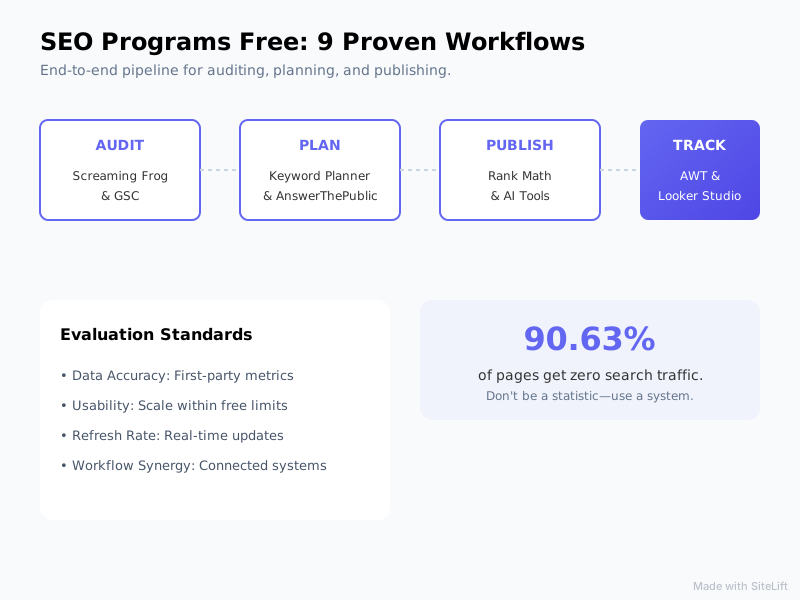
Research from Ahrefs shows that 90.63% of all web pages receive zero search traffic from Google. The primary culprit isn't a lack of expensive software—it's the absence of a connected system. When you stitch together the right free seo tools into repeatable operational workflows, you can handle site audits, keyword research, content production, and rank tracking without spending a dime.
Below are 9 proven workflows that turn standalone free platforms into an end-to-end publishing pipeline.
How We Evaluated Free SEO Programs and Workflows
To separate genuinely useful software from stripped-down demo products, we tested over two dozen platforms against strict operational criteria. A valuable free tool must offer actionable data without forcing an immediate credit card upgrade.
       [ AUDIT ]                  [ PLAN ]                  [ PUBLISH ]                 [ TRACK ]
  Screaming Frog & GSC    --->   Keyword Planner    --->   Rank Math & AI Tools  --->   AWT & Looker Studio
 (Technical Health Check)       & AnswerThePublic         (Optimization & Schema)       (CTR & Rank Tracking)
We evaluated each workflow using four core standards:
- Data Accuracy: Direct access to first-party indexation, crawl, or search volume metrics.
- Usability & Scale: The ability to execute complete tasks (like auditing 500 pages or tracking target queries) within free usage limits.
- Refresh Rate: How frequently data updates to reflect recent optimization changes.
- Workflow Synergy: How easily outputs from one tool feed directly into the next stage of your publishing pipeline.
1. Google Search Console + Looker Studio: Free Site Audit Tool & Performance Tracking Workflow
- What it is: Google's official webmaster portal paired with its native data visualization platform.
- Best for: Real-time performance tracking, CTR optimization, and indexation diagnostics.
- Standout strength: 100% accurate first-party data directly from Google's index.
- Main drawback: Lacks competitive intelligence metrics for competitor sites.
Step-by-Step Workflow
Using Google Search Console as a free site audit tool gives you direct visibility into how Google indexes your site. However, native GSC tables make it hard to spot macro trends. By streaming GSC data into Google Looker Studio, you create an automated dashboard that alerts you to organic performance drops immediately.
+--------------------------+      +---------------------------+      +--------------------------+
|  Google Search Console   | ---> |   Google Looker Studio    | ---> | Metadata Rewriting Engine |
| (Extract Low-CTR Queries)|      | (Automated CTR Dashboards)|      |  (Optimize Title & Meta) |
+--------------------------+      +---------------------------+      +--------------------------+
- Connect Data: Link your verified Search Console property to a blank Looker Studio report.
- Filter Low CTRs: Create a table displaying
Query,Impressions,Clicks, andCTR. Filter for queries with position < 10 and CTR below 2%. - Execute Rewrites: Target these high-impression, low-click keywords by rewriting title tags and meta descriptions to improve search intent match.
According to Backlinko, the top organic result on Google receives an average click-through rate (CTR) of 27.6%. Moving a page from position 4 to position 1 by tweaking title hooks can double your traffic without creating new pages.
2. Screaming Frog (Free Version): Technical Crawling and On-Page Health Workflow
- What it is: An industry-standard desktop site crawler.
- Best for: Technical site audits and detecting link debt on small-to-midsize sites.
- Standout strength: Deep technical inspection including canonicals, response codes, and pagination.
- Main drawback: Free tier caps desktop crawls at 500 URLs per domain.

Step-by-Step Workflow
The free license of Screaming Frog SEO Spider is perfect for performing rapid technical audits on sites under 500 pages.
- Run Full Crawl: Input your root URL and initiate the crawl.
- Isolate Technical Debt: Filter the Response Codes tab by
Client Error 4xxandRedirection 3xxto map broken links and redirect chains. - Audit Meta Hygiene: Switch to the Page Titles and Meta Description tabs to pull every missing, duplicate, or overly long tag into a spreadsheet.
- Fix Canonical and Depth Issues: Identify orphan pages and deep click-depth bottlenecks. To speed up link audits without firing up desktop software every time, you can also run quick web-based checks with a Free Internal Link Analyzer to spot pages buried deeper than three clicks.
Pro Tip: Export Screaming Frog's "Inlinks" tab for every 404 error page. This gives you the exact source URL needing link update, cutting remediation time in half.
3. Ahrefs Webmaster Tools (AWT): Free Keyword Tracker & Backlink Audit Workflow
- What it is: A web-based site ownership diagnostic tool powered by Ahrefs' crawl index.
- Best for: Tracking domain health, backlink acquisition, and keyword movements.
- Standout strength: Provides top-tier third-party backlink data for owned websites completely free.
- Main drawback: Restricted strictly to domains you verify ownership of via DNS or GSC.
Step-by-Step Workflow
While full Ahrefs plans carry a premium price tag, Ahrefs Webmaster Tools acts as a high-powered free keyword tracker and link monitoring hub for site owners.
[ AWT Keyword Monitor ] ──► Identify Positions Dropping (Rank 4-10)
                                        │
                                        ▼
[ Backlink Profile Audit ] ──► Identify Lost Referring Domains
                                        │
                                        ▼
[ Refresh Pipeline ] ───────► Reclaim Links & Update Outdated Sections
- Verify Ownership: Connect your site via Google Search Console integration for instant setup.
- Monitor Ranking Declines: Access the Organic Keywords report to sort keywords by position change. Focus on terms that dropped from positions 1-3 down to 4-10.
- Analyze Backlink Decay: Open the Lost Backlinks tab to view high-authority domains that recently removed links to your pages. Reach out to editors with updated source links to reclaim lost equity.
4. ChatGPT & Claude Free Tiers: Free AI SEO Software for Content Planning Workflow
- What it is: Advanced conversational LLMs capable of semantic analysis and outline construction.
- Best for: Content intent mapping, generating briefs, and structured data creation.
- Standout strength: Generates complex schema structures and search intent analyses in seconds.
- Main drawback: Requires precise prompt engineering to avoid generic advice or incorrect facts.
Step-by-Step Workflow
Using generative AI as free ai seo software dramatically speeds up early-stage content development.
- Reverse-Engineer Top Results: Copy the H2 and H3 headings from the top three ranking pages for your target term.
- Prompt for Intent Gaps: Paste the headings into ChatGPT or Claude with the following prompt:
"Analyze these top-ranking outlines for the keyword [TARGET KEYWORD]. Identify missing subtopics, unanswered audience questions, and unique angles needed to build a more comprehensive guide."
- Build Structured Data: Use the AI's research output to write your content, then draft customized FAQ Schema. To ensure your JSON-LD code contains zero syntax errors before publishing, format and validate your markup using a Free Schema Markup Generator.
5. Google Keyword Planner + Google Trends: Free Search Demand Workflow
- What it is: First-party search intent and seasonal demand tools from Google.
- Best for: Validating commercial intent, search volumes, and temporal trends.
- Standout strength: Provides historical search trend metrics straight from Google's advertising pipeline.
- Main drawback: Keyword Planner displays volume ranges (e.g., 1K-10K) unless you run active ad campaigns.
Step-by-Step Workflow
Relying on single search volume metrics often leads to publishing content at the wrong time. Combining Google Keyword Planner with Google Trends ensures you target keywords right as interest spikes.
+-------------------------------+      +-------------------------------+      +-------------------------------+
|     Google Keyword Planner    | ---> |         Google Trends         | ---> |    60-Day Editorial Calendar  |
| (Identify Base Volume Metrics)|      | (Validate Seasonality Peaks)  |      |  (Publish Before Peak Spike)  |
+-------------------------------+      +-------------------------------+      +-------------------------------+
- Extract Core Terms: Enter broad seed phrases into Google Keyword Planner to pull related commercial queries.
- Validate Trend Direction: Run high-potential terms through Google Trends. Select a 5-year timeframe to spot annual seasonality patterns.
- Time Your Publishing: Schedule content creation 60 days before historical search peaks occur. If search volume spikes every October, publish your optimized guide by early August to let search bots crawl and rank the page in time.
6. AnswerThePublic + Ubersuggest Free: Long-Tail Keyword Discovery Workflow
- What it is: Search query visualization tools that scrape Google auto-suggest data.
- Best for: Finding question-based long-tail keywords and People Also Ask (PAA) queries.
- Standout strength: Uncovers natural language questions typed by real users.
- Main drawback: Daily search limits on free usage tiers (typically 1–3 searches per day).
Step-by-Step Workflow
Winning featured snippets requires answering specific, conversational search queries directly.
- Mine Natural Language Questions: Plug your core focus keyword into AnswerThePublic to generate a visual web of "Who," "What," "Why," and "How" questions.
- Cross-Reference Volume: Take these long-tail questions and run them through Ubersuggest's free daily searches to verify search demand and SEO difficulty scores.
- Cluster Into Content Sections: Instead of writing individual thin posts for every question, group 5-8 closely related queries into a single authoritative guide. Format each question as an explicit H2 or H3 heading followed immediately by a concise, 40-word answer.
7. Rank Math / Yoast SEO Free Plugins: On-Page Optimization Workflow
- What it is: Native content optimization plugins for Content Management Systems like WordPress.
- Best for: On-page technical validation, canonical configuration, and XML sitemap management.
- Standout strength: Instant feedback on keyword distribution, title length, and readability directly within the CMS editor.
- Main drawback: Readability and density scores rely on rigid formulas rather than nuanced context.
Step-by-Step Workflow
Having great research won't help if your site lacks basic on-page structure. Free CMS plugins act as quality assurance checkpoints right before you hit publish.
[ Content Draft ] ──► Plugin Optimization Real-Time Check
                             │
                             ├─► Title & Meta Pixel Truncation
                             ├─► XML Sitemap Auto-Update
                             └─► Schema Integration
                             │
                             ▼
                    [ Publish Post ]
- Configure Automated Sitemaps: Enable automatic XML sitemap generation within Rank Math or Yoast to notify search engines whenever content changes.
- Real-Time On-Page Tuning: Paste your draft into the editor. Adjust target keyword insertion across the URL slug, SEO title, first 100 words, and image ALT text.
- Enforce Link Hygiene: Use the plugin's internal link suggestions to connect your new article to at least 3 existing relevant pages on your domain.
8. Bing Webmaster Tools: IndexNow Workflows for SEO Programs Free Teams
- What it is: Microsoft's free search management suite equipped with modern automated indexing tools.
- Best for: Fast indexing via IndexNow, visual heatmaps, and keyword inspection.
- Standout strength: Free instant indexing protocol (IndexNow) that instantly pings search engine crawlers.
- Main drawback: Smaller global market share compared to Google.
Step-by-Step Workflow
Waiting days or weeks for search bots to discover new content wastes crucial momentum. Bing Webmaster Tools gives you access to IndexNow—a protocol that automatically submits updated URLs to participating search engines instantly.
- Integrate IndexNow: Activate the IndexNow plugin on your CMS, or link your domain through Bing Webmaster Tools.
- Trigger Fast Submissions: Whenever you update or publish a page, the API automatically pings Bing and partner engines.
- Review Clarity Data: Use the built-in Microsoft Clarity integration within Bing Webmaster Tools to review heatmaps and session recordings for free, pinpointing user UX bottlenecks that lower engagement.
Pro Tip: Pages indexed within minutes gain a fast testing window. Monitor early impressions in Bing Webmaster Tools during the first 48 hours to confirm search crawlers read your meta tags properly.
9. SiteLift Starter Workflows: Moving Beyond Manual SEO Programs Free Stacks
- What it is: An autonomous growth engine that merges auditing, keyword clustering, content generation, and publishing into a single platform.
- Best for: Businesses and teams that want to scale organic visibility without spending hours manually jumping between 6 different free tools.
- Standout strength: Automates the complete publishing pipeline—from finding keyword gaps to generating context-aware content and deploying it directly to your CMS.
- Main drawback: Designed for hands-off growth, making it less suitable for users who prefer manually tweaking every meta tag by hand.
Step-by-Step Workflow
Manual stacks built from disparate seo programs free tiers take real time to manage. You constantly have to export CSVs, copy prompts into AI models, check CMS plugins, and manually request indexation. Autonomous systems streamline these disjointed steps into a hands-free process.
MANUAL FREE STACK (Hours of Work):
[ GSC Export ] -> [ Screaming Frog ] -> [ ChatGPT Prompting ] -> [ CMS Formatting ] -> [ Manual Indexing ]

SITELIFT AUTONOMOUS PIPELINE (Autopilot):
[ Automated Gap Analysis ] --------> [ AI Generation & Schema ] --------> [ Automated CMS Direct Publish ]
- Connect Your Infrastructure: Link your web platform seamlessly to SiteLift.
- Set Growth Parameters: Define your core topic silos and business goals.
- Execute Autopilot Publishing: SiteLift continuously identifies content opportunities, writes comprehensive, search-optimized articles, embeds correct schema, and publishes directly to your CMS without requiring manual intervention.
To see how autonomous automation replaces fragmented software stacks, read our comprehensive breakdown on the Best SEO Automation Tools in 2026.
Summary Comparison: Which Free SEO Program Fits Your Needs?
Choosing the right combination of free tools comes down to identifying your immediate operational bottleneck. If you lack traffic insights, start with Google Search Console. If your site suffers from broken links and broken canonicals, prioritize Screaming Frog.
Infographic by SiteLift
| Tool / Workflow | Primary Use Case | Free Tier Limit | Best Feature |
|---|---|---|---|
| Google Search Console + Looker | Performance Tracking | Unlimited data (16-month history) | Accurate 1st-party click/impression metrics |
| Screaming Frog | Technical Site Audit | Up to 500 URLs per crawl | Deep technical header and link error checks |
| Ahrefs Webmaster Tools | Rank & Backlink Tracker | Verification-locked domains only | Comprehensive backlink profile health check |
| ChatGPT & Claude Free | AI Content Planning | Usage/message rate limits apply | Semantic analysis & schema code generation |
| Google Keyword Planner | Demand & Volume Research | Shows volume ranges without ad spend | Historical seasonality trend data |
| AnswerThePublic | Long-Tail Discovery | Limited daily queries | Question mapping for PAA feature snippets |
| Rank Math / Yoast Free | On-Page Optimization | Basic features per site | In-editor scoring and sitemap automation |
| Bing Webmaster Tools | Fast Indexing | Unlimited owned properties | Instant indexation via IndexNow |
| SiteLift | Autonomous SEO Pipeline | Starter workflows available | Hands-free keyword, draft, & publish workflow |
Why Manual Free Stacks Cost More Than You Think
Why manual tool stitching is overrated: Many founders and marketers spend hours manually exporting spreadsheets from one free tool, cleaning the data, pasting it into AI prompts, formatting content inside WordPress, and running manual rank checks.
While the software subscription costs $0, you end up paying a heavy tax in manual labor. Managing these workflows manually easily takes 10 to 15 hours every week. Once your site grows beyond a handful of pages, switching to an autonomous pipeline that handles research, creation, and distribution on autopilot yields a far higher return on investment. If you want to streamline team responsibilities, explore our recommendations for the 4 Best SEO Project Management Tools.
Frequently Asked Questions About Free SEO Programs
Are free SEO programs accurate enough for professional SEO campaigns?
Yes, especially when using first-party platforms like Google Search Console, Google Keyword Planner, and Bing Webmaster Tools. These systems pull metrics directly from search engine databases. While third-party estimates (such as traffic volume guesses in freemium tools) vary slightly across providers, first-party data offers absolute accuracy for monitoring your own site's performance.
What are the biggest limitations of using free SEO tools?
The primary drawbacks are data caps, restricted historical metrics, and manual overhead. Free plans typically limit page crawls (e.g., Screaming Frog’s 500-URL limit), cap daily queries (e.g., AnswerThePublic), or restrict analysis strictly to sites you own (e.g., Ahrefs Webmaster Tools). Moving data manually between tools also consumes significant operational time.
Can free AI SEO software replace full-time content writers?
Free generative AI models excel at generating outlines, structuring research, summarizing search intent, and drafting schema code. However, unrefined AI output often lacks deep subject matter expertise, unique brand voice, and genuine strategic insights. The best approach is pairing AI draft generation with strategic oversight to maintain quality and avoid generic content.
How do I track keyword rankings for free without daily query limits?
The most reliable free method is connecting Google Search Console data directly to Google Looker Studio. While commercial rank trackers charge daily fees to refresh ranking metrics, Looker Studio displays your actual search impressions, position shifts, and average rankings automatically over time without added costs.
How can I automate my publishing pipeline if I am using free SEO tools?
You can build semi-automated pipelines using webhooks, Google Sheets, Zapier free tiers, and Rank Math plugins to push drafts straight to your CMS. However, completely removing manual steps requires an autonomous engine like SiteLift, which manages the whole pipeline—from target keyword discovery to optimized drafting and publishing—on complete autopilot.
— sitelift.io
Topics Covered:
- seo programs free
- free seo tools
- free keyword tracker
- free site audit tool
- free ai seo software
More from SiteLift

Google AI Search Change: What SGE and AI Overviews Mean for Your Traffic
Understand the Google AI search change. Learn how SGE and AI Overviews impact organic traffic, zero-click searches, and how to optimize for LLM citations.

White Hat Link Building Techniques That Still Work for Google and AI Search
Discover 5 proven white hat link building techniques that earn top Google rankings and AI search citations. Master ethical link building today.

Ecommerce Link Building: Scale Product Authority and Revenue on Autopilot
Master ecommerce link building. Learn how to secure product page backlinks, execute digital PR, fix redirect leaks, and automate your store authority.