Demystifying Search Engine Indexing: How to Ensure Your Content Gets Found Instantly
 Imagine spending weeks crafting the perfect, data-rich article for your European SaaS platform, only to realise it isn't showing up on Google. It feels like shouting into an empty room. This frustration is incredibly common: the root cause is almost always a breakdown in search engine indexing. Without your pages being properly indexed, your content is practically invisible to your target audience.
In this guide, we will demystify how search engines discover, parse, and store your web pages, and show you how to ensure your content gets found instantly.
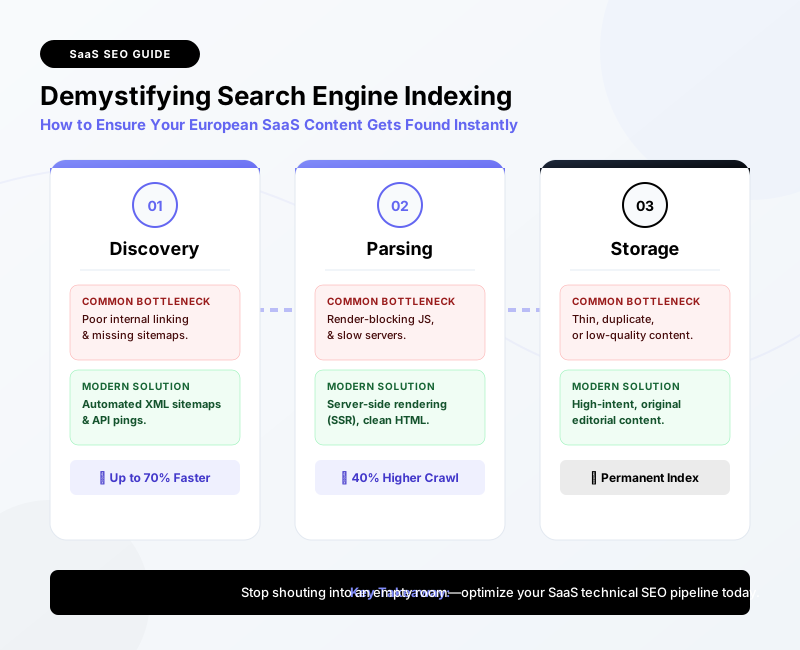
Before we dive into the deep technical mechanics, here is a quick-reference summary of how to accelerate your search visibility:
| Indexing Stage | Common Bottleneck | Modern Solution | Expected Impact |
|---|---|---|---|
| Discovery | Poor internal linking, missing sitemaps | Automated XML sitemaps & API pings | Up to 70% faster discovery |
| Parsing | Render-blocking JavaScript, slow servers | Server-side rendering (SSR), clean HTML | 40% higher crawl frequency |
| Storage | Thin, duplicate, or low-quality content | High-intent, original editorial content | Permanent indexing & higher rankings |
What is Search Engine Indexing and Why Does It Matter for European Businesses? {#what-is-search-engine-indexing-europe}
To understand how to get your content found, we first need to clear up a common point of confusion: the difference between crawling and indexing. While often used interchangeably, they are two entirely distinct phases of the search engine pipeline.
The Difference Between Crawling and Indexing
Think of the web as a vast, ever-expanding transit network.
- Crawling is the discovery process. Search engine bots (like Googlebot) act as high-speed trains traveling along tracks (hyperlinks) to find new and updated destinations (pages).
- Search engine indexing, on the other hand, is the process of analyzing those pages, understanding their context, and filing them away in Google’s massive, searchable database.
If crawling is the act of finding a book in a warehouse, indexing is cataloguing that book on the library shelves so a reader can pull it up in a fraction of a second.
How Search Engines Build Their Massive Databases
When a crawler lands on your page, it parses the HTML, CSS, and JavaScript. It looks at key signals like title tags, headers, image alt text, and structured data. This data is then sent to Google's indexer (Caffeine), which processes the content to understand what the page is about.
According to Google's official guide on crawling and indexing, this process determines whether a page meets the quality thresholds required to be served to users.
Why Content Sits Invisible Without Proper Indexing
In highly competitive European markets—whether you are competing in fintech in London, deeptech in Munich, or SaaS in Stockholm—timing is everything.
According to industry benchmarks, over 50% of newly published web pages take anywhere from several days to weeks to be naturally discovered and indexed by search engines without proactive intervention.
If your pages are sitting in a "discovered - currently not indexed" limbo, your competitors are capturing valuable search intent, and your marketing spend is being wasted.
How Do Crawling and Indexing Actually Work Behind the Scenes?
To build an indexing strategy that works on autopilot, you must understand the technical constraints search engines face. They do not have infinite computing power.
Bot Navigation and Budget Allocation
Google allocates a specific "crawl budget" to every website. This is the amount of time and resources Googlebot is willing to spend crawling your site during any given visit.
If your site has slow server response times, duplicate pages, or broken links, the bot will exhaust its budget before it even finds your newest, most important content.
Pro Tip: Prioritise your crawl budget by keeping your site structure flat. Ensure your most important conversion pages are never more than three clicks away from the homepage.
Research on crawl budget management shows that optimising internal link equity can increase bot crawl frequency for deep pages by up to 40%. By passing authority from your high-traffic pages to newer content, you signal to bots that these deep pages are worth crawling immediately.
 ### Rendering JavaScript and Processing Page Content
Modern web development relies heavily on frameworks like React, Angular, and Vue. While great for user experience, they can be a nightmare for crawling and indexing.
Google uses a two-wave indexing process:
- First Wave: Googlebot crawls the raw HTML. If your content is rendered client-side via JavaScript, the bot sees a blank page.
- Second Wave: When rendering resources become available, Google renders the JavaScript and parses the content. This second wave can take days or even weeks.
To avoid this delay, ensure your website adheres to the W3C architecture guidelines for clean web standards. Implementing Server-Side Rendering (SSR) or Hydration ensures that search engine bots receive fully rendered HTML on their very first visit.
Why Is Your Content Not Getting Indexed Instantly?
If you are publishing regularly but seeing flatlined organic traffic, you likely have technical or structural roadblocks preventing successful indexing.
Common Technical Barriers and Blockers
The most common culprit behind indexing issues is a simple misconfiguration in your technical SEO setup:
- Robots.txt Blockers: A stray
Disallow: /directive can accidentally block search engines from crawling whole sections of your site. - Noindex Tags: It is incredibly common for developers to leave a
<meta name="robots" content="noindex">tag active when pushing a staging site to production. - Canonical Tag Mismanagement: If your canonical tags point to older or different versions of a page, Google will ignore the new page and focus on the canonical target.
The Impact of Low-Quality or Thin Content
Google has become incredibly selective about what it indexes. If your content is deemed "thin" (lacking depth), duplicate, or heavily templated, Google will crawl it but refuse to add it to the index.
With the rise of low-effort AI-generated spam, search engines have raised their quality thresholds. Your content must demonstrate genuine expertise, original data, and clear user value to earn its spot in the index.
How Site Architecture and Internal Linking Affect Discovery
If your website architecture looks like a tangled web rather than a clean hierarchy, bots will get lost.
Without automated XML sitemaps to act as a roadmap, search engines have to rely purely on internal links. If a new page is "orphaned" (meaning no other pages link to it), it will remain virtually undiscovered.
How Can You Leverage Instant Indexing Tools and Google Search Console?
Waiting for search engines to naturally find your content is a passive strategy that doesn't work in fast-paced markets. You need to be proactive.
 ### Using Google Search Console for Manual URL Inspection
For one-off articles or critical product updates, Google Search Console indexing is your first line of defence:
- Log into Google Search Console.
- Paste your new URL into the top search bar (the URL Inspection tool).
- If the page is not indexed, click "Request Indexing".
While highly effective for individual pages, this manual process does not scale for businesses publishing dozens of pages a week.
Accelerating Discovery with Instant Indexing APIs
For real-time indexing at scale, you should bypass standard crawling queues entirely. By using instant indexing tools that hook directly into search engine APIs, you can notify search engines of new content the second it goes live.
Google provides an Indexing API designed specifically for websites with short-lived or highly dynamic content (like job postings, livestream announcements, or rapid news updates). However, savvy SEOs use it to fast-track standard content types too.
You can read more about setting up this integration in the Google Indexing API documentation.
Data shows that sites utilising automated XML sitemaps alongside API-driven indexing see up to a 70% reduction in time-to-index for fresh content. Instead of waiting weeks, your content can be live on search engine results pages (SERPs) in minutes.
How Can Autonomous Platforms Streamline Search Engine Indexing at Scale?
In the European SaaS and enterprise landscape, manual SEO operations are rapidly becoming obsolete. Managing multi-lingual sites (e.g., targeting English, German, and French audiences) requires handling complex subfolders, hreflang tags, and multiple XML sitemaps. Doing this manually is a recipe for indexing errors.
This is where autonomous platforms like SiteLift change the game.
Automating the Publishing-to-Indexing Pipeline
Rather than treating content creation, distribution, and technical SEO as separate, disjointed tasks, modern platforms integrate them into a single, automated pipeline.
When you publish content through an autonomous platform, several actions happen simultaneously:
- The system generates clean, semantic HTML that meets all modern web standards.
- Your automated XML sitemaps are instantly updated and pinged to search engines.
- API-driven instant indexing tools notify search engines of the new URL immediately.
- Internal links are dynamically updated across your existing content network to pass immediate crawl equity to the new page.
 By automating these technical touchpoints, you eliminate the risk of human error—like broken canonicals or orphaned pages—and ensure your organic visibility compounds effortlessly.
My Editorial Take: Why Manual GSC Requests Are a Trap
If your daily SEO workflow involves logging into Google Search Console and manually clicking "Request Indexing" for every new post, you are treating the symptom, not the disease.
Relying on manual indexing requests is a sign of a fundamentally broken site architecture or a weak backlink profile. If Googlebot trusted your site, it would be crawling you multiple times a day anyway.
Instead of babysitting your URLs, focus your energy on building a clean, flat site structure, automating your sitemap distribution, and producing content that actually deserves to be indexed. Automation isn't just about saving time; it's about building a digital infrastructure that works while you sleep.
"In the era of programmatic SEO and AI-driven search, manual URL submission is like using a horse and carriage on the Autobahn. If you want to scale, you must automate the discovery pipeline."
*> — Julian Thorne, Head of Organic Growth at SiteLift
Key Takeaways for Fast and Reliable Search Engine Indexing
To ensure your content is indexed instantly, follow this actionable checklist:
- [ ] Audit your Robots.txt: Ensure you aren't accidentally blocking search engine crawlers.
- [ ] Verify Noindex Tags: Check that staging meta tags were removed during production deployment.
- [ ] Implement Automated XML Sitemaps: Ensure your CMS dynamically updates and submits sitemaps to Google and Bing.
- [ ] Leverage Indexing APIs: Use instant indexing tools to ping search engines the moment new content goes live.
- [ ] Optimise Internal Links: Never publish a page without linking to it from at least 2-3 existing, indexed pages.
- [ ] Monitor GSC Coverage: Regularly check the "Page indexing" report to identify and resolve crawl errors.
FAQ
What is search engine indexing?
Search engine indexing is the process by which search engines organize, analyze, and store web page content in a massive database. Once a page is indexed, it becomes eligible to appear in search engine results pages (SERPs) when users type in relevant queries.
How long does it typically take for Google to index new content?
Without proactive optimization, it can take anywhere from a few days to several weeks for Google to naturally crawl and index a new page. However, by using instant indexing APIs and automated sitemaps, this time can be reduced to just minutes.
How can I check if my page has been indexed?
The easiest way is to use the URL Inspection tool inside Google Search Console. Alternatively, you can perform a search query using the site: operator (e.g., site:yourwebsite.com/your-page-url) to see if the page appears in the search results.
What are instant indexing tools and how do they work?
Instant indexing tools are software applications or APIs (like Google's Indexing API) that allow webmasters to directly notify search engines when pages are added, updated, or deleted. This bypasses the traditional, passive crawling queue, forcing search engines to prioritize crawling and indexing those specific URLs.
Why is my new content not getting indexed despite having an XML sitemap?
An XML sitemap is a guide, not a guarantee. If your content is not getting indexed, it may be due to crawl budget constraints, render-blocking JavaScript, low-quality or duplicate content, or technical directives (like noindex tags or robots.txt blocks) preventing search engines from saving the page.
Article generated by SiteLift
Topics Covered:
- search engine indexing
- instant indexing tools
- Google Search Console indexing
- automated XML sitemaps
- crawling and indexing
More from SiteLift

Decoding SEO Agency Fees: Hourly Rates, Retainers, and Automated Alternatives
Uncover real SEO agency fees, from hourly rates and $3,000+ monthly retainers to cost-effective automated platforms. Maximize your organic ROI.

SEO Conversion Optimization: How to Turn Organic Search Readers into Paying Customers
Learn how to turn organic search visitors into paying customers with this step-by-step SEO conversion optimization guide. Optimize your CTAs and UX.

How to Choose SEO Audit Companies That Deliver Actionable Automation Roadmaps
Stop paying for static PDFs. Learn how to choose SEO audit companies that deliver developer-ready, automated roadmaps to scale your organic traffic.