Modern SEO Content Management: Building an Automated End-to-End Pipeline

If you’re still managing SEO in spreadsheets, tabs, and Slack threads, you’re not doing seo content management — you’re doing chaos management.
I’ve seen it too many times: great writers producing great articles that never rank because publishing is inconsistent, internal links are forgotten, and old posts quietly decay. This guide fixes that. You’ll learn how to build an automated end-to-end pipeline that takes you from keyword cluster to brief to publish to refresh, without losing quality or control.
By the end, you’ll have a system for cms content automation, hands-off publishing pipelines, disciplined automated article management, and real content lifecycle tracking that compounds traffic month after month.
SEO Content Management Prerequisites: What You Need Before You Start
Think of this as your pre-flight check. Good seo content management isn’t just tools — it’s access, goals, and rules.
Tools and access you’ll need:
- CMS admin access (WordPress, Webflow, HubSpot, Contentful, or Sanity) with API/webhook permissions
- Google Search Console, GA4, and a rank tracker (Ahrefs, Semrush, or similar)
- Content inventory export + backlink data
- AI writing assistant + plagiarism/fact-check workflow
- Scheduler/automation layer (native CMS scheduling, Zapier/Make, or built-in pipeline)
Skills and time:
- Basic technical SEO and editorial judgment. You don’t need to code, but you should understand URL structure, schema, and sitemaps.
- Time: 4-6 hours for initial audit setup, then 2-3 hours per week to review automation outputs. The goal is leverage, not zero oversight.
Governance to define now:
- Primary KPIs: organic sessions, keyword momentum (rankings movement across clusters), conversions, and visibility in AI Overviews
- Brand voice guide, E-E-A-T standards, and sourcing rules
- No-publish rules: what automation can never publish without human review (YMYL topics, pricing claims, legal statements)
Pro Tip: Document your “definition of done” for every article before you automate anything. If you can’t define quality, automation will just scale mediocrity faster.
This matters more than ever. According to Ahrefs’ search traffic study of over 1 billion pages, 90.63% of pages get no organic traffic from Google. Most of that isn’t a writing problem — it’s a management problem.

Step 1: How to Audit Your Existing Content and Keywords for SEO Content Management
You can’t automate what you haven’t inventoried. Step 1 creates your baseline.
Running a Full Content Inventory and Performance Audit
Concrete actions:
- Export all indexable URLs from your CMS. Include publish date, last updated date, author, category, and word count.
- Pull 12-16 months of data from Search Console: clicks, impressions, CTR, and average position per URL and query.
- Add GA4 conversions/engagement and backlink counts from Ahrefs or Semrush.
- Merge into one sheet and tag each URL by intent: informational, commercial, transactional, or navigational.
Group queries into keyword clusters, not isolated keywords. One hub page + supporting articles per cluster is how you build topical authority.
Expected result: A single source of truth showing winners, zombies, and dead weight.
Common mistake to avoid: Auditing traffic without auditing intent. A post with 5,000 visits and zero conversions that cannibalizes your money page is not a winner.
How to Decide What to Keep, Update, Consolidate, or Prune
Use this decision framework:
- Keep and monitor: Ranking in top 1-10, CTR healthy, content still accurate
- Update: Positions 11-30, declining CTR, outdated stats/screenshots, thin sections vs. SERP leaders
- Consolidate: Multiple posts targeting the same intent and cannibalizing each other
- Prune/Noindex: No traffic in 12 months, no backlinks, no strategic value, duplicate or auto-generated thin pages
Look specifically for index bloat — tag pages, thin author archives, old campaign landing pages, and near-duplicate location pages. If Google has to crawl 5,000 low-value URLs to find 200 good ones, your good content suffers.
For fundamentals on keyword mapping and on-page signals, I still send teams to the Moz Learn SEO guide to keyword research before they touch automation.
Step 2: How to Design Your CMS Content Automation Architecture
This is where cms content automation stops being a buzzword and becomes plumbing.
Choosing and Configuring Your CMS for Automation
According to W3Techs’ CMS usage data, WordPress powers over 43% of all websites. That’s why most automation tutorials assume WordPress, but the principles work anywhere if your CMS has an API.
| CMS | Automation Strengths | Watch Outs |
|---|---|---|
| WordPress | REST API, WP-Cron, massive plugin ecosystem, easy schema/sitemap control | Plugin sprawl slows Core Web Vitals; lock user roles |
| Webflow | Clean code output, visual CMS collections, webhooks + Zapier/Make | Limited bulk operations; CMS item limits on lower plans |
| HubSpot | Tied to CRM, great governance and approvals | Less flexible URL/taxonomy control; costs scale fast |
| Contentful / Sanity | API-first, perfect for headless publishing pipelines, versioning | Requires front-end dev for rendering, schema, and sitemaps |
Concrete actions:
- Enable API access and create dedicated automation user roles (editor, not admin).
- Lock URL rules: lowercase, short, keyword-led, no dates unless it’s news.
- Standardize taxonomy: 5-8 core categories max, consistent tags, mandatory hub assignment.
- Set metadata templates: title formula, meta description formula, default OG image, and required schema types (Article, FAQPage, HowTo, Product where relevant).
For crawling, indexing, and structured data requirements, follow the Google Search Central documentation on how Search works — it’s the source of truth for technical compliance.
Mapping Your Publishing Pipeline Stages from Brief to Indexation
Draw this on a whiteboard before you build it in software:
keyword cluster -> brief -> draft -> review -> optimize -> publish -> interlink -> index -> measure -> refresh
Each stage needs an owner (human or system), inputs, and exit criteria. Example:
- Brief can’t move to Draft without target query, intent, H2 outline, internal link targets, and FAQ entities.
- Draft can’t move to Review without passing uniqueness, sourcing, and readability checks.
- Publish can’t happen without category, featured image alt text, schema validation, and XML sitemap inclusion.
Expected result: No more “oops, we published without internal links or meta description.” The pipeline enforces it.
Common mistake to avoid: Automating publishing before you automate QA. Speed without gates creates index bloat at scale.
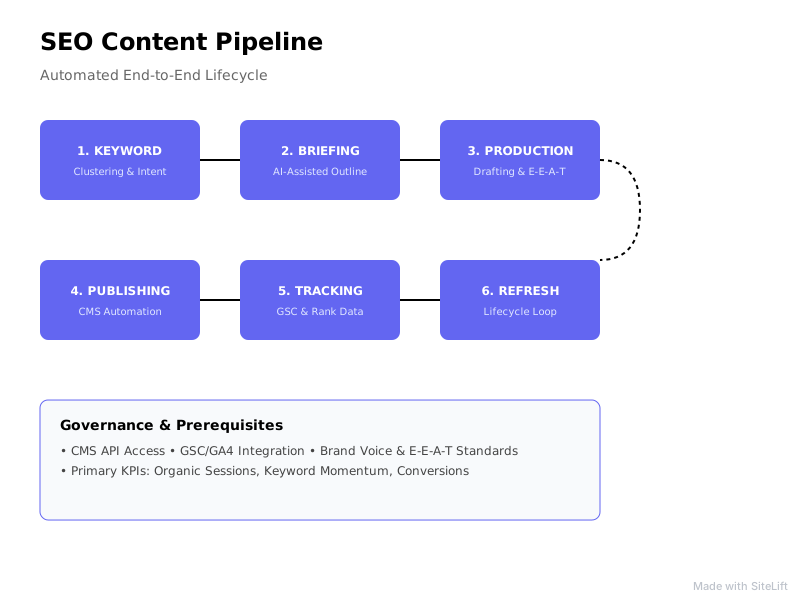
Infographic by SiteLift
Pro Tip: Start with one content hub, not your whole site. Prove your publishing pipeline on 15-20 related articles, then roll it out. Hub-level wins are how you get buy-in for full automation.
Step 3: How to Automate Article Creation Without Losing Quality
Automation should remove busywork, not judgment. This step is about automated article management with guardrails.
Building Programmatic Briefs and Content Templates
Great briefs make decent AI drafts usable and great writers faster.
Concrete actions:
- Build a reusable brief template with: primary + secondary queries, search intent, SERP type (what ranks: guides, tools, videos, Reddit?), word count range, H2/H3 outline, “must-answer” FAQs, internal links to add, entities to cover, and original angle.
- Pull SERP data automatically: People Also Ask, top 10 headings, content gaps your competitors miss.
- Create 3-4 content templates: How-To Guide, Comparison, Definition/Hub, and Use-Case/Example post. Each has required blocks (intro with answer, steps, pros/cons table, FAQ schema block).
If you want to sharpen your team’s briefing skills, the Content Marketing Institute’s strategy resources have solid governance and planning frameworks to borrow from.
Adding Human-in-the-Loop Review for E-E-A-T and Accuracy
Google doesn’t penalize AI assistance — it penalizes unhelpful, inaccurate content. The Search Engine Journal coverage of helpful content and AI search shifts is worth following to stay current on where that line moves.
My non-negotiable checklist for every AI-assisted draft:
- Fact-check every stat, quote, and step. Add primary sources.
- Add first-hand insight: screenshots, test results, customer examples, or “we tried this” notes.
- Show E-E-A-T: real author bio, credentials where needed, last reviewed date, citations.
- Optimize for AI visibility: clear definitions, concise 40-60 word answer blocks, Q&A formatting, tables, and FAQ schema.
Expected result: Drafts that are 70-80% ready, with humans adding the 20% that actually ranks: accuracy, experience, and differentiation.
Common mistake to avoid: Publishing raw AI output across hundreds of URLs. That’s how you get thin content at scale — and a painful cleanup project later. If you need a second pair of eyes on optimization, see top SEO content optimization tools to elevate your workflow.
My Take: Why Editorial Differentiation Is Underrated in Automated Workflows
I’ll be honest: most automated content fails not because the tech is bad, but because the input is generic.
Everyone feeds the same prompt, analyzes the same top 10 results, and publishes a slightly reworded version of what already ranks. Why would Google — or an AI answer engine — pick yours?
In my own builds, the highest-ROI step is forcing one unique block per article: original data, a contrarian take, a teardown, a template, a mini case study. It takes 20 minutes extra and drives 80% of the links and AI citations. Automation should handle structure and distribution so humans have time for that block. If you automate away the thinking, you’ve just built a very efficient commodity machine.
Step 4: How to Build Publishing Pipelines That Publish, Distribute, and Interlink on Autopilot
Publishing is not the finish line. Discovery, interlinking, and distribution are.
Automating Scheduling, Internal Linking, and Multi-Channel Distribution
Concrete actions:
- Set velocity rules: e.g., 2 hub articles + 3 supporting posts per week, spaced to avoid index spikes.
- Automate on-publish tasks: assign category/hub, add tags, compress images, set alt text, inject schema, update XML sitemap, and add to related-posts modules.
- Implement internal link rules: every new post must link to its hub + 3-5 related posts, and the hub must link back. Use link-suggestion tooling to surface anchor text opportunities as you scale.
- Repurpose on distribution: push to newsletter, social queue, and partner network with canonical tags intact.
Expected result: Every article launches with technical completeness and contextual connections — no orphan pages.
Common mistake to avoid: Random publishing cadence and “we’ll interlink later.” Later never comes, and topical authority never builds.
Connecting Your CMS to Premium Networks and Indexing APIs
Fast discovery matters, especially for new sites. Beyond your owned site:
- Syndicate or distribute excerpts to a curated premium network with proper canonicals to consolidate signals.
- Use Indexing APIs and internal hub links to get crawled quickly — new posts linked from high-traffic hubs get found faster than isolated posts.
- Monitor Search Console Index Coverage weekly for “Discovered - currently not indexed” and “Crawled - currently not indexed” patterns.
This pressure is only growing. According to Gartner’s forecast on search behavior, traditional search volume will drop 25% by 2026 as AI chatbots and virtual agents gain share. That doesn’t mean SEO dies — it means your publishing pipelines must output content that works for both classic blue links and AI answers: structured, factual, quotable, and well-cited.
Step 5: How to Implement Content Lifecycle Tracking and Keyword Momentum Monitoring
Publish and pray is not a strategy. Content lifecycle tracking is how winners compound.
Setting Up Real-Time Dashboards for Rankings and Content Health
Build one dashboard your team actually checks:
- By cluster: impressions, average position, CTR, clicks, conversions
- By lifecycle stage: new (<30 days), growing, stable, decaying, outdated
- By content health: last updated date, Core Web Vitals pass/fail, schema errors, internal links in/out, backlinks
- AI visibility: citations in AI Overviews, chatbot referrals, branded vs. non-branded query share
Track keyword momentum, not just rankings snapshots. Are clusters moving up as a group after you publish a hub? That’s topical authority compounding.
Concrete actions:
- Tag every URL with hub, intent, funnel stage, and lifecycle stage in your CMS or tracker.
- Create alerts for position drops >5 spots, CTR drops >20%, or traffic decay >25% over 90 days.
- Log every change: what was updated, when, and why — with updated
dateModifiedschema.
Creating Automated Refresh Triggers Based on Decay and SERP Shifts
Set rules so refreshes happen automatically, not when someone remembers:
- Refresh if traffic drops 20%+ over 60-90 days or a competitor leapfrogs you with fresher/better coverage
- Refresh if content age >12 months in fast-moving niches (SEO, AI, finance, health)
- Refresh if SERP intent shifts (e.g., listicles replaced by tools/comparisons)
- Expand if you rank positions 4-15 for valuable terms — add FAQs, examples, visuals, and internal links
Expected result: Fewer zombies, higher average position per hub, and lower cost per retained click.
Common mistake to avoid: Only creating new content. In most audits I run, updates to existing posts drive faster ROI than net-new articles for the first 90 days.
Why Is Your SEO Content Management Pipeline Not Driving Traffic? Troubleshooting Common Pitfalls
If velocity is up but traffic is flat, run this diagnostic.
Technical SEO bottlenecks that block automation:
| Symptom | Likely Cause | Fix |
|---|---|---|
| Slow indexation | Orphan pages, weak internal links, sitemap errors | Link from hubs, validate sitemap in Search Console, fix noindex leaks |
| Crawled but not indexed | Thin content, duplicate metadata, low site authority | Consolidate, differentiate, improve E-E-A-T signals |
| Rankings stuck page 2 | Intent mismatch, weak topical coverage | Re-map intent, fill hub gaps, earn internal + external links |
| Traffic drops after scale-up | Cannibalization, index bloat | Merge competing posts, prune/noindex low-value URLs |
Check the basics first: robots.txt blocks, accidental noindex tags, canonical chains, slow Core Web Vitals from uncompressed images or heavy plugins, and missing schema validation.
Content quality, cannibalization, and index bloat issues:
- Thin AI content: If five posts say the same thing in different words, merge them into one definitive hub piece.
- Keyword cannibalization: Search
site:yourdomain.com + keyword. If multiple URLs compete, pick one primary and redirect or repurpose the rest. - Over-automation: Automation without original insight creates scale without advantage. Add data, examples, and expert quotes.
- Missing search intent: A 3,000-word guide won’t outrank a free tool when users want a tool. Match format to intent.
30-60-90 day QA checklist:
- Days 1-30: Fix indexation, sitemaps, schema errors, and internal link orphans. Pause net-new if bloat is severe.
- Days 31-60: Update top 20 decayed posts, consolidate cannibalized clusters, tighten metadata templates.
- Days 61-90: Scale proven hub template, expand distribution, and set automated refresh triggers live.
What Does Successful Automated SEO Content Management Look Like?
When your system works, it feels boring — in the best way.
You publish consistently without last-minute scrambles. Each hub gains topical depth. Keyword momentum trends up across clusters, not just one lucky post. Cost per article drops because briefs, QA, interlinking, and distribution are templated. Old content gets refreshed before it dies.
That’s the evolution: from manual chaos to semi-automated seo content management to fully autonomous operations.
If you want to skip building all that plumbing yourself, sitelift.io is designed for exactly this shift. It automatically generates targeted content, distributes it across a curated premium network, integrates with popular CMS platforms, and tracks keyword momentum in real time — a complete brief-to-publish-to-refresh loop without manual intervention. I’d suggest starting small: audit your site, pilot one content hub with full automation, measure lift over 60 days, then expand across regions and languages.
Your next step is simple: pick one hub this week, run the audit from Step 1, and map its pipeline on one page. Once that loop runs clean, scale it.
— sitelift.io
FAQ
What is SEO content management?
Seo content management is the end-to-end process of planning, creating, publishing, optimizing, and maintaining search-driven content across its lifecycle. It covers keyword clustering, briefs, editorial standards, CMS publishing, internal linking, technical SEO like schema and sitemaps, and ongoing refreshes to protect rankings and AI visibility.
How does CMS content automation work?
CMS content automation connects your CMS via APIs, webhooks, and plugins to automate repetitive tasks: generating briefs, drafting, applying metadata templates and schema, scheduling publishes, suggesting internal links, updating sitemaps, and syncing to distribution channels. Humans set governance and review gates; the system enforces consistency at scale.
What should an automated end-to-end SEO publishing pipeline include?
A complete pipeline includes keyword cluster research, programmatic briefs, AI-assisted drafting, human E-E-A-T review, on-page optimization, scheduled publishing, automatic interlinking, schema and sitemap updates, multi-channel distribution, indexation monitoring, and refresh triggers. Each stage needs clear exit criteria so nothing publishes incomplete.
How do you track content lifecycle and keyword momentum?
Use content lifecycle tracking by tagging each URL with its stage — new, growing, stable, decaying — and monitoring impressions, CTR, average position, conversions, and content age in a real-time dashboard. Track keyword momentum at the cluster level to see if topical authority is compounding, and trigger refreshes on traffic decay, position loss, or SERP intent shifts.
Can SEO content management be fully automated without hurting quality?
Yes, if you automate workflow — not judgment. Fully autonomous systems work when you have strict brief templates, sourcing and fact-check rules, human-in-the-loop review for sensitive topics, uniqueness and helpful-content checks, and version control. Automation handles scale and consistency; humans add original insight, accuracy, and differentiation that both Google and AI answers reward.
Topics Covered:
- seo content management
- cms content automation
- publishing pipelines
- automated article management
- content lifecycle tracking
More from SiteLift

AI for SEO: How to Automate Research, Content Creation and Distribution
Learn how to use AI for SEO to automate keyword research, generative content creation, CMS publishing, and search engine visibility.

SEO Tools in 2026: How to Build an Autonomous Stack That Grows Traffic on Autopilot
Discover how to build an autonomous stack with modern AI SEO tools, automated publishing workflows, and real-time rank tracking to grow organic traffic.

Repurposing Content for SEO: How to Multiply Organic Reach Across Channels
Learn how repurposing content for SEO multiplies organic reach. Discover step-by-step strategies for syndication, AI visibility, and automation.