Mastering Organic Search Analytics: How to Turn Raw SERP Data into Actionable Growth

If you are managing search strategy for a business today, you already know that collecting data isn't the problem — it’s making sense of the noise. Raw metrics from Search Console and Google Analytics can easily feel like an unending stream of vanity numbers. Mastering organic search analytics is no longer just about checking rank tracking reports every Monday morning; it is about translating complex search engine results page (SERP) signals, privacy-compliant user behaviors, and content performance metrics into predictable revenue growth.
In European markets, this challenge is compounded by strict privacy laws, rapidly changing consent requirements, and shifting search engine algorithms. To compete, brands must look beyond surface-level clicks and build a robust analytics framework that measures true market impact.
This guide explores how to build a privacy-first analytics engine, map complex multi-touch conversion journeys, automate executive reporting, and leverage real-time search trends to stay ahead of the competition.
Key Takeaways
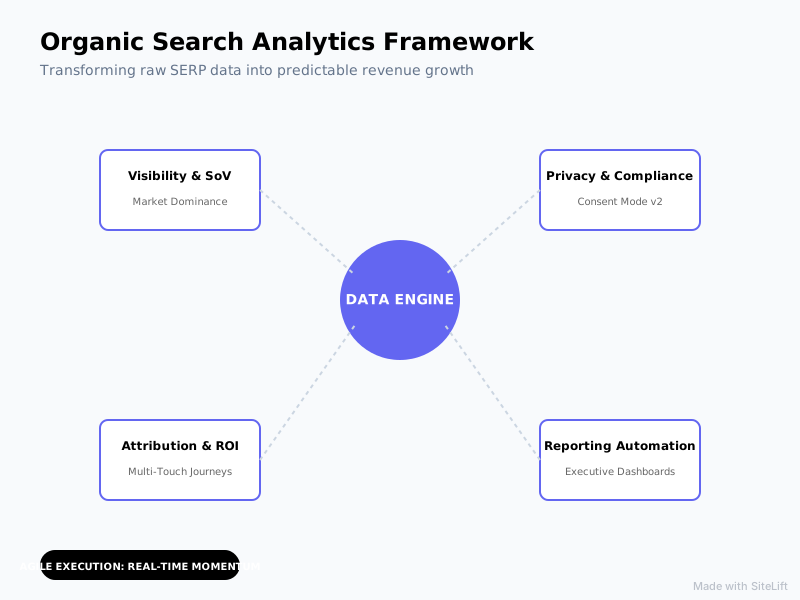
| Focus Area | Core Metric / Concept | Strategic Objective |
|---|---|---|
| Visibility & SoV | Share of Voice (SoV) & Organic CTR | Shift from single-keyword ranks to holistic market dominance. |
| Privacy & Compliance | Consent Mode v2 & Server-Side Tracking | Maintain data integrity while respecting EU/UK privacy regulations. |
| Attribution & ROI | Multi-Touch Conversion Tracking | Prove organic search value across early, middle, and late buyer touchpoints. |
| Reporting Automation | Looker Studio Executive Dashboards | Eliminate manual spreadsheet updates and deliver real-time ROI metrics. |
| Agile Execution | Real-Time Keyword Momentum | Reclaim declining traffic and capitalize on rising search trends automatically. |
What is Organic Search Analytics and Why Does It Matter for European Enterprises?
Defining the Modern Organic Search Landscape
Historically, organic performance was evaluated through a narrow lens: rank position #1 for a handful of head terms. Modern organic search analytics encompasses a much broader ecosystem. It is the systematic analysis of how search engines discover, evaluate, and present your content, alongside how real users interact with those entry points across their entire journey.
Today's SERPs are crowded with AI Overviews, rich snippets, map packs, and visual assets. As a result, simply ranking in position three doesn't guarantee the traffic it did five years ago. According to research from Backlinko, while the top organic result on Google receives an average click-through rate (CTR) of 27.6%, CTR drops sharply as SERP features push organic listings further down the page. Modern search analytics must account for visual prominence, snippet ownership, and user intent alignment — not just blue-link rankings.
The Shift from Keyword Rankings to Share of Voice (SoV)
Tracking individual keywords often creates a false sense of security. A position upgrade from #8 to #4 on a low-intent term yields little commercial value, whereas losing ground on fifty long-tail transactional queries can quietly cripple conversion pipelines.
Forward-thinking growth teams track Share of Voice (SoV). Organic SoV measures your brand's overall visibility across an entire universe of target queries relative to your direct competitors. By weighting search volume, position, and estimated CTR across hundreds or thousands of topic-clustered keywords, SoV provides an executive-level metric that reflects true digital market share.
Organic SoV (%) = (Total Estimated Organic Clicks for Brand / Total Estimated Market Search Volume) x 100
Navigating GDPR and Privacy-First Analytics in Europe
Tracking search performance in Europe requires navigating strict regulatory frameworks. Between the ePrivacy Directive, the General Data Protection Regulation (GDPR), and recent enforcement actions across the EU, traditional cookie-based analytics setups often fail to capture complete data sets.
According to a study by Adobe, over 64% of European marketers state that privacy regulations like GDPR have fundamentally changed how they track search performance. When users reject analytics cookies through consent banners, standard Google Analytics setups lose visibility into those sessions completely.
Standard GA4 Tracking (Unconsented User)  --> Data Loss (30% - 50% missing sessions)
Google Consent Mode v2 + Behavioral Modeling --> Privacy-Compliant Modeled Data (Restored Context)
To maintain accurate measurement without violating regulatory standards:
- Implement Google Consent Mode v2, ensuring advanced consent signals are passed directly to GA4.
- Rely on Google Search Console (GSC) data as a privacy-safe baseline, since GSC tracks server-side search impressions and clicks independent of user cookies.
- Utilize server-side tagging to anonymize IP addresses and strip personal identifiable information (PII) before processing analytics signals.
Why Organic Search Analytics Demands a Modern Google Analytics SEO Setup
Configuring GA4 for Precise Organic Traffic Attribution
Out of the box, Google Analytics 4 (GA4) provides basic traffic segmentation, but it requires tailored configuration to yield actionable SEO insights. A properly configured Google Analytics SEO setup requires clean traffic attribution that isolates true organic engine traffic from referral clutter and direct drift.
To optimize GA4 for search attribution:
- Verify Default Channel Groupings: Ensure traffic from search engines like Ecosia, DuckDuckGo, and Qwant (which are widely used across Europe) is properly tagged as
Organic Searchrather than genericReferral. - Adjust Session Timeout Settings: B2B research cycles in European markets often involve long evaluation periods. Extend your session timeout settings from the default 30 minutes to capture longer consideration loops accurately.
- Turn on Data Retention Controls: Switch GA4's default event data retention setting from 2 months to 14 months to allow for robust year-over-year organic comparative analysis.
Setting Up Custom SEO Dimensions and Content Groupings
Viewing site performance page by page is inefficient for sites with hundreds of URLs. Custom Content Groupings allow you to aggregate performance by logical site architecture, such as blog categories, product lines, or localization subdirectories (e.g., /uk/, /de/, /fr/).
https://example.com/fr/blog/seo-guide  --> Grouping: [FR] [Blog]
https://example.com/de/shop/software    --> Grouping: [DE] [Product]
By passing a custom parameter called content_group within your data layer, you can create reports in GA4 that instantly reveal which site sections drive organic engagement and where technical debt or content fatigue is holding back growth.
Overcoming the 'Not Provided' Keyword Data Barrier
Since Google encrypted keyword search queries over a decade ago, marketers have wrestled with the dreaded (not provided) label in web analytics platforms. While GA4 won't natively show which keyword drove a specific user to convert, you can bridge this gap by integrating Google Search Console directly into GA4.
By linking your GSC property to GA4 (via Admin > Product Links > Search Console Links), you unlock two dedicated reporting views inside GA4:
- Google Organic Search Traffic: Maps landing page performance directly to search queries.
- Google Organic Search Queries: Displays impressions, clicks, average position, and CTR for actual search queries right inside your main reporting workspace.

What is the Best Way of Tracking Organic Conversions to Prove ROI?
Mapping the Organic User Journey in GA4
According to HubSpot, tracking organic conversions remains the number one challenge for 41% of inbound marketers globally. The core difficulty lies in user intent: organic visitors rarely convert on their very first pageview. They discover a blog post, leave, return three days later via a branded search, download a whitepaper, and finally convert weeks later via a direct link.
To capture this path, you must trace the organic user journey beyond primary landing pages.
Touchpoint 1: Unbranded Search (Organic)  --> User reads educational guide
Touchpoint 2: Direct Visit (Direct)         --> User reviews product pricing
Touchpoint 3: Branded Search (Organic)    --> User completes demo request [CONVERSION]
Setting up Conversion Events for Lead Generation and E-commerce
Proving financial return requires defining macro and micro-conversions inside GA4. Macro-conversions represent core revenue events (e.g., demo bookings, SaaS signups, checkout completions), while micro-conversions measure progressive commitment (e.g., newsletter signups, PDF downloads, video views).
To create a explicit SEO conversion funnel:
- Navigate to Admin > Events in GA4 and click Create Event.
- Define trigger parameters based on user interactions (e.g., event name equals
form_submitANDpage_locationcontains/thank-you/). - Toggle the created event as a Key Event (GA4's updated terminology for Conversions).
- Assign estimated monetary values to micro-conversions based on historical sales velocity (e.g., if 1 in 10 newsletter subscribers converts into a €1,000 contract, assign a €100 value to every newsletter signup).
Understanding Multi-Touch Attribution for Organic Search
If you only use Last-Touch attribution, you risk vastly underestimating the financial value of top-of-funnel organic content. Organic search frequently operates as the first initial exposure or middle informational touchpoint in long buying cycles.
Last-Touch Attribution: Focuses 100% of credit on final click (often Branded or Direct)
Data-Driven Attribution: Distributes credit across initial search, mid-funnel content, and final conversion
GA4's default Data-Driven Attribution (DDA) model uses machine learning to evaluate how different touchpoint combinations contribute to conversions. By analyzing both converting and non-converting paths, DDA awards partial revenue credit to early educational search queries, giving you a defensible framework for proving content ROI to leadership.
Infographic by SiteLift
How Do You Build an Actionable SEO Dashboard Setup?
Selecting Key Performance Indicators (KPIs) for Stakeholders
Building a great reporting dashboard isn't about packing in as many charts as possible; it's about telling a clear story tailored to your audience. According to a survey by Search Engine Land, 72% of SEO professionals rely on custom-built dashboards to report ROI to stakeholders.
Different organizational tiers require different granularity:
| Stakeholder Level | Core Target Metrics | Strategic Focus |
|---|---|---|
| C-Suite / Executives | Organic Revenue, Pipeline Value, Customer Acquisition Cost (CAC), Share of Voice | Revenue impact and business growth against competitors. |
| Marketing Leadership | Organic Conversions, Cost Per Lead (CPL), Organic vs. Paid Mix, Category SoV | Channel efficiency and budget allocation. |
| SEO & Content Teams | Click-Through Rate (CTR), Impressions, Technical Health Score, Keyword Velocity | Tactical performance and optimization targets. |
Connecting Google Looker Studio with Search Console and GA4
Google Looker Studio (formerly Data Studio) is an exceptional tool for building interactive, real-time dashboards that combine search console metrics with analytics data.
Follow this workflow for an effective SEO dashboard setup:
- Create Data Sources: Connect your Google Looker Studio workspace to both your GA4 property and your Google Search Console property (selecting both Site Impression and URL Impression tables).
- Build a Blended Data Model: Join GSC data with GA4 data using the target URL / Landing Page path as the common key. This lets you display search impressions, CTR, landing page sessions, and goal conversions side-by-side in a single table.
- Incorporate Interactive Filters: Add date-range pickers, device type selectors, and country filters so stakeholders can drill down into specific European target regions (e.g., isolating DACH or Nordic traffic performance).
[Google Search Console] (Impressions, CTR, Average Position)
                        \
                         +---> [Looker Studio Blended Data View] ---> Integrated Dashboard
                        /
[Google Analytics 4]    (Sessions, Engagement, Key Events)
Automating Weekly and Monthly SEO Reporting
Manual reporting drains valuable time that should be spent executing growth strategies. Automate dashboard delivery by scheduling Looker Studio PDF email exports directly to project managers and executive stakeholders every Monday morning.
Pro Tip: Include dynamic conditional formatting in your Looker Studio tables. Set rules to highlight pages where impressions are growing by >20% month-over-month but CTR is lagging below 2%. These auto-flagged rows serve as an instant, actionable checklist for headline and meta description optimization.
Strategic Perspective: Why Traditional SERP Tracking Is Dead
For over fifteen years, the SEO industry was obsessed with rank position. Marketers would celebrate moving a keyword from rank #4 to rank #2. But in the modern search era, rank position has become a misleading metric.
Here is my honest take: Tracking static rankings is a vanity trap that wastes time.
Between localized results, dynamic SERP components, and AI-synthesized responses, two users standing on opposite sides of the same city can search for the exact same query and see entirely different search results pages. A ranking of "3" might mean your link is displayed above the fold for one user, while for another, it sits below an AI Overview, two sponsored ad modules, a local map pack, and a People Also Ask accordion.
Traditional View: Position #3 = Great Visibility
Modern SERP View: Position #3 = Below AI Overview + 4 Ads + Map Pack (Zero Clicks)
Focusing purely on position leads teams to double down on vanity keywords that generate zero commercial output. Winning growth teams focus on qualified interaction volume, Share of Voice, and pipeline velocity. If your search tracking doesn’t clearly show how organic traffic moves someone from anonymous researcher to paying customer, you aren't measuring SEO — you are just collecting numbers.
— Marcus Vance
How to Leverage Real-Time Keyword Momentum for Competitive Advantage
Identifying Sudden Search Trend Shifts and Algorithm Updates
Search intent is dynamic. Seasonality, economic shifts, and localized trends can cause search volume for specific topics to swing dramatically within days. Monitoring real-time keyword momentum allows growth teams to capture emerging demand before competitors recognize the shift.
When Google rolls out core algorithm updates, real-time analytics act as an early warning radar system. Track indexation fluctuations and impression trends in Search Console on a daily basis following an update to quickly spot affected page templates:
Step 1: Track daily impression drops across page clusters (Search Console API)
Step 2: Isolate template-level commonalities (e.g., outdated schema, thin content)
Step 3: Deploy site-wide architectural fixes within 48-72 hours
Capitalising on Content Decay and Historical Optimisation
Publishing fresh content continuously without maintaining your existing library leads to declining traffic. Over time, published pages experience content decay — a gradual loss of SERP visibility caused by outdated references, obsolete data, or newer competitor alternatives.
New Content Published --> Peak Visibility (Months 3-9) --> Content Decay Sets In --> Traffic Loss (-30% to -60%)
                                                                  |
                                                     [Historical Optimisation]
                                                                  |
                                                       Traffic Spike (+80%+)
To systematically fix content decay:
- Identify At-Risk Pages: Filter your analytics for pages that experienced a >15% drop in organic sessions over the past 90 days compared to the prior year period.
- Analyze Search Console Queries: Look for queries where impressions remain high but average position has slipped from the top 3 down to position 6-10.
- Execute Historical Updates: Update out-of-date facts, add missing subsections that address newly surfaced intent, improve internal links, and refresh publication dates.
Integrating AI-Driven SERP Tracking for Agile Content Adjustments
Manually monitoring hundreds of pages for content decay and intent changes quickly becomes impossible at scale. Advanced platforms handle this heavy lifting automatically.
This is where autonomous visibility platforms like SiteLift transform search workflows. Instead of manually parsing SERP updates, analyzing lost keyword positions, and manually drafting content updates, platforms like SiteLift track real-time search trends and content momentum on autopilot. By integrating continuous algorithmic SERP monitoring with automated, high-quality content updates and CMS publishing pipelines, SaaS and digital brands can protect their search footprint and systematically grow organic market share without expanding headcounts.
FAQ
What is the difference between Google Search Console and Google Analytics for SEO?
Google Search Console (GSC) measures pre-click search engine performance (impressions, clicks, average position, click-through rates, and technical indexation data directly from Google). Google Analytics 4 (GA4) measures post-click user behavior (on-site sessions, bounce rates, scroll depth, engagement, and conversion events). Both tools are essential and should be linked together for a complete view of your search performance.
How does GDPR impact organic search analytics tracking in Europe?
GDPR mandates that users in the EU explicit consent before non-essential tracking cookies are dropped. When users decline consent, traditional web analytics platforms miss session data. To remain compliant while retaining accurate data, European enterprises use Google Consent Mode v2, server-side analytics tagging, and rely heavily on privacy-safe first-party data sources like Google Search Console.
How can I track organic conversions accurately in GA4?
To track organic conversions in GA4:
- Ensure GSC is linked to your GA4 property.
- Define custom key events (conversions) for high-value actions such as form completions or purchases.
- Enable Data-Driven Attribution (DDA) under Admin > Attribution Settings so GA4 awards credit to organic touchpoints across multi-touch buyer journeys.
What is real-time keyword momentum, and why is it important?
Real-time keyword momentum tracks how rapidly search volume, user intent, and rankings are changing for specific search queries over short timeframes. Monitoring momentum enables content teams to capitalize on fast-emerging search trends, update decaying content before losing significant traffic, and mitigate traffic drops caused by search engine algorithm updates.
How do I set up an automated SEO dashboard for my business?
You can build an automated dashboard using Google Looker Studio:
- Connect your GA4 property and Google Search Console property as data sources.
- Design custom visualizations for key stakeholders (e.g., Executive high-level summaries vs. tactical SEO tables).
- Use blended data sources to display Search Console CTR and impression metrics alongside GA4 conversion data.
- Schedule automated weekly or monthly PDF reports to be emailed directly to your team.
Topics Covered:
- organic search analytics
- Google Analytics SEO setup
- tracking organic conversions
- real-time keyword momentum
- SEO dashboard setup
More from SiteLift

Visibility Tracker Explained: Measure True Share of Voice Across Google and AI Search
Discover how a visibility tracker measures search visibility scores and share of voice across Google and AI search engines to compound your organic reach.

LLM Visibility Tool: How to Measure and Grow Your Brand in ChatGPT and Perplexity
Discover how to use an LLM visibility tool to monitor ChatGPT brand mentions, track Perplexity citations, and scale your AI share of voice.

Single Page Application Search Engine Optimization: The Complete Rendering and Indexing Guide
Master single page application search engine optimization: rendering, indexing, Core Web Vitals & audits. Fix your SPA SEO today.