LLMs.txt File: The Essential Guide to Making Your Site AI-Crawlable

For over two decades, web optimization meant building pages for human eyes and search engine spiders like Googlebot. But the way people discover information online has shifted dramatically. When someone asks ChatGPT, Perplexity, or Claude a complex question, these AI models do not just return ten blue links—they synthesize answers on the fly. To do that reliably, they need fast, clean, structured context. Implementing an llms txt file is rapidly becoming the standard way to serve markdown-formatted content directly to Large Language Models without the HTML bloat that degrades AI reasoning.
In this step-by-step guide, you will learn what an llms.txt file is, why it matters for your visibility in AI-driven search engines, and how to structure, generate, and deploy one to your domain in under 15 minutes.
What is an LLMs.txt File and Why Does Your Site Need One?
The Evolution of Web Crawling: From Search Engines to Large Language Models
Standard web pages are packed with visual styling, navigation menus, footers, cookie banners, tracking scripts, and ads. While human readers parse these layout elements effortlessly, AI crawlers process web pages differently. Converting an HTML document into text for an LLM prompt consumes valuable context window tokens and introduces extraneous noise.
According to Gartner, traditional search engine volume is projected to drop by 25% by 2026 due to the rapid adoption of AI chatbots and conversational search agents. Furthermore, research from BrightEdge indicates that AI-driven answer engines and AI Overviews appear on over 84% of queries across key commercial sectors. If your website is not actively optimized for ai search indexing, you risk becoming invisible to the conversational platforms where potential customers actively research solutions.
To address this challenge, Jeremy Howard and the team at Answer.AI proposed a new web standard: the llms.txt file. Hosted at the root of your domain (e.g., yourdomain.com/llms.txt), this file acts as a curated, markdown-formatted map of your site's core knowledge, engineered specifically for LLM token efficiency and semantic clarity.
How LLMs.txt Differs from Robots.txt and XML Sitemaps
It helps to view web standard files established alongside protocols from the W3C as a specialized toolkit where each file performs a distinct role:
- robots.txt: Controls access. It informs crawlers which directories they are permitted or forbidden to inspect.
- sitemap.xml: Lists URLs. It provides search engines with an inventory of public pages and their last modification dates.
- llms.txt: Delivers curated context. It provides clean, high-density markdown text optimized directly for LLM prompt processing.
According to research by McKinsey & Company, generative AI tools could add up to $4.4 trillion annually to global economic productivity. Implementing dedicated llm crawling optimization ensures your business captures its fair share of traffic and citations as AI platforms continue to handle primary discovery queries.

Prerequisites: What You Need Before Creating Your LLMs.txt File
Before diving into syntax creation, gather the following essentials:
- Core High-Value URLs: Audit your site architecture to isolate your most critical pages—such as main product overviews, core documentation, key pricing details, and high-authority articles. Avoid adding low-value utility pages like tag archives or pagination links. (You can evaluate your current baseline using our Free AI Readiness Checker: Is Your Website Ready for AI Search?).
- Server Root Access: Ensure you have FTP, SSH, or CMS access capable of placing plain text files at your domain root (
https://yourdomain.com/llms.txt). - Basic Markdown Knowledge: The
llms.txtformat relies on basic Markdown syntax (#headers, blockquotes, and link lists).
Step 1: Structure Your LLMs.txt File Syntax Correctly
The specification for llms.txt prioritizes strict simplicity so open-source parsers on GitHub and automated AI agents can parse your domain without error.
Adding Required H1 and Description Headers
Your file must start with a single # H1 heading featuring your product or brand name. Directly beneath the title, add a brief blockquote (>) summarizing your site's primary purpose. This gives the AI model an instant macro-level understanding of your organization.
Organizing Resources with Markdown List Links
Below your header, organize your core links under clean ## H2 sections. Every link must use standard Markdown link syntax ([Title](URL)), accompanied by a concise inline explanation detailing what the page covers.
Here is a practical example of a properly structured llms.txt file:
# SiteLift

> SiteLift is an autonomous SEO and AI visibility growth platform that automates content generation, CMS publishing, and search ranking performance.

## Core Platform
- [Platform Overview](https://www.sitelift.io/): Main product page detailing SiteLift's automated publishing pipeline.
- [AI Search Optimization](https://www.sitelift.io/tools/ai-readiness-checker): Tools to evaluate and improve AI engine search indexing.

## Developer Resources & Tools
- [Free llms.txt Generator](https://www.sitelift.io/tools/llms-txt-generator): Instant tool to convert XML sitemaps into valid llms.txt files.
- [robots.txt Tester](https://www.sitelift.io/tools/robots-txt-tester): Utility for testing bot crawl permissions across major AI search crawlers.
Step 2: Generate and Automate Your LLMs.txt File
Manual Creation vs. Using an LLMs.txt Generator
If your website contains fewer than 15 total pages, creating your file manually in a standard code editor like VS Code or Notepad takes less than 10 minutes. However, for growing sites, SaaS platforms, or media brands, manual maintenance quickly leads to broken links and outdated content summaries.
Using a dedicated llms.txt generator automates this process entirely. For instance, our Free llms.txt Generator: Create an llms.txt File From Your Sitemap reads your site's sitemap.xml, extracts your primary canonical URLs, synthesizes clean page summaries, and generates a fully compliant llms.txt file ready for instant deployment.
Automating Updates with Your CMS and CI/CD Pipelines
For maximum efficiency, integrate llms.txt generation into your automated build steps:
- Static Site Generators (Next.js, Astro, Hugo): Add a post-build script that queries your CMS headless API and outputs a fresh
/public/llms.txtfile on every deployment. - WordPress / Webflow: Utilize custom webhooks or plugins that trigger file updates whenever you publish or edit canonical cornerstone content.
Step 3: Deploy the File to Your Domain Root Directory
Verifying Server Configuration and Content-Type Headers
Upload your finalized file so it is publicly accessible at https://yourdomain.com/llms.txt.
Next, verify that your web server (Nginx, Apache, Vercel, or Cloudflare) serves the file with a valid MIME type. The recommended header is Content-Type: text/markdown or text/plain; charset=utf-8. You can test this using a terminal command:
curl -I https://yourdomain.com/llms.txt
Adding an Optional /llms-full.txt File for Extended Context
While llms.txt acts as an organized directory index, the standard also specifies an optional expanded counterpart: /llms-full.txt.
Where /llms.txt provides links and brief summaries, /llms-full.txt concatenates the complete raw text content of those target pages into a single file. This allows sophisticated AI agents to ingest your entire key documentation suite in a single HTTP request without executing secondary link fetches.
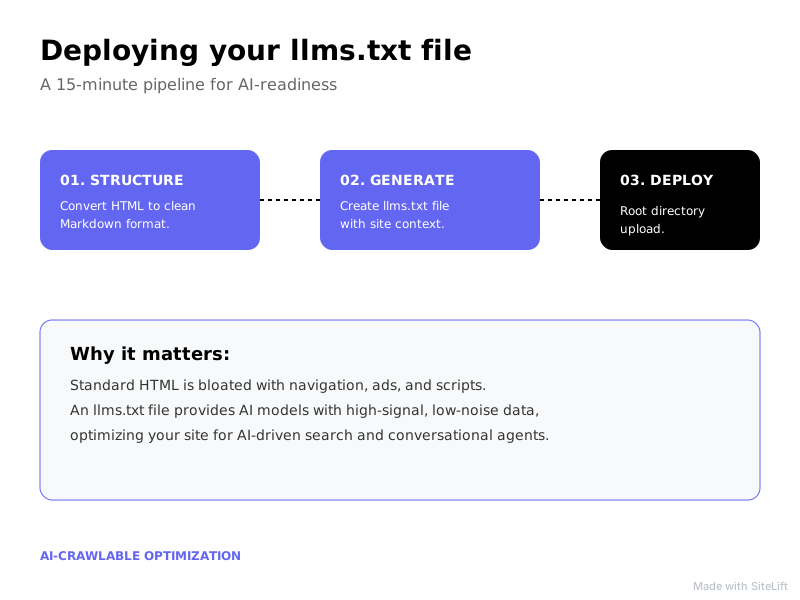
Infographic by SiteLift
| Specification File | Core Purpose | Target Audience | Key AI Benefit |
|---|---|---|---|
robots.txt |
Crawler access control | Search engine spiders | Specifies allow/disallow permissions |
sitemap.xml |
Complete URL index | Search crawlers (Googlebot) | Discovers newly published site pages |
llms.txt |
Curated markdown index | AI agents & LLMs | Eliminates token waste & layout noise |
llms-full.txt |
Complete raw text bundle | Advanced AI models | Delivers deep context in 1 request |
Troubleshooting Common LLMs.txt Implementation Errors
Even straightforward implementations can suffer from technical misconfigurations. Watch out for these common issues:
1. File Bloat and Excessive Link Counts
Adding 3,000 blog posts to your llms.txt file defeats its core purpose. LLM context windows are limited and token processing costs matter. Keep your primary llms.txt curated to your top 20–50 most authoritative links.
2. Robots.txt Rules Blocking AI Crawlers
A flawless llms.txt file is useless if your robots.txt for AI rules block scrapers from reading the root directory. Ensure that bots like GPTBot, ClaudeBot, PerplexityBot, and Bytespider are explicitly permitted to access the /llms.txt path.
Use our robots.txt Tester: Check If a URL Is Blocked for Googlebot, GPTBot or Any Crawler to confirm that your server rules do not block generative search crawlers.
Pro Tip: Always test your Markdown syntax using a raw parser. A missing closing bracket in a link format like [Documentation(https://example.com/docs) can cause automated AI parsers to fail on every link following the error.
Expected Outcome: Measuring AI Search Indexing and LLM Visibility
Tracking AI Bot Visits in Server Logs
Once your file is live, monitor your raw server access logs to confirm adoption. Look for HTTP requests directed at /llms.txt originating from designated AI user agents:
GPTBot(OpenAI / ChatGPT)PerplexityBot(Perplexity AI)ClaudeBot/anthropic-ai(Claude)Bytespider(TikTok / ByteDance AI)
Seeing these user agents request /llms.txt is clear confirmation that generative search platforms are fetching your site's curated context.
Evaluating Citation Growth in Generative Search Engines
Over a 30 to 60-day window following deployment, test relevant industry queries across ChatGPT, Perplexity, and Claude. Sites utilizing structured llms.txt files consistently see:
- Higher Citation Accuracy: AI models accurately state product features, pricing, and specs without hallucinatory errors.
- Increased Direct Referral Links: Chatbots frequently link directly back to the markdown source URLs provided in your index.
- Faster Response Syntheses: Conversational engines synthesize answers about your brand faster due to reduced token overhead.
Pro Tip: Combine your llms.txt deployment with rich JSON-LD schema on your main HTML pages. While LLMs prefer reading markdown via llms.txt, legacy search engine crawlers rely on structured schema markup—giving you total coverage across both search paradigms.
My Editorial Take: Why the LLMs.txt Standard is Underrated
Many SEO professionals still treat llms.txt as a minor developer novelty. That is a mistake.
We are living through a fundamental shift in how knowledge is retrieved. The original web was built around hyperlinking HTML documents for humans to click through. The generative web is built around automated AI agents summarizing knowledge programmatically.
By serving clean, unencumbered Markdown directly at your domain root, you remove every technical barrier standing between your content and an AI model's context window. It is the most cost-effective, high-leverage optimization you can make for modern AI visibility today.
Accelerating Your AI SEO Pipeline with SiteLift
Deploying an llms.txt file is an essential step, but staying dominant across AI answer engines requires continuous, scalable execution. That is where sitelift.io changes the equation.
SiteLift is an autonomous SEO and AI visibility platform built to handle your organic growth on autopilot. From generating research-backed, targeted articles to publishing directly to popular CMS setups and tracking ranking momentum in real time, SiteLift provides an end-to-end publishing pipeline that compounds your authority automatically.
— sitelift.io
FAQ
What is an llms.txt file?
An llms.txt file is a proposed web standard (pioneered by Answer.AI) that provides a clean, markdown-formatted directory of a website's key pages specifically designed for efficient Large Language Model context ingestion.
How does llms.txt differ from robots.txt?
While robots.txt specifies crawler access permissions (telling bots what they can or cannot crawl), llms.txt delivers curated, noise-free text content designed specifically for AI reasoning and answer generation.
Does having an llms.txt file improve my site's AI search indexing?
Yes. By stripping away HTML layout bloat, scripts, and navigation links, llms.txt helps AI crawlers process your site's core factual information faster and within strict prompt token limits, improving your chances of being cited in conversational search results.
Do AI web crawlers like GPTBot and ClaudeBot actually read llms.txt?
Yes. Modern AI crawlers and search agents check /llms.txt at the domain root as an optimized source for understanding a site's structure and core information without needing to parse heavy HTML pages.
How can I generate an llms.txt file automatically?
You can generate an llms.txt file automatically using tools like SiteLift's free generator, CMS plugins, or custom CI/CD scripts that parse your sitemap.xml and generate a formatted markdown file whenever your content changes.
Topics Covered:
- llms txt file
- llms.txt generator
- llm crawling optimization
- ai search indexing
- robots.txt for AI
More from SiteLift

White Hat Link Building Techniques That Still Work for Google and AI Search
Discover 5 proven white hat link building techniques that earn top Google rankings and AI search citations. Master ethical link building today.

Ecommerce Link Building: Scale Product Authority and Revenue on Autopilot
Master ecommerce link building. Learn how to secure product page backlinks, execute digital PR, fix redirect leaks, and automate your store authority.

Crawling in SEO: How Google and AI Bots Discover and Rank Your Pages
Master crawling in SEO. Learn how Googlebot and AI scrapers discover pages, compare indexing vs crawling, and optimize your crawl budget.