How to Build Custom Dashboards Using a Search Engine Ranking API

Many off-the-shelf SEO tools charge hefty premium fees for custom dashboards and limit your seat licences. If you want to build bespoke interfaces that perfectly fit your workflows, using a search engine ranking api is the ultimate way to gain complete data ownership.
According to a survey by Search Engine Land, over 62% of enterprise SEO teams now use custom APIs rather than standard out-of-the-box SEO platforms to power their internal reporting. Additionally, research from Databox shows that 45% of marketing agencies spend more than 10 hours per month manually compiling SEO reports for clients, highlighting the massive demand for automated SERP tracking.
By building your own data pipeline, you can bypass these limitations, save hours of manual labour, and build highly tailored, interactive reports. This step-by-step guide walks you through building a custom SEO dashboard from scratch using Python, a database, and Looker Studio.
What You Need
Before writing any code, ensure you have the following prerequisites ready:
- A Development Environment: Python 3.8+ installed on your local machine or a cloud environment.
- An API Key: Credentials from a reliable search engine ranking API that supports localized European search engines.
- A Database: A lightweight database like PostgreSQL or Google BigQuery to store your parsed ranking data.
- Visualisation Software: A free account on Looker Studio or Power BI.
- Time Required: Approximately 2 to 3 hours.
Step 1: How Do You Select and Configure Your Search Engine Ranking API?
Selecting the right API provider is critical, especially when dealing with complex European search landscapes. Europe presents unique challenges: you often need to track the same keyword across different countries, languages, and localized search domains (for example, German searches in Switzerland versus Germany).
Evaluating API Features for European Multi-Regional Tracking
When evaluating a search engine ranking api, ensure it supports precise geo-targeting down to specific European postal codes and languages. The API must allow you to specify the exact Google domain (like google.fr, google.de, or google.co.uk), the country code (gl), and the language code (hl).
Configuring Parameters for Real-Time Ranking Data
Most reliable APIs require a structured payload to return accurate, real-time ranking data. Below are the key parameters you need to configure:
q(Query): The keyword you want to track.google_domain: The localized search engine domain (e.g.,google.esfor Spain).gl(Country): The two-letter country code (e.g.,frfor France).hl(Language): The language code (e.g.,frfor French).device: Set todesktopormobileto capture device-specific behaviour.

Pro Tip: Always test your initial API requests using a tool like Postman before writing your script. This allows you to inspect the JSON payload structure and verify that the API is returning the correct localized results.
Step 2: How to Integrate a Search Engine Ranking API for SEO Data Extraction
Once you have chosen your API provider and secured your API key, it is time to write the script that programmatically fetches your ranking data. We will use Python for this tutorial due to its robust data manipulation libraries.
Writing the Fetch Script in Python
This lightweight script queries the API for a list of target keywords and saves the raw JSON response.
import os
import requests
import json

API_KEY = os.getenv("SERP_API_KEY")
API_URL = "https://api.serpprovider.com/search"

def fetch_serp_data(keyword, country="gb", language="en"):
    payload = {
        "api_key": API_KEY,
        "q": keyword,
        "gl": country,
        "hl": language,
        "device": "desktop",
        "engine": "google"
    }
    try:
        response = requests.get(API_URL, params=payload, timeout=10)
        response.raise_for_status()
        return response.json()
    except requests.exceptions.RequestException as e:
        print(f"Error fetching data for '{keyword}': {e}")
        return None

# Example usage
if __name__ == "__main__":
    keyword_data = fetch_serp_data("best cloud software", "gb", "en")
    if keyword_data:
        print("Successfully retrieved SERP data.")
Handling API Authentication and Rate Limiting
To prevent your script from failing when hitting API rate limits, you must implement robust error handling. Most APIs return a 429 Too Many Requests status code when you exceed your limits.
We recommend implementing an exponential backoff algorithm. This algorithm pauses the script for a short time, doubling the wait time with each successive failure, before retrying the request. Always store your API keys securely in an .env file rather than hardcoding them into your scripts.
Step 3: How Do You Parse and Clean the Raw SERP JSON Payload?
The raw JSON payload returned by a search engine ranking API is highly detailed, containing everything from organic results to paid ads and map packs. To build clean, custom SEO reporting, you must parse this payload and isolate the metrics that matter most to your stakeholders.
Extracting Organic Positions and Rich SERP Features
A typical Google search results page is no longer just a list of ten blue links. You need to write parsing logic that handles organic results alongside rich search features. Refer to the Google Search Central documentation to understand how Google structures different search features.
Here is how you can parse the JSON to extract organic rankings, People Also Ask (PAA) boxes, and local map packs:
def parse_serp_payload(raw_json):
    parsed_results = []

    # Extract Organic Results
    organic_results = raw_json.get("organic_results", [])
    for result in organic_results:
        parsed_results.append({
            "position": result.get("position"),
            "title": result.get("title"),
            "link": result.get("link"),
            "type": "organic"
        })

    # Extract People Also Ask (PAA)
    paa_questions = raw_json.get("related_questions", [])
    for question in paa_questions:
        parsed_results.append({
            "position": None,  # PAA doesn't have a standard organic position
            "title": question.get("question"),
            "link": question.get("link"),
            "type": "paa"
        })

    return parsed_results
Normalising Data for Multi-Language Tracking
When working across multiple European markets, you must normalise search query data. This means converting characters with accents or umlauts (such as ü, é, or å) into standard UTF-8 encoding. It also involves converting all URLs to lowercase to avoid duplicate entries in your database.
Step 4: How to Connect Your Cleaned Data to a Visualisation Tool?
Once your parser has converted the raw JSON into a structured format (such as a pandas DataFrame or a SQL table), you can load it into your database and connect it to your visualization tool.
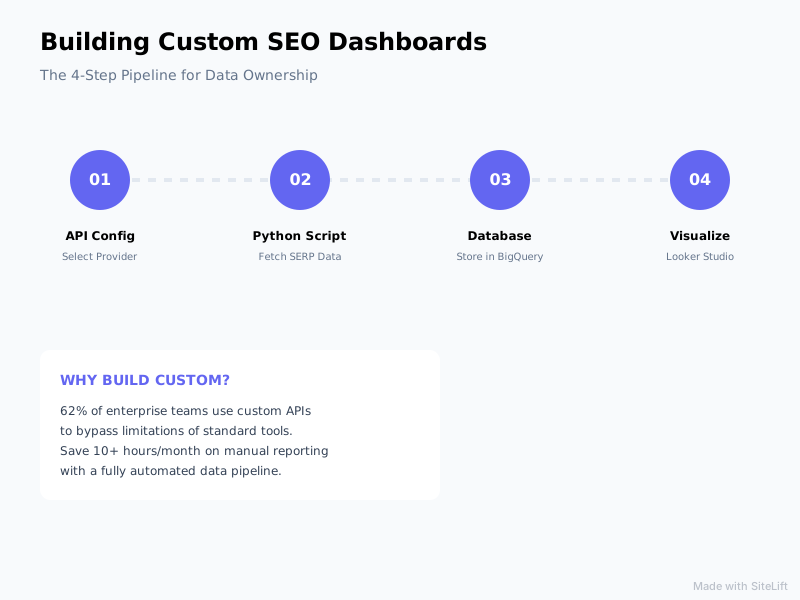
Infographic by SiteLift
Choosing Your Dashboard Stack
Different business sizes require different architectures. Below is a quick comparison of popular stacks:
| Stack Level | Database | Visualisation Tool | Best For |
|---|---|---|---|
| Low-Code | Google Sheets / BigQuery | Looker Studio | Small-to-medium agencies, quick setups |
| Enterprise | PostgreSQL / Snowflake | Power BI / Tableau | Large multinational corporations |
| Bespoke | MongoDB / PostgreSQL | Custom React Dashboard | SaaS platforms, client-facing portals |
Building Custom SEO Reporting in Looker Studio
To display your data in Looker Studio, follow the official guidelines in the Looker Studio Help Center to connect your database directly.
Once connected, you can design your dashboard interface. Focus on displaying three key metrics:
- Share of Voice (SoV): A calculated metric showing how visible your brand is for your target keyword set.
- Average Keyword Position: Your average rank across all tracked search queries.
- Ranking Distribution: A bar chart displaying how many keywords rank in the Top 3, Top 10, and Top 100 search positions.
Pro Tip: Add interactive filters at the top of your dashboard. This allows stakeholders to toggle between desktop and mobile data, or filter by specific European countries and languages with a single click.
Why Standard SEO Dashboards Are a Trap (My Editorial Take)
I have spent years working with standard, off-the-shelf SEO platforms, and I will be completely honest: most of them are a trap. They force you into their proprietary, black-box metrics like "Domain Authority" or "Visibility Indices" that they calculate using their own arbitrary formulas.
When you build your own pipeline using a raw search engine ranking api, you regain complete control. You can calculate your own Share of Voice based on actual click-through rate (CTR) curves tailored to your specific industry. You are no longer locked into paying for 50 user seats just so your client-facing team can view a basic report. Custom data pipelines are not just about saving money—they are about actual data ownership.
Step 5: How Do You Automate SERP Tracking and Set Up Alerts?
A dashboard is only useful if the data is fresh. You must automate your data pipeline so that it runs without manual intervention.
Scheduling Automated Data Refreshes
You can automate your Python scripts using several scheduling tools:
- Cron Jobs: Ideal if you are running your script on a simple Linux virtual private server (VPS).
- GitHub Actions: A great, serverless way to run your script on a daily schedule for free.
- AWS Lambda / Google Cloud Functions: Best for enterprise-level scaling and reliability.
Ensure your automated SERP tracking script runs during off-peak European hours (such as 02:00 CET). This guarantees that fresh data is processed and ready in your dashboard by the time your team starts work in the morning.
Configuring Slack or Email Alerts for Critical Ranking Shifts
Do not make your team check the dashboard every day to spot ranking drops. Instead, build a simple webhook that alerts your team via Slack or Microsoft Teams when high-priority keywords drop out of the top positions.
def send_slack_alert(keyword, old_pos, new_pos):
    webhook_url = os.getenv("SLACK_WEBHOOK_URL")
    message = {
        "text": f"🚨 **Ranking Drop Alert!**\nThe keyword *'{keyword}'* has dropped from position {old_pos} to {new_pos}."
    }
    requests.post(webhook_url, json=message)
What Are the Common Pitfalls When Building Custom Dashboards?
While building your own dashboard is incredibly rewarding, there are a few common pitfalls you should avoid to keep your pipeline running smoothly.
Managing API Costs at Scale
If you are tracking thousands of keywords daily, API costs can add up quickly. To keep costs manageable, implement a caching mechanism. For informational keywords that do not fluctuate rapidly, you might only need weekly updates rather than real-time hourly tracking.
Handling Search Engine Algorithm Updates and Layout Changes
Google frequently updates its search engine results page layout, which can break custom JSON parsers. To prevent your dashboard from breaking, choose a search engine ranking API provider that actively maintains and updates its HTML parsers.
Ensuring GDPR Compliance with Localised Data
When tracking localized search queries within Europe, you must ensure your data storage practices comply with official GDPR regulations. While tracking keyword rankings is completely compliant, avoid storing any user-identifying parameters, such as the IP addresses or precise GPS coordinates of the users executing the searches.
What Is the Expected Outcome of Your Custom SEO Dashboard?
Once your custom dashboard is live and automated, you will achieve complete data ownership. You will no longer be dependent on third-party SEO platforms, saving your agency or business thousands of Euros in monthly subscription fees.
According to a study by McKinsey, data-driven organisations are 23 times more likely to acquire customers. By feeding clean, real-time ranking data directly into your reporting, your marketing teams can make faster, more informed SEO decisions.
Scaling Your SEO Efforts with Autopilot Systems
Building custom dashboards is the first step toward automating your marketing operations. If you want to take your automation to the next level, platforms like sitelift.io can complement your custom setup.
While your custom dashboard tracks your current rankings, SiteLift acts as an autonomous SEO and AI visibility platform. It automatically generates optimized content, distributes it across a premium network, and tracks keyword momentum on autopilot. This allows you to close the loop between tracking rankings and actively growing your search visibility.
FAQ
What is a search engine ranking api?
A search engine ranking API is a tool that allows developers to programmatically query search engines (like Google, Bing, or Yandex) and receive structured search results (usually in JSON format) for specific keywords, locations, devices, and languages.
How often should I refresh real-time ranking data in my dashboard?
For most businesses, refreshing ranking data once a day is more than enough. However, for high-stakes e-commerce brands or news publishers, hourly updates for high-priority keywords may be necessary.
Can I track local map pack rankings using a SERP API?
Yes. Most modern search engine ranking APIs return structured data for local map pack results, including business names, ratings, and physical addresses, allowing you to track your local SEO visibility.
How does automated SERP tracking compare to traditional SEO tools?
Automated SERP tracking via an API gives you raw, unfiltered data that you can manipulate, store, and display however you want. Traditional SEO tools restrict how you view your data and often charge extra fees for custom reports or additional user seats.
Is storing SERP data compliant with GDPR regulations?
Yes, storing search engine ranking data is fully compliant with GDPR regulations because it does not contain any personally identifiable information (PII). It simply tracks public search engine results pages for specific search queries.
— Lukas Weber, Lead Technical SEO Architect
Topics Covered:
- search engine ranking api
- automated SERP tracking
- API integration for SEO
- real-time ranking data
- custom SEO reporting
More from SiteLift

Visibility Tracker Explained: Measure True Share of Voice Across Google and AI Search
Discover how a visibility tracker measures search visibility scores and share of voice across Google and AI search engines to compound your organic reach.

LLM Visibility Tool: How to Measure and Grow Your Brand in ChatGPT and Perplexity
Discover how to use an LLM visibility tool to monitor ChatGPT brand mentions, track Perplexity citations, and scale your AI share of voice.

Single Page Application Search Engine Optimization: The Complete Rendering and Indexing Guide
Master single page application search engine optimization: rendering, indexing, Core Web Vitals & audits. Fix your SPA SEO today.