301 vs 302 Redirect: Which One Protects Rankings and AI Citations?

When you move content from one URL to another, your choice between a 301 vs 302 redirect determines whether your organic visibility survives or collapses. Pick the wrong status code, and you risk dropping hard-won keyword rankings, bleeding link equity, or severing the source citations that AI answer engines rely on to credit your brand.
Redirects serve as digital forwarding addresses. At the server-client interface, an HTTP redirect instructs browsers, search engine bots, and Large Language Model (LLM) indexers where a requested resource has moved and how to treat the destination URL.
Here is an at-a-glance breakdown before we break down the underlying mechanics.
At-a-Glance: 301 vs 302 Redirect Comparison
| Feature / Criterion | 301 Redirect (Moved Permanently) | 302 Redirect (Found / Moved Temporarily) |
|---|---|---|
| Primary Intent | Permanent address change | Temporary relocation |
| Link Equity (PageRank) | Transfers full PageRank to target URL | Equity remains attributed to the origin URL |
| Search Indexing | Canonicalizes destination; drops source URL | Keeps source URL in index; ignores target indexation |
| Browser Caching | Aggressively cached by default by browsers | Not cached by default; fresh checks on every request |
| AI Citations & RAG | Updates entity mapping and persistent citations | High risk of hallucination or citation drop-off |
| Reversibility | Difficult to reverse due to persistent client cache | Trivially easy to reverse or remove |
| Ideal For | Site migrations, rebrands, permalink updates | A/B testing, seasonal stock, geo-routing |
301 vs 302 Redirect: Core Technical Evaluation Criteria
Before evaluating whether to implement a permanent or temporary redirect, you need to understand how web crawlers, indexers, and retrieval-augmented generation (RAG) pipelines assess these server signals. We judge redirect performance against four distinct criteria.
Core Criteria: Link Equity (PageRank) Transfer
Backlinks are foundational to organic trust. A redirect must bridge inbound equity from the old URL to the new destination. If a server response fails to signal a permanent shift, search engines will hesitate to pass accumulated signals, stranding historical authority on dead endpoints.
Search Engine Indexing and Canonicalization
Crawlers rely on server headers to understand canonical hierarchy. When search bots encounter a redirected URL, they must decide whether to swap the old URL out of the primary index or keep the legacy page listed while serving the new URL's content behind the scenes. Misaligned status codes create duplicate content issues and erratic canonicalization. For a deeper breakdown of this process, review our guide on understanding search engine indexing.
AI Crawler Behavior and Vector Retrieval Latency
Modern discovery extends beyond traditional SERPs. Retrieval pipelines powering ChatGPT, Perplexity, and Google AI Overviews query live web documents to ground responses. When these scrapers hit redirects, latency spikes. If the status code signals ambiguity, vector retrieval models often discard the source URL entirely, costing you valuable AI citations.
Implementation Complexity and Reversibility
Browser caching rules dictate how forgiving a redirect is. Some status codes cache indefinitely on client machines, meaning any accidental routing will persist for individual visitors even after you fix the server configuration. Other codes require round-trip server checks on every ping, allowing real-time flexibility.
What Is a 301 Redirect? The Permanent Relocation Option
A 301 redirect returns the HTTP response status code 301 Moved Permanently. As defined in the official W3C standards on HTTP/1.1 status code definitions, this status code informs the client that the target resource has been assigned a new permanent URI, and any future references should use one of the returned URIs.
HTTP/1.1 301 Moved Permanently
Location: https://example.com/new-path/
Cache-Control: public, max-age=31536000
Because browsers cache 301 responses aggressively, users returning to the old URL will bypass the server entirely on subsequent visits, jumping straight to the new destination.
How Search Engines Handle 301 Permanent Redirects
When Googlebot encounters a 301 redirect, it initiates a canonical transition. The crawler schedules the target URL for indexing, begins stripping the original URL from the index, and reallocates performance metrics. This is not instantaneous—it often takes several crawl passes depending on page authority—but the eventual outcome is an absolute transfer of identity.
Impact on Link Equity and 301 Redirect SEO
Historically, SEO professionals feared that 301 redirects eroded PageRank, treating them like a leaky pipeline. That is no longer the case. According to Google Search Central documentation on redirects, 30x redirects pass full PageRank without dilution, equivalent to a direct canonical tag.
Executing strategic 301 redirect seo ensures that when you prune outdated content, consolidate cannibalized pages, or transition architectures, you do not throw away external links built over years.
Role in Site Migration SEO and Domain Rebranding
During an architectural overhaul or domain switch, a 1-to-1 redirect mapping is the single most important technical safeguard. Successful site migration seo depends on returning 301s from legacy paths directly to their exact modern counterparts. Pointing old paths to unrelated destinations like your homepage will cause Google to classify them as soft 404s, stripping your link equity.

What Is a 302 Redirect? The Temporary Forwarding Method
A 302 redirect returns the HTTP response code 302 Found (originally named Moved Temporarily in HTTP/1.0). The MDN Web Docs specification for HTTP redirect status codes explains that a 302 informs the client that the requested resource resides temporarily under a different URI.
HTTP/1.1 302 Found
Location: https://example.com/temporary-landing/
Cache-Control: no-cache
Because the move is temporary, browsers do not cache the response locally by default. Every subsequent visit makes a fresh trip to the server to check whether the original URL has resumed normal service.
How Search Engines Treat 302 Found Status Codes
When search engines see a 302, their default assumption is that the original URL will return shortly. Consequently, they keep the original URL indexed and refuse to pass historical link authority to the target URL.
If search engines crawl a 302 redirect, they show the legacy URL in search results but render the content from the temporary destination.
When to Use a 302 Redirect Temporary Solution
A 302 redirect temporary configuration is ideal for transient operational shifts:
- A/B Split Testing: Directing a portion of visitors to an alternate design variant without signaling to search engines that the test URL should outrank the original.
- Temporary Stock Depletion: Routing users from an out-of-stock product to a related alternative until restocked next week.
- Geo-Targeting / Device Detection: Routing international visitors based on IP address while letting search crawlers view the baseline URL.
- Scheduled Maintenance: Sending users to a temporary maintenance page for a four-hour server upgrade.
Risks of Misusing 302s for Permanent Content Shifts
Misusing a 302 during a permanent migration is dangerous. If you leave a 302 redirect active for months, search engines face canonical ambiguity. Eventually, Google may execute "reverse canonicalization"—it guesses your intent, treats the 302 as a 301, and swaps the indexation anyway.
Leaving this up to an algorithm creates volatile rank fluctuations and delays index updates.
Pro Tip: If you must route users dynamically based on currency or location, avoid using automatic 302 redirects on bots. Check headers to serve static canonical content to web crawlers to keep your main pages crawlable.
301 vs 302 Redirect: Head-to-Head Comparison Matrix
Understanding the functional boundaries between a permanent 301 vs 302 redirect prevents costly indexing mistakes.
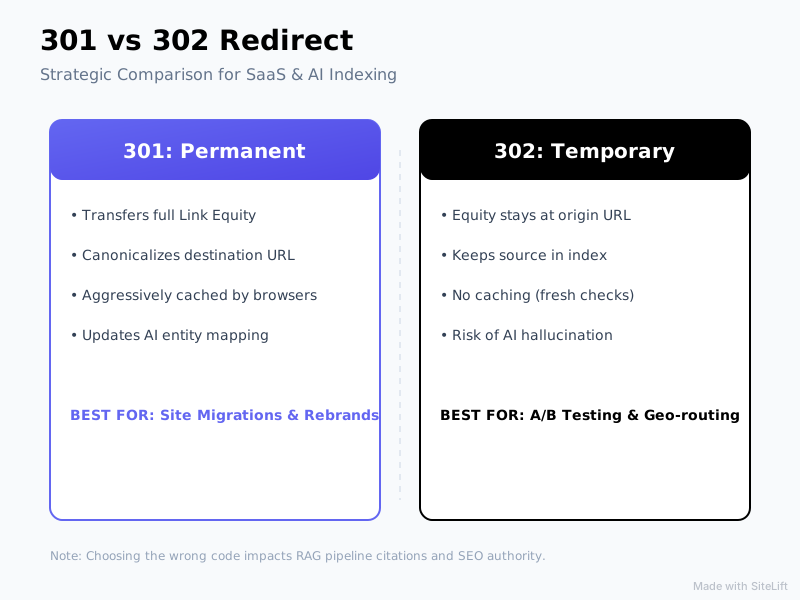
Infographic by SiteLift
At-a-Glance Feature and Performance Breakdown
| Evaluation Vector | 301 Permanent Redirect | 302 Temporary Redirect |
|---|---|---|
| HTTP Status Definition | 301 Moved Permanently |
302 Found (Moved Temporarily) |
| Search Index Impact | Destination URL indexes; Source URL drops | Source URL stays indexed; Destination hidden |
| Backlink Equity Flow | 100% PageRank passed to target URL | 0% passed; signals stay at origin URL |
| Browser Caching | High; requires manual browser cache flush to unset | Low; requests re-ping the server every time |
| AI Answer Engine Retrieval | Resolves entity mapping cleanly for RAG | Prone to citation drops or dead source URLs |
| Risk of Misconfiguration | High (difficult to unpick if rolled out at scale) | Low (revertable with a simple server config edit) |
How 301 and 302 Redirects Impact AI Citations and RAG Engines
The rise of conversational answer engines (such as SearchGPT, Perplexity, and Gemini) has shifted technical requirements. These engines construct answers using Retrieval-Augmented Generation (RAG). They retrieve snippets from top URLs, verify entity authority, and append attribution footnotes.
Data from the HTTP Archive reveals that over 12% of total web requests result in a redirect status code (3xx), making redirect latency a primary performance factor.
User Query ---> RAG Retrieval Engine ---> Encounters 302 Redirect ---> Source Ambiguity (Drop Citation)
User Query ---> RAG Retrieval Engine ---> Encounters 301 Redirect ---> Immediate Entity Update (Retains Citation)
When an AI retrieval scraper encounters a 302 temporary redirect, two failures typically occur:
- Source Disconnect: RAG systems associate factual claims with the source URI. A temporary redirect suggests the data at the destination is unstable, leading answer engines to omit the citation to prevent hallucination.
- Scraper Latency Limits: AI agents crawl with short timeout windows. A slow or temporary redirect hop frequently causes the scraper to drop the request, excluding your site from real-time generation.
You can verify whether AI scrapers can reach your content without getting stuck using our free tool for testing whether AI bots can crawl your URLs.
Troubleshooting Redirect Errors: How to Perform a Redirect Chain Fix
Redirect issues rarely happen in isolation; they compound over years of CMS migrations, domain shifts, and marketing updates. The most common technical defect is a redirect chain.
Detecting Chains and Infinite Loops
A redirect chain happens when a request jumps across multiple hops before landing on a terminal URL:
URL A (301) -> URL B (301) -> URL C (302) -> URL D (200 OK)
Ahrefs analyzed 2 billion internal links and found that redirect chains affect more than 40% of large websites, directly causing crawl budget and equity degradation.
Even worse are redirect loops, where URL A routes to URL B, which routes back to URL A. This triggers a ERR_TOO_MANY_REDIRECTS browser error, completely locking out both users and bots.
Step-by-Step Redirect Chain Fix to Preserve Crawl Budget
Resolving chains requires flattening all intermediate steps into a direct 1-to-1 jump.
1. Identify the Chain
Run a crawler across your domain to export all 3xx status codes, recording both the source and ultimate destination paths.
2. Flatten at the Edge or Server Level
Update your rules so that every historical legacy URL points directly to the final 200 OK destination.
For Nginx server blocks, avoid chained rewrites:
# BAD: Creates a chain if /old-promo already redirects elsewhere
rewrite ^/vintage-promo$ /spring-sale permanent;

# GOOD: Direct terminal routing
rewrite ^/vintage-promo$ /current-catalog permanent;
For Cloudflare Edge Rules, use single-hop URL Rewrite or Dynamic Redirect rules instead of stacking Page Rules. Pointing directly to the final destination eliminates intermediate TLS handshakes and round-trip times.
3. Update Internal Anchors
A complete redirect chain fix includes updating your internal HTML links. Never rely on server redirects for your own navigational links; update your CMS database so that internal links bypass redirects and load the terminal URL on the first request.
Decision Framework: Which Redirect Should You Choose?
Follow this decision tree whenever you configure a redirect to ensure zero loss of traffic or indexation.
Is the relocation permanent?
├── YES
│   ├── Is HTTP method preservation required (POST requests)?
│   │   ├── YES -> Use HTTP 308 Permanent Redirect
│   │   └── NO  -> Use HTTP 301 Moved Permanently
└── NO
    ├── Is HTTP method preservation required (POST requests)?
    │   ├── YES -> Use HTTP 307 Temporary Redirect
    │   └── NO  -> Use HTTP 302 Found
When to Choose a 301 Redirect
- Migrating from HTTP to HTTPS across an entire domain.
- Changing domain names or unifying brand properties during acquisitions.
- Restructuring URL permalinks (e.g., removing subdirectories like
/blog/2021/post-nameto/blog/post-name). - Permanently retiring a deprecated product and passing its accumulated link equity to the direct replacement model.
When to Choose a 302 Redirect
- Running short-term marketing campaigns with promotional URL slugs.
- Managing inventory stockouts where the product returns to stock within 14 days.
- Conducting temporary landing page experiments or split-path UX audits.
- Routing unauthenticated app users to login screens while preserving the requested return URL.
Edge Cases: 307 and 308 Redirects
Modern web applications and REST APIs require stricter handling than 301s and 302s can provide.
- HTTP 307 (Temporary Redirect): The modern counterpart to the 302. Its key difference is that it guarantees the HTTP request method cannot change. If a client makes a
POSTrequest to an endpoint, a 307 forces the client to send aPOSTrequest to the target URI. A 302 often silently mutates the request into aGET, breaking form submissions or API calls. - HTTP 308 (Permanent Redirect): The modern counterpart to the 301. It preserves link equity and permanent canonicalization while forbidding the client from changing the request method from
POSTtoGET.
Pro Tip: Use HTTP 308 for internal API route migrations or authenticated webhook handlers, but stick with HTTP 301 for standard website content to ensure compatibility with older crawlers.
Editorial Verdict: Why Clean Redirect Topology Is Underrated
Many teams treat redirects as simple housekeeping, but that perspective is outdated. In an ecosystem governed by real-time RAG pipelines and tight search crawl budgets, redirect topology directly dictates visibility.
A messy web of 302s and lingering chains does not just bleed PageRank; it introduces latency that causes AI crawlers to time out and drop your site from generation loops entirely. Making the conscious choice to map every move to a clean, single-hop 301 guarantees that your historical authority carries forward seamlessly across both traditional search engines and emerging AI answer platforms.
Redirect configuration is no longer just about preserving link juice; it is about establishing unambiguous canonical truths that both legacy search algorithms and AI indexers can trust without hesitation. — sitelift.io

If manually diagnosing crawl chains, tracking dropped URLs, and auditing technical visibility across search engines feels like an endless drain on resources, autonomous optimization makes all the difference. Platforms like SiteLift automate end-to-end publishing pipelines, manage dynamic entity visibility, and track organic momentum in real time—keeping your domain fully optimized for both search algorithms and AI engines on autopilot.
Frequently Asked Questions
Does a 301 redirect pass 100% of link equity and PageRank?
Yes. Official Google documentation confirms that 301, 302, and other 30x HTTP status codes transfer link equity without dilution. A 301 redirect passes full PageRank to the destination URL, functionally acting like a direct rel="canonical" tag.
Can a 302 redirect accidentally turn into a 301 in Google's index?
Yes. If Googlebot detects that a 302 redirect has remained live for an extended period and the original URL no longer functions independently, it may execute reverse canonicalization. The search engine will assume the move is permanent, transferring indexation and equity to the destination URL despite the 302 header.
How do 301 and 302 redirects affect AI search engines like ChatGPT and Perplexity?
AI answer engines retrieve live data using strict scraper timeout thresholds. A 301 redirect clearly updates entity mapping, allowing RAG systems to credit the final destination with accurate citations. A 302 temporary redirect introduces ambiguity; retrieval engines often discard the destination URL to avoid hallucination risks, costing you citations.
What is the difference between a 302 redirect and a 307 redirect?
While both signal a temporary move, a 302 redirect allows browsers to change the request method from POST to GET during the jump. An HTTP 307 redirect strictly forbids this, guaranteeing that the original request method and body remain identical when contacting the destination.
How do redirect chains hurt website rankings and crawl performance?
Redirect chains force web crawlers to complete multiple network round trips before reaching a single page. This wastes your server's crawl budget, slows down Core Web Vitals (specifically Time to First Byte), and causes external link equity to drop if search engines stop following the chain before reaching the final URL.
Topics Covered:
- 301 vs 302 redirect
- 301 redirect seo
- 302 redirect temporary
- redirect chain fix
- site migration seo
More from SiteLift

White Hat Link Building Techniques That Still Work for Google and AI Search
Discover 5 proven white hat link building techniques that earn top Google rankings and AI search citations. Master ethical link building today.

Ecommerce Link Building: Scale Product Authority and Revenue on Autopilot
Master ecommerce link building. Learn how to secure product page backlinks, execute digital PR, fix redirect leaks, and automate your store authority.

Crawling in SEO: How Google and AI Bots Discover and Rank Your Pages
Master crawling in SEO. Learn how Googlebot and AI scrapers discover pages, compare indexing vs crawling, and optimize your crawl budget.