Keyword Checking on Autopilot: Validate, Track and Prioritize Winners Faster

If you're still copy-pasting keywords into a rank tool once a week, you're doing keyword checking backwards. In this guide, you'll build an automated workflow that validates demand, filters competition, tracks movement daily, and tells you exactly which pages to update next.
Why does it matter? Because most content never gets seen. According to Ahrefs, 90.63% of all indexed web pages get zero organic search traffic from Google in their search traffic distribution study. Manual checks won't fix that. An autopilot system will.
You'll go from spreadsheet chaos to a continuous loop in five steps — no manual lookups required.
What Is Automated Keyword Checking (and Why Manual Tracking Fails)?
Modern keyword checking isn't typing a phrase into Google and noting you rank #8. It's continuous validation of visibility, demand, competition, and velocity across locations, devices, and SERP features.
Manual tracking fails for three reasons: it's a snapshot, it's biased, and it doesn't scale.
The Limits of Manual Rank Checks and Static Spreadsheets
When you check rankings manually, you see personalized results influenced by location, history, and device. You miss AI Overviews, People Also Ask boxes, and local packs that steal clicks.
Spreadsheets make it worse. They go stale the day after you update them. You can't see if position 14 today was position 32 last week — and that trajectory is where the money is.
How Automated Keyword Checking Unlocks Scalable Visibility
Automated keyword checking polls your target SERPs daily via a keyword rank checker, normalizes for location and device, and stores history. That history powers everything else.
Google itself explains that rankings can shift as it crawls, indexes, and evaluates pages differently over time in Google's explanation of how Search crawling and indexing works. If Google is constantly re-evaluating, you need to be constantly measuring.
Bottom line: manual = where am I? Automated = where am I heading, how fast, and what should I do next?
What You Need Before You Automate Keyword Checking
You don't need an enterprise stack. You need clean inputs and about 2-3 hours for initial setup. After that, maintenance should be under 30 minutes per week.
Tools checklist:
- Google Search Console access (verified domain, 3+ months of data if possible)
- Automated rank tracking tool with daily updates, mobile vs. desktop, and geo-targeting
- Search volume and difficulty data source — Ahrefs, Semrush, or similar API
- Analytics — GA4 or equivalent for conversion mapping
- Content system — CMS access or an autonomous publishing pipeline
Skills: Basic SEO literacy. You should know your money pages and what a converting visitor looks like.
Starting assets:
- A seed list of 50-200 keywords from Search Console, sales calls, and support tickets.
- Your domain footprint: target countries, languages, and priority URLs.
- A baseline: current sessions, top 20 pages, and average CTR from Search Console.
Pro Tip: Don't start with 5,000 keywords. Start with 100 that map to revenue. You can scale a working system; you can't fix a bloated one.

Step 1: Perform Initial Search Volume Analysis and Intent Categorization
Action: Run search volume analysis on your seed list, then tag every keyword by intent.
Export volume, trend (12-month), and location-specific demand. Filter by your actual markets — US volume means nothing if you sell in the UK and Australia. Look for sustainable demand, not one-month spikes.
Then categorize:
- Informational: how to check keyword ranking, what is SERP volatility
- Commercial: best keyword rank checker, keyword difficulty check tool
- Transactional: buy, pricing, demo, near me
- Navigational: brand + login, brand + pricing
Expected result: A clean list segmented by funnel stage, with volatile zero-click queries flagged separately.
Common mistake to avoid: Chasing vanity volume. A 40,000-volume informational term that never converts loses to a 400-volume commercial term every time. This is critical because organic search drives real pipeline — a BrightEdge study found that organic search drives 53.3% of all trackable website traffic, but only if you target terms with intent.
If you want a deeper process for finding commercial terms, see my breakdown on how to identify high-value organic search keywords on autopilot.
Step 2: Run a Dynamic Keyword Difficulty Check to Filter Low-Hanging Opportunities
Action: Run a keyword difficulty check scored against your authority, not a generic number.
Most KD scores measure backlink strength of the top 10. That's useful, but incomplete. Cross-reference KD with:
- Domain Rating of the top 5 results vs. yours
- Content freshness (is #2 from 2019?)
- SERP weakness signals: thin content, forums ranking, outdated stats, low referring domains
Expected result: Three buckets — Quick Wins (KD low + weak SERP), Strategic Bets (KD medium + high value), and Avoid for Now (KD high + strong domains).
Use this simple filter:
| Signal | Quick Win | Strategic Bet | Skip |
|---|---|---|---|
| KD vs. your authority | At or below you | 10-20 points above | 30+ above |
| Top 10 content age | >2 years old / thin | Mixed, some strong | Fresh, in-depth |
| SERP competitors | Forums, UGC, low links | 1-2 giants + weak spots | All high-authority brands |
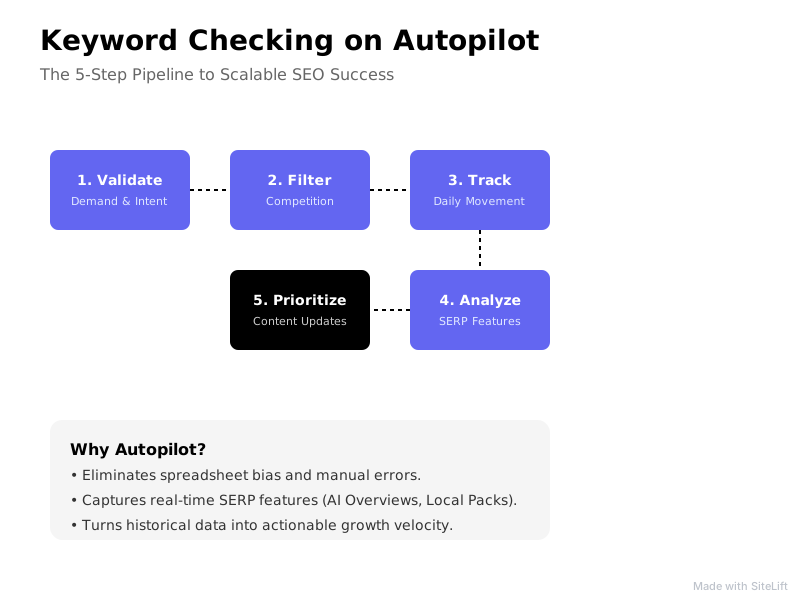
Infographic by SiteLift
Common mistake to avoid: Treating KD as gospel. A KD 15 with Reddit and Quora ranking is easier than a KD 5 dominated by a brand with perfect intent match. Always open the actual SERP.
Pro Tip: Sort by relevance x low difficulty first, not volume. I’d rather own five position 3-5 terms that convert than rank #28 for a trophy keyword.
Step 3: Deploy an Automated Keyword Rank Checker Across Geotargeted Locations
Action: Configure your keyword rank checker to poll daily for your filtered list.
Set up:
- Frequency: daily for money terms (top 100), weekly for research terms
- Locations: exact geos you serve — e.g., New York + London + Sydney, not just “US”
- Devices: track mobile and desktop separately
- SERP features: enable detection for Featured Snippets, People Also Ask, Local Pack, and AI Overviews
Expected result: A live dashboard showing true position, URL ranking, SERP feature ownership, and day-over-day change without you touching anything.
Common mistake to avoid: Tracking only “average position.” If your page ranks #4 on desktop in Austin but #19 on mobile in London, the average lies to you. Segment it.
This is where automated keyword checking pulls away from manual lookups. Industry analysis of SERP evolution on Search Engine Land's coverage of AI Overviews and SERP changes shows answer boxes and AI summaries are reshaping what “rank #1” even means. If your tracker can’t see them, you’re blind to click loss.
Step 4: Establish Keyword Momentum Tracking to Detect Early Breakouts
This is my favorite part, and honestly, the most underrated shift in SEO right now.
Everyone obsesses over static rankings. I stopped doing that two years ago. Rankings tell you where you are. Keyword momentum tracking tells you where you’re going — and that’s far more actionable. In my experience, a keyword jumping from #28 to #16 in 14 days with no new links is screaming “Google wants to rank you, just finish the job.” That signal is gold.
Action: Build velocity views, not just position reports.
Define:
- Upward velocity: +3 or more positions in 7 days, or +8 in 30 days
- Downward velocity: -5 or more in 7 days
- Striking distance: positions 11-20 with positive momentum
Set automated alerts:
- Fast climbers entering top 20 → prioritize for internal links + refresh
- Top 3 terms slipping → check SERP feature theft or content decay
- New keywords entering top 50 you didn’t target → new content opportunity
Expected result: A weekly “movers” list of 10-15 terms that deserve action now.
Common mistake to avoid: Reacting to daily noise. One-day drops are often Google testing. Wait for 3-7 day confirmation before rewriting a page.
Pro Tip: Create a dedicated “Striking Distance” view. Those page-two terms are your cheapest wins — a few headings, FAQs, and internal links can push them to page one.
Step 5: Prioritize Winners and Trigger Dynamic Content Updates
Data without action is just a prettier spreadsheet. This step closes the loop between keyword checking and publishing.
Action: Score every tracked keyword with a simple formula:
Priority Score = (Monthly Volume x Intent Value 1-3 x CTR Opportunity) + Momentum Bonus
CTR opportunity matters hugely here. Research from Backlinko found that the #1 organic result has an average CTR of 27.6%, with steep drop-offs after position 3. Moving from #11 to #4 isn’t incremental — it’s transformative.
Example scoring:
| Keyword | Volume | Intent (1-3) | Position / Momentum | Priority |
|---|---|---|---|---|
| automated keyword rank checker | 800 | 3 (commercial) | #14, +6 in 7d | High – refresh now |
| what is keyword checking | 1,200 | 1 (info) | #6, flat | Medium – add FAQ |
| free rank tool | 5,000 | 1 (info, low fit) | #32, flat | Low – ignore |
Then trigger updates automatically:
- High momentum + striking distance → add sections, FAQs, fresh examples, and internal links from relevant posts. Run a quick audit with a tool like this free internal link analyzer to find orphan pages and depth issues before you publish.
- Decaying top performers → check for broken outbound links and 404s that hurt trust, outdated screenshots, and lost SERP features.
- Consistent winners → replicate the template to adjacent terms.
Common mistake to avoid: Optimizing everything. Pick 3-5 winners per week. Compounding beats chaos.
Troubleshooting Common Pitfalls in Automated Keyword Checking
Even good automation hits turbulence. Here’s how to read it.
Handling SERP Flapping and Algorithmic Turbulence
If rankings bounce 4-6 spots daily for a week, don’t panic. That’s usually Google testing relevance — the “Google dance.” True decay is directional: down 2-3 spots weekly for 3+ weeks with declining impressions in Search Console.
What to do: annotate algorithm updates, compare to competitors (are they all bouncing?), and wait 7 days before major rewrites.
Preventing Keyword Cannibalization in Automated Systems
Automated systems love to surface the same keyword for multiple URLs. If /blog/rank-checker and /features/rank-checker both rank #18 and #22 for the same term, they’re splitting authority.
Audit quarterly: search site:yourdomain.com + keyword, pick one primary URL, consolidate, and redirect or canonicalize the loser.
Fixing Localization Skew
Tracking “English” globally hides real performance. A term ranking #2 in the US but #25 in Germany looks like #8 on average — useless for both teams. Always split dashboards by locale and use local search volumes for prioritization.
Expected Outcome: Building a Continuous Autonomous SEO Growth Loop
At 30 days, you’ll have clean data: real demand, true difficulty, and daily movement by device and location. No more guessing.
At 90 days, the loop compounds. Fast climbers get refreshed in days, not quarters. Decayers get caught before they fall off page one. New opportunities surface automatically from Search Console gaps.
That’s the shift: keyword checking becomes an operating system, not a report. Check → score → publish → measure → repeat.
Put Keyword Checking on Autopilot with SiteLift
Doing this manually is possible, but exhausting. That’s why I recommend systematizing it.
SiteLift was built for exactly this loop — it tracks keyword momentum tracking in real time, automatically generates targeted content for validated winners, and distributes it across a premium network without manual intervention. You define the topics that drive revenue; it handles validation, publishing, and continuous optimization.
If your team spends hours pulling rank reports instead of acting on them, it’s time to flip the model. Let automation do the checking, so you can do the growing.
FAQ
How often should an automated keyword rank checker refresh ranking data?
For revenue-driving terms, daily. Daily polling catches SERP feature theft, AI Overview intrusions, and momentum shifts early enough to act. For long-tail research lists, weekly is enough. Anything less frequent than weekly misses velocity signals and makes keyword checking reactive instead of proactive.
What is the difference between static rank tracking and keyword momentum tracking?
Static tracking tells you position today (#12). Keyword momentum tracking tells you velocity and direction (#22 → #14 → #12 in 21 days). Momentum reveals intent from Google — whether it wants to rank you higher if you improve the page — which is far more useful for prioritization than a single snapshot.
How does a keyword difficulty check determine competitive viability?
A keyword difficulty check scores how hard it will be to outrank the current top 10 based on backlinks, domain authority, content depth, and SERP competitiveness. The key is contextualizing it: a KD 40 might be viable for a DR 75 site but impossible for a DR 20 site. Always layer in manual SERP review for thin, outdated, or UGC results that signal weakness.
Can automated keyword checking tools detect fluctuations caused by Google AI Overviews?
Yes, if configured correctly. Modern tools track SERP feature presence alongside classic blue-link positions. Look for a tracker that flags when an AI Overview appears, who is cited, and whether your CTR dropped even though your position held. That distinction is critical now that answers often sit above position one.
How do I choose which ranking keywords to prioritize for content optimization?
Prioritize by Traffic Potential x Business Value x Momentum. Favor commercial-intent terms in striking distance (positions 11-20) moving upward. A low-volume term that drives demos and is climbing fast beats a high-volume flat term every time. Limit focus to 3-5 winners per week for consistent compounding.
— sitelift.io
Topics Covered:
- keyword checking
- keyword rank checker
- keyword difficulty check
- search volume analysis
- keyword momentum tracking
More from SiteLift

How to Identify and Target High-Value Organic Search Keywords with Zero Manual Effort
Learn how AI keyword discovery and automated pipelines let you identify high-value organic search keywords and scale B2B SaaS traffic effortlessly.

Daily Rank Tracking: Catch Google and AI Search Shifts Before Competitors
Master daily rank tracking to catch Google algorithm shifts, track AI search fluctuations, and protect your organic rankings before competitors react.

What Is a Content Map? How to Plan Topical Authority That Compounds Traffic
Learn how to build a strategic content map. Discover how entity clustering and pillar-cluster architecture compound your organic traffic.